Hi,
I am working on the ble_app_template project.
1-How can I enable simple pairing without NFC?
2-Also how can I set pairing code?
3-Is the write way to secure characteristics?
attr_md.rd_auth = 1;
attr_md.wr_auth = 1;
Thanks!
Hi,
I am working on the ble_app_template project.
1-How can I enable simple pairing without NFC?
2-Also how can I set pairing code?
3-Is the write way to secure characteristics?
attr_md.rd_auth = 1;
attr_md.wr_auth = 1;
Thanks!
Hi Muqarrab,
Please see the Security parameters documentation for pairing and this post for secure characteristics.
-Amanda H.
Thanks, Amanda Hsieh
Can we perform Just Works bonding(without entering any key) without NFC Antenna?
Is it possible without NFC Antenna?
yes, the ble_app_hrs example is without the NFC Antenna.
-Amanda H
Thanks, Amanda Hsieh
I have uploaded the ble_app_hrs example and connected from the nRF app.
But I have not received/got pop up for pairing?
It won't pop up for pairing. You have to perform pairing as the Heart Rate Application documentation.
-Amanda H.
Hi Amanda Hsieh
I have to question.
1-If I made authentic/secured characteristics. Can I read/write data using this pairing method? Is this pairing method secure?
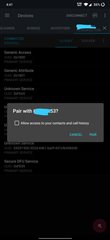
2-How can I get a paring request like this in the attached image? Any example code?
Thanks
Hi Amanda Hsieh
I have to question.
1-If I made authentic/secured characteristics. Can I read/write data using this pairing method? Is this pairing method secure?
2-How can I get a paring request like this in the attached image? Any example code?
Thanks
Hi,
Muqarrab said:1-If I made authentic/secured characteristics. Can I read/write data using this pairing method? Is this pairing method secure?
If you want to test that pairing is required but not Man In The Middle (MITM) protection, then I would suggest you try BLE_GAP_CONN_SEC_MODE_SET_ENC_NO_MITM() instead.
Muqarrab said:2-How can I get a paring request like this in the attached image? Any example code?
Please see Glucose Application.
-Amanda H.
Hi,
Please see Glucose Application.
I have already seen this example. It generates a pairing pin on UART but its mostly failed pairing when I enter that code.
So basically I want the pairing process without entering code that can read/ write authentic/secured characteristics.
Hi, Amanda Hsieh,
As per your instruction, I have added BLE_GAP_CONN_SEC_MODE_SET_ENC_NO_MITM().
Now when I read/write characteristics device starts bonding.
Now can you please confirm that without pairing anyone can't read/write characteristics?
Hi,
Muqarrab said:can you please confirm that without pairing anyone can't read/write characteristics?
if you use BLE_GAP_CONN_SEC_MODE_SET_ENC_NO_MITM() a peer that pairs with Just Works will be able to access the characteristic value.
Please see the documentation:
BLE_GAP_CONN_SEC_MODE_SET_ENC_NO_MITM
Set sec_mode pointed to by ptr to require encryption, but no MITM protection.
-Amanda H.
Hi,
Are you talking about this?
/**@brief GAP connection security modes.
*
* Security Mode 0 Level 0: No access permissions at all (this level is not defined by the Bluetooth Core specification).\n
* Security Mode 1 Level 1: No security is needed (aka open link).\n
* Security Mode 1 Level 2: Encrypted link required, MITM protection not necessary.\n
* Security Mode 1 Level 3: MITM protected encrypted link required.\n
* Security Mode 1 Level 4: LESC MITM protected encrypted link using a 128-bit strength encryption key required.\n
* Security Mode 2 Level 1: Signing or encryption required, MITM protection not necessary.\n
* Security Mode 2 Level 2: MITM protected signing required, unless link is MITM protected encrypted.\n
*/
typedef struct
{
uint8_t sm : 4; /**< Security Mode (1 or 2), 0 for no permissions at all. */
uint8_t lv : 4; /**< Level (1, 2, 3 or 4), 0 for no permissions at all. */
} ble_gap_conn_sec_mode_t;
uint32_t custom_value_char_add(ble_cus_t * p_cus, const ble_cus_init_t * p_cus_init)
{
uint32_t err_code;
ble_gatts_char_md_t char_md;
ble_gatts_attr_md_t cccd_md;
ble_gatts_attr_t attr_char_value;
ble_uuid_t ble_uuid;
ble_gatts_attr_md_t attr_md;
memset(&char_md, 0, sizeof(char_md));
char_md.char_props.read = 1;
char_md.char_props.write = 1;
char_md.char_props.notify = 0;
char_md.p_char_user_desc = NULL;
char_md.p_char_pf = NULL;
char_md.p_user_desc_md = NULL;
char_md.p_cccd_md = NULL;
char_md.p_sccd_md = NULL;
memset(&attr_md, 0, sizeof(attr_md));
attr_md.read_perm = p_cus_init->custom_value_char_attr_md.read_perm;
attr_md.write_perm = p_cus_init->custom_value_char_attr_md.write_perm;
attr_md.read_perm.lv = 2;
attr_md.write_perm.sm = 2;
attr_md.vloc = BLE_GATTS_VLOC_STACK;
attr_md.rd_auth = 0;
attr_md.wr_auth = 0;
attr_md.vlen = 0;
/* This code belongs in custom_value_char_add() in ble_cus.c*/
ble_uuid.type = p_cus->uuid_type;
ble_uuid.uuid = CUSTOM_VALUE_CHAR_UUID;
/* This code belongs in custom_value_char_add() in ble_cus.c*/
memset(&attr_char_value, 0, sizeof(attr_char_value));
attr_char_value.p_uuid = &ble_uuid;
attr_char_value.p_attr_md = &attr_md;
attr_char_value.init_len = sizeof(uint8_t);
attr_char_value.init_offs = 0;
attr_char_value.max_len = sizeof(uint8_t);
/* This code belongs in custom_value_char_add() in ble_cus.c*/
err_code = sd_ble_gatts_characteristic_add(p_cus->service_handle, &char_md,
&attr_char_value,
&p_cus->custom_value_handles_2);
if (err_code != NRF_SUCCESS)
{
return err_code;
}
return NRF_SUCCESS;
}
attr_md.read_perm.lv = 2;
attr_md.write_perm.sm = 2;