This post is older than 2 years and might not be relevant anymore
More Info: Consider searching for newer posts

nRF Connect Desktop doesn't recognize nRF52840 dongle

Hi,

I am trying to use nRF connect desktop with nRF52840 dongle.

But, in Bluetooth Low Energy app, when I select connected dongle in the drop down list, it always return the following error message.

I am running nRF Connect on Win10 64bit, and using USB 3.2 Gen 1 port.

Received status with code 5 IO_RESOURCES_UNAVAILABLE, message: 'Error setting up serial port COM6. open: �A�N�Z�X�����ۂ���܂����B: �A�N�Z�X�����ۂ���܂����B'

Error occured when opening port. Errorcode: Unknown value (0x8029)

Here is the log message:

2020-09-23T15:13:59.516Z INFO Application data folder: C:\Users\acidc\AppData\Roaming\nrfconnect\pc-nrfconnect-ble
2020-09-23T15:13:59.567Z DEBUG App pc-nrfconnect-ble v2.4.0 official
2020-09-23T15:13:59.567Z DEBUG App path: C:\Users\acidc\.nrfconnect-apps\node_modules\pc-nrfconnect-ble
2020-09-23T15:13:59.567Z DEBUG nRFConnect 3.5.0 is supported by the app (^3.4.0)
2020-09-23T15:13:59.567Z DEBUG nRFConnect path: C:\Users\acidc\AppData\Local\Programs\nrfconnect\resources\app.asar
2020-09-23T15:13:59.567Z DEBUG HomeDir: C:\Users\acidc
2020-09-23T15:13:59.567Z DEBUG TmpDir: C:\Users\acidc\AppData\Local\Temp
2020-09-23T15:14:20.080Z INFO Device setup completed
2020-09-23T15:14:20.080Z INFO Connectivity firmware version: ble-connectivity 4.1.2+Jul-14-2020-05-48-48. SoftDevice API version: 5. Baud rate: 1000000.
2020-09-23T15:14:20.081Z INFO Opening adapter connected to COM6
2020-09-23T15:14:20.792Z ERROR Received status with code 5 IO_RESOURCES_UNAVAILABLE, message: 'Error setting up serial port COM6. open: �A�N�Z�X�����ۂ���܂����B: �A�N�Z�X�����ۂ���܂����B'
2020-09-23T15:14:20.793Z DEBUG State change: STATE_START -> STATE_FAILED
2020-09-23T15:14:23.800Z ERROR Error occured when opening port. Errorcode: Unknown value (0x8029)

Parents Reply Children
  • Thanks.

    Confirmed that pressing RESET button put the device in DFU mode.

    But, I would like to use the dongle in default FW as a central scanner in Bluetooth Low Energy app in nRF Connect.

    And, I found that this dongle can be recognized successfully in the other PC with nRF Connect.

    So, it is not the issue of dongle hardware, but seems to be PC related issue.

    Any help would be appreciated.  

  • Sorry no really, it is the "classic" try restart, re-install, make sure you have admin privileges and no other terminal software is trying to acquire the serial port.

  •  Thank you.

    I tried everything, but no success.

     - remove and reinstall nrfConnect

     - launch nrf connect with admin provileges

     - confirm no other application use this port

     - connect dongle in different available USB port

    One thing I found was that once I reboot the PC while keep connecting dongle to USB port, the dongle was recognized successfully and BLE scan was correctly executed.

    And, I could just repeat close and reopen as long as the dongle staying in the port.

    However, once the dongle is unplugged from the USB port, it cannot be opened again with the error message above, even if I plug it in the USB port again.

    In this case, is the USB disconnection process not working properly? Or is there some hidden process blocking it?

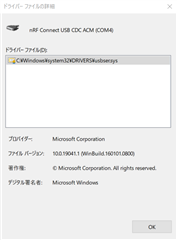
    Attached is the driver applied to my dongle.

    Sorry, if this could be no more nordic related issue, I have to find the another solution.

    Your suggestions are welcome.

  • Problem solved!
    One of my startup application which monitor PC performance called "NZXT Cam" was blocking the serial port of my nrf dongle. 

    When I close this application, nRF Connect always recognize the dongle even after connection/disconnection cycle.

    Thank you very much for your kind help.

  • @Dabbler thank you for posting your solution.  I had recently installed NZXT Cam to try to debug some PC power issues, and had no inkling at all that this could be why NRF Connect was no longer working for me.

Related