This post is older than 2 years and might not be relevant anymore
More Info: Consider searching for newer posts

Flash Memory Issue

Hi,
I have written these 3 functions to erase/read and write.

/////////////////////////////////////////////////////////////////////////////// SNV

const uint32_t f_addr = 0x000FF000; // Last page start address 255

// Create a pointer to that address
uint32_t * p_addr = (uint32_t *)f_addr; //cast f_addr to a pointer

uint32_t erase_SNV()
{
    NRF_LOG_INFO("Memory Erased");
    return sd_flash_page_erase(255);
}


uint32_t write_SNV(int address,uint8_t value)
{
    uint32_t val;
    val=value;
    NRF_LOG_INFO("Data Write in Flash");
    ret_code_t err_code;
    err_code = sd_flash_write(p_addr+address, &val, sizeof(val));
    APP_ERROR_CHECK(err_code);
    return err_code;
}

uint32_t read_SNV(int address)
{
     NRF_LOG_INFO("The Data read from flash is: %d", *(p_addr)+address);
     return *(p_addr)+address;
}


When I write any value from address 1 it gives following wrong output(0 1 2 3).
    write_SNV(1,11);
    read_SNV(1);
    write_SNV(2,12);
    read_SNV(2);
    write_SNV(3,13);
    read_SNV(3);

  //  read_SNV(0);
    read_SNV(1);
    read_SNV(2);
    read_SNV(3);
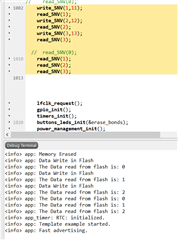


But When I start address from 0 it gives the right values.

    write_SNV(0,10);
    read_SNV(0);
    write_SNV(1,11);
    read_SNV(1);
    write_SNV(2,12);
    read_SNV(2);
    write_SNV(3,13);
    read_SNV(3);

    read_SNV(0);
    read_SNV(1);
    read_SNV(2);
    read_SNV(3);


How can I save values in rondom addresses?
Thanks!

Parents
  • Hello,

    I think you should read up on flash handling before doing this. I suggest that you check out the flash_fds or the flash_fs example, but I can try to explain why this is not working.

    And by the way, if you upload the examples that you use to test it is faster for us to browse your code, and find the references to the SDK\softdevice functions you are using.

    Are you sure that you have pasted the implementation you are using? I suspect you have removed at least one APP_ERROR_CHECK(err_code)?

    Flash operations are fairly slow, compared to the runtime of your application. If I try to run your application implementation, the first write_SNV() is working fine, but the next is generating an error because APP_ERROR_CHECK(err_code) is called with err_code = 17, returned from sd_flash_write(). This is because there is already a flash operation ongoing. 

    If the first flash write is not yet done, it is not possible to read out the flash that you are not yet finished writing in between.

    This is why I recommend you looking into the flash_fs example. When you set up a proper flash handler, you can wait for the flash callback before you try to read it back. Try to search for the flash tickets here on devzone. There are probably hundreds of flash related tickets related to this kind of issue. 

    Best regards,

    Edvin

  • Hi ,

    Sorry for the late reply.Can I add a handler in my current code?

    I am trying this. Is this the correct way?
    Or any suggestion to fix the issue in this code?

    uint32_t write_SNV(int address,uint8_t value)
    {
        uint32_t val;
        val=value;
        ret_code_t         err_code;
        err_code=NRF_ERROR_BUSY;
       // NRF_LOG_INFO("Data Write in Flash");
    
       // err_code = sd_flash_write(p_addr+address, &val, sizeof(val));
        
    
        while(err_code!=NRF_SUCCESS)
        {
        err_code = sd_flash_write(p_addr+address, &val, sizeof(val));
        }
        
    //    APP_ERROR_CHECK(err_code);
    
    
      if(err_code==NRF_ERROR_INTERNAL)
      {
       NRF_LOG_INFO("NRF_ERROR_INTERNAL");
      }
      else if(err_code==NRF_ERROR_INVALID_ADDR)
      {
       NRF_LOG_INFO("NRF_ERROR_INVALID_ADDR");
      } 
      else if(err_code==NRF_ERROR_BUSY)
      {
       NRF_LOG_INFO("NRF_ERROR_BUSY");
      }
      else if(err_code==NRF_ERROR_FORBIDDEN)
      {
       NRF_LOG_INFO("NRF_ERROR_FORBIDDEN");
      }
      else if(err_code==NRF_SUCCESS)
      {
       NRF_LOG_INFO("NRF_SUCCESS");
      }
    
        return err_code;
    }
    

  • I guess there is something in that flash area already. Are you running the unmodified flash_fstorage example, or did you add it to another project?

    Try to comment out the nrf_fstorage_write() and see what it prints if you don't write anything. Also, %c will only print characters if it is an ascii value. Try to print using %02x:

    If it doesn't print FF for all the values, it means that the flash is not empty. Also, you can use NRF_LOG_RAW_INFO(); if you don't want the linefeed after every char:

        NRF_LOG_INFO("Reading from flash hex:");
        for(uint8_t i=0; i<sizeof(m_hello_world); i++)
        {
            NRF_LOG_RAW_INFO("%02x:", m_hello_world[i]);
        }
        NRF_LOG_RAW_INFO("\r\n");
        NRF_LOG_INFO("Reading from flash char:");
        for(uint8_t i=0; i<sizeof(m_hello_world); i++)
        {
            NRF_LOG_RAW_INFO("%c", m_hello_world[i]);
        }
        NRF_LOG_RAW_INFO("\r\n");
        NRF_LOG_INFO("done");

    I suspect that there is some data in that flash area before you try to write to it. As I mentioned, writing to flash can only change 1's to 0's, so you need to erase the page first. Try using "nrfjprog --eraseall" befoe programming the example. Also, if you add things to your project, then the address 0x3F000 may already be used by the application .hex file.

    Regarding everything else: So you are using SDK17, and you use the peer manager. Look at the sdk_config.h file of the project that uses the peer manager, and search for FDS_VIRTUAL_PAGES. This sets the number of FDS pages. By default it is 3.

    The secure_bootloader\pca10056_s140_ble bootloader has a flash start address of 0xf8000. So if you use this one, then it means that the FDS pages are on 0xF7000, 0xF6000 and 0xF5000. You can use 0xF4000->0xF4FFF. 

    In your bootloader project, when you get this far, check it's sdk_config.h file. Look for NRF_DFU_APP_DATA_AREA_SIZE.

    This is the parameter saying how much of the flash beneath the bootloader that is reserved for application flash use, and this area will not be overwritten during a DFU. 

    By default it is set to 12288. This is the number of bytes that are protected. One flash page is 4096 bytes long, so this corresponds to 3 pages (the FDS pages). If you want to add another page for custom data, please increase this number by 4096.

    BR,

    Edvin

  • I guess there is something in that flash area already. Are you running the unmodified flash_fstorage example, or did you add it to another project?

    I am using the unmodified flash_fstorage example.


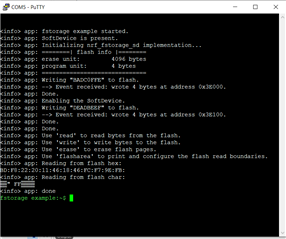
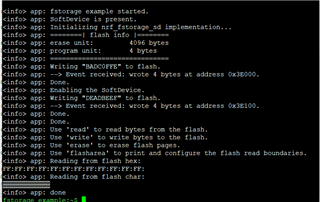
    Here is the data I have read after implementing your code part.

  • You need to erase your chip before programming it. I guess the content of that area is from another project that you tested once.


    Edvin said:
    Try using "nrfjprog --eraseall"
  • You need to erase your chip before programming it. I guess the content of that area is from another project that you tested once.

Reply Children
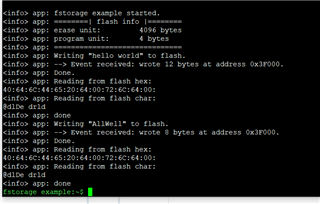
  • I am trying to save different data in the same location but getting different data. Confused

        char  m_hello_world[]   ="hello world";
    
        NRF_LOG_INFO("Writing \"%s\" to flash.", m_hello_world);
        rc = nrf_fstorage_write(&fstorage, 0x3f000, m_hello_world, sizeof(m_hello_world), NULL);
        APP_ERROR_CHECK(rc);
    
        wait_for_flash_ready(&fstorage);
        NRF_LOG_INFO("Done.");
    
     
        rc = nrf_fstorage_read(&fstorage, 0x3f000, m_hello_world_f, sizeof(m_hello_world_f));
        APP_ERROR_CHECK(rc);
    
    
        NRF_LOG_INFO("Reading from flash hex:");
        for(uint8_t i=0; i<sizeof(m_hello_world_f); i++)
        {
            NRF_LOG_RAW_INFO("%02x:", m_hello_world_f[i]);
        }
        NRF_LOG_RAW_INFO("\r\n");
        NRF_LOG_INFO("Reading from flash char:");
        for(uint8_t i=0; i<sizeof(m_hello_world_f); i++)
        {
            NRF_LOG_RAW_INFO("%c", m_hello_world_f[i]);
        }
        NRF_LOG_RAW_INFO("\r\n");
        NRF_LOG_INFO("done");
    
    
        char m_hello_world_1[]="AllWell";
    
    
        NRF_LOG_INFO("Writing \"%s\" to flash.", m_hello_world_1);
        rc = nrf_fstorage_write(&fstorage, 0x3f000, m_hello_world_1, sizeof(m_hello_world_1), NULL);
        APP_ERROR_CHECK(rc);
    
        wait_for_flash_ready(&fstorage);
        NRF_LOG_INFO("Done.");
    
     
        rc = nrf_fstorage_read(&fstorage, 0x3f000, m_hello_world_f, sizeof(m_hello_world_1));
        APP_ERROR_CHECK(rc);
    
    
        NRF_LOG_INFO("Reading from flash hex:");
        for(uint8_t i=0; i<sizeof(m_hello_world_f); i++)
        {
            NRF_LOG_RAW_INFO("%02x:", m_hello_world_f[i]);
        }
        NRF_LOG_RAW_INFO("\r\n");
        NRF_LOG_INFO("Reading from flash char:");
        for(uint8_t i=0; i<sizeof(m_hello_world_f); i++)
        {
            NRF_LOG_RAW_INFO("%c", m_hello_world_f[i]);
        }
        NRF_LOG_RAW_INFO("\r\n");
        NRF_LOG_INFO("done");


  • You don't erase the page in between.

    I have tried to say several times that when you write to flash, you can only change bits from 1 to 0. That means if you write a byte 0x0F to a byte that was already 0xFF, then it will have the value 0x0F after you write. If you write the byte 0xDD to a byte that already have 0xFF 0x0F,  then it will end up with the value 0x0D. That is how flash works. you need to erase the page using sd_flash_page_erase(), which will clear the entire flash page, and set it to all 0xFF.

    Edit: one of the 0xFF above should have been 0x0F. fixed now.

  • Hi ,
    I have tested what you have said. It working. 
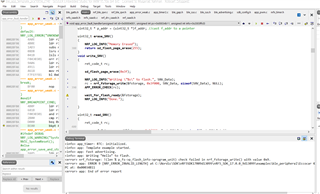
    Now I am trying to add this part to my project but getting the following Issue. Can you please check?

  • so some function returns an error that has the name NRF_ERROR_INVALID_LENGTH. Did you check what function that returned this value? Perhaps you can check the function description in the .h file that declares this function. Does that give any hints on why it may return that error?

    BR,

    Edvin

  • o some function returns an error that has the name NRF_ERROR_INVALID_LENGTH. Did you check what function that returned this value?

    Yes, I have checked and this is function returning an error.

        rc = nrf_fstorage_write(&fstorage, 0x3f000, SNV_Data, sizeof(SNV_Data), NULL);
        APP_ERROR_CHECK(rc);


    ret_code_t nrf_fstorage_write(nrf_fstorage_t const * p_fs,
                                  uint32_t               dest,
                                  void           const * p_src,
                                  uint32_t               len,
                                  void                 * p_context)
    {
        NRF_FSTORAGE_PARAM_CHECK(p_fs,        NRF_ERROR_NULL);
        NRF_FSTORAGE_PARAM_CHECK(p_src,       NRF_ERROR_NULL);
        NRF_FSTORAGE_PARAM_CHECK(p_fs->p_api, NRF_ERROR_INVALID_STATE);
        NRF_FSTORAGE_PARAM_CHECK(len,         NRF_ERROR_INVALID_LENGTH);
    
        /* Length must be a multiple of the program unit. */
        NRF_FSTORAGE_PARAM_CHECK(!(len % p_fs->p_flash_info->program_unit), NRF_ERROR_INVALID_LENGTH);
    
        /* Source and destination addresses must be word-aligned. */
        NRF_FSTORAGE_PARAM_CHECK(addr_is_aligned32(dest),                NRF_ERROR_INVALID_ADDR);
        NRF_FSTORAGE_PARAM_CHECK(addr_is_aligned32((uint32_t)p_src),     NRF_ERROR_INVALID_ADDR);
        NRF_FSTORAGE_PARAM_CHECK(addr_is_within_bounds(p_fs, dest, len), NRF_ERROR_INVALID_ADDR);
    
        return (p_fs->p_api)->write(p_fs, dest, p_src, len, p_context);
    }
    

    This is working perfectly fine in the example but not working here. 

Related