This post is older than 2 years and might not be relevant anymore
More Info: Consider searching for newer posts

nrf52832 uart logs not show with ble_app code examples.

Hello, 

I have a costum board with nrf52832 chip. when I upload example code  "/examples/peripheral/uart/" I can see logs coming and loopback test is working great, but when I upload "examples/ble_central/ble_app_multilink_central/pca10040/s132/armgcc/" GPIO on LED pins works, ble also works, but i can not see logs comming true uart. If I test same code example on  "/examples/ble_central/ble_app_multilink_central/pca10056/s140/armgcc" on nrf52 devkit with nfr52840 chip on it, all logs are coming great without of sdk_config.h file change. What I missed in sdk_config.h file or what disturbs uart comunication when ble_app code examples are used with nrf52832 chip?

Schematic of costum board:
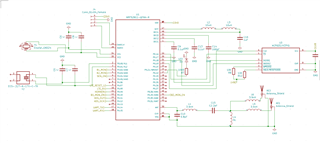
and config file:

8132.sdk_config.h

modified pca10040.h file for custom board:

5078.pca10040.h

Makefile I did not change.

Thank You for Your support

Parents Reply Children
  • I changed Makefile and sdk_config.h file according  suggested link, but it did not help. but did help something else: Setting up TX and RX pins to 6 and 8 as a pca10040 board has. They worked, so that means that pins 14, and 15, is used for something else in board pca10040 code examples. So what else I need to change in code example so 14 and 15 pins could be free for uart usage? Till now I tried to define only one led, one button and comment 14 and 15 pin related rows in system_52.h file, but it looks that it is not enough.  

  • Hi,

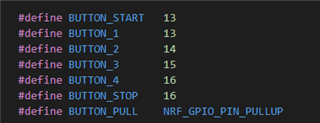
    Pin 14 and Pin 15 are defined as Buttons in pca10040.h:


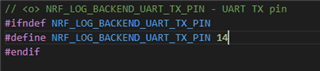
    The example set the buttons as input in leds_init() which will probably override any configuration that is set by log_init(). The solution is to move log_init() to right after the buttons_init() and configure the UART backend in log init to use Pin 14 or Pin 15 as tx in sdk_config.h. You should also eventually define other buttons for Button_2 and Button_3 for the example to work as intended.

     :

    best regards

    Jared

Related