This post is older than 2 years and might not be relevant anymore
More Info: Consider searching for newer posts

Understanding/debugging DFU?

Hello,

I have added DFU to our project. In general it works, at least parts of it.

Assume I receive often/always NRF_DFU_EVT_DFU_FAILED, how do I find out, what is the reason for it?

Is there some documentation which handles these case? Perhaps function calls to get additional info?

Or is the right way to log exchanged data, analyze them, compare them to suggested sequences?

Where do I find documentation of exchanged data?

Many thanks!

Best regards,

Marie

Parents
  • Concrete example: I seems to be able to update the app, but not the softdevice. It results in an error.

    nrf_dfu_req_handler_req_process

    NRF_DFU_OP_OBJECT_EXECUTE

    response.result=0x000B

    NRF_DFU_EVT_DFU_FAILED

    NRF_DFU_EVT_TRANSPORT_DEACTIVATED

    Error seems to be 0x0B, which seems to be "NRF_DFU_RES_CODE_EXT_ERROR".
    According to explanation:
    Extended error. The next byte of the response contains the error code of the extended error (see @ref nrf_dfu_ext_error_code_t.
    But how to get extended error code?

    Already with my minimal setup I reach maximum size which does not fit to limits of size of bootloader in flash.


  • Hello Marie,

    The extended error range can be used to report any of the following error: nrf_dfu_ext_error_code_t.   In this case I suppose the extended error could be NRF_DFU_EXT_ERROR_SD_VERSION_FAILURE considering you only get this for the Softdevice update.

    Did you add the FWID of the current Softdevice running on your device when you crated the DFU update package? The update will get rejected otherwie.

    I find the best way to debug the bootloader is to start with the debug configuration (pca10xxx_<softdevice>_<transport>_debug) which has logging over RTT enabled by default. The log is quite verbose, and will usually print out the exact error when an update fails.

    Best regards,

    Vidar

  • This is what I see in build log:

    [100%] Generating xxx_bl_sd_app.zip
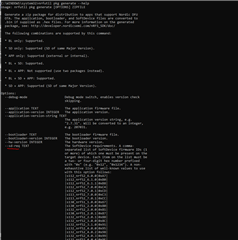
    cd /d C:\git\embedded_software\cmake-build-debug\src && C:\Users\marie.maurer\AppData\Local\Programs\Python\Python38\Scripts\nrfutil.exe pkg generate --sd-req 0x0101 --hw-version 52 --application C:/git/embedded_software/cmake-build-debug/src/xxx.hex --application-version-string 1.0.0 --app-boot-validation NO_VALIDATION --key-file C:/git/embedded_software/src/../keys/dfu_private.key --sd-id 0x0101 --bootloader C:/git/embedded_software/toolchains/nRF5/nRF5_SDK_17.0.2_d674dde/examples/dfu/secure_bootloader/pca10040_s132_ble/armgcc/_build_xxx/bootloader.hex --bootloader-version 1 --softdevice C:/git/embedded_software/toolchains/nRF5/nRF5_SDK_17.0.2_d674dde/components/softdevice/s132/hex/s132_nrf52_7.2.0_softdevice.hex --sd-boot-validation NO_VALIDATION C:/git/embedded_software/cmake-build-debug/src/xxx_bl_sd_app.zip
    Zip created at C:/git/embedded_software/cmake-build-debug/src/xxx_bl_sd_app.zip
    mingw32-make.exe[3]: Leaving directory 'C:/git/embedded_software/cmake-build-debug'

    I use SD 7.2.0 and SDK 7.0.2. Bootloader also generated with these versions.

    Is update SD 7.2.0 to SD 7.2.0 a problem? I seem to remember there was a switch that prevents downgrade...

  • The update should not be rejected because you upload the same Softdevice version. The downgrade prevention mechanism you mentioned applies to the app fw version.

    There is no logging enabled in this bootloader project you are building, so I suggest you debug the bootloader with GDB/Ozone or similar to help find out which step in nrf_dfu_ver_validation.c::nrf_dfu_ver_validation_check() is failing.

Reply
  • The update should not be rejected because you upload the same Softdevice version. The downgrade prevention mechanism you mentioned applies to the app fw version.

    There is no logging enabled in this bootloader project you are building, so I suggest you debug the bootloader with GDB/Ozone or similar to help find out which step in nrf_dfu_ver_validation.c::nrf_dfu_ver_validation_check() is failing.

Children
  • Many thanks for your hints!

    I have done debugging on this topic and I think, I know the check which is failing:

    fw_version_ok from components\libraries\bootloader\dfu\nrf_dfu_ver_validation.c
    has the following check inside (almost at the end of the function):

        else
        {
            return  (p_init->fw_version > s_dfu_settings.bootloader_version);
        }


    Both version are 0x0001, so function returns false, because it is not greater.
    This gives me the above error.

    This is a text from sdk_config.h:

    // <i> Whether to check the incoming version against the version of the existing app and/or
    // <i> the incoming SoftDevice requirements against the existing SoftDevice.
    // <i> This applies to application updates, and possibly to SoftDevice updates.
    // <i> Disabling this causes the checks to always ignore the incoming firmware version and
    // <i> to ignore the SoftDevice requirements if the first requirement is 0.
    // <i> This does not apply the bootloader updates. If the bootloader depends on the SoftDevice
    // <i> e.g. for BLE transport, this does not apply to SoftDevice updates.
    // <i> See @ref lib_bootloader_dfu_validation for more information.
    // <i> When signed updates are required, version checking should always be enabled.

    I have to use signed updates, so I must enable this.
    I do DFU via Bluetooth. I have a bit problems to understand what above means...
    What can stay at same version, what must be increased?
    I must always increase bootloader version?
    And when I update bootloader I can optionally update softdevice to a new version?
    Or update bootloader version with a downgrade of softdevice?
    But never downgrade bootloader?
    Is this right?
    Is there some document which helps me on this topic or even on other similar topics?


  • Thanks. So it's apparently failing on the bootloader version check. The bootloader version number must be incremented on every update. An update with the same version will not be accepted,  please refer to the NRF_DFU_APP_ACCEPT_SAME_VERSION config options for details.

Related