This post is older than 2 years and might not be relevant anymore
More Info: Consider searching for newer posts

Thingy:91 firmware update issue and no LTE connection

Hello,

It looks like several people are having issues updating the firmware of the Thingy:91 modem with a simple USB cable.

I personally tried on Windows 10, 8 and 7. No luck.
The firmware currently installed is mfw_nrf9160_1.1.1 (it was never updated). I am trying to update to mfwnrf9160120.
When I try, after switching on to DFU mode, the error message I receive is "MCUboot DFU failed. Please make sure that the device is in MCUboot mode and try again."
I'm using the Programmer v. 1.4.5 of the nRF Connect v 3.5.0 application.

The Thingy:91 is always flashing blue, so it can't have access to network. I wonder if updating the firmware would solve this.

My question is: is there any chance that a (near future) driver or Programmer update could solve this issue?
Otherwise, if I need to use a hardware programmer, could you point me to the right (and cheapest) one (including the right cable), for example on DigiKey or Mouser? 

Thanks for your support.

             Andrea

  • Hi Andrea,
    Could you share the full output log from the programmer app when this happens?

    Which operating system are you using?
    Which version of the Thingy:91 do you have (should be mentioned on the sticker)?
    What exactly are you trying to flash? (make sure it is the correct file)
    Could you try to update the modem with the v1.1.2 file and then see if it also works with v1.1.3? 


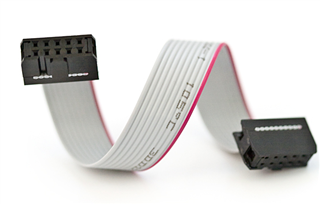
    The cheapest solution for an external debugger is maybe to get an nRF91DK, there you can use the debug-out port connected to a simple 10-pin connector as such:

  • Hi Martin,

    thanks for your message.

    I am now using Windows10 Pro v.1903.
    The Thingy:91 version on the sticker is 1.4.0
    I have now tried v1.1.2 (mfw_nrf9160_1.1.2.zip) and v.1.1.3 (mfw_nrf9160_1.1.3.zip), with same results, here is the output log:

    2020-10-13T14:42:40.698Z INFO Application data folder: C:\Users\andrea\AppData\Roaming\nrfconnect\pc-nrfconnect-programmer
    2020-10-13T14:42:40.940Z INFO Using nrfjprog library 10.9.0, pc-nrfjprog-js 1.7.3
    2020-10-13T14:42:41.701Z ERROR Error while probing devices: Error occured when get serial numbers. Errorcode: CouldNotCallFunction (0x9)
    Lowlevel error: INVALID_OPERATION (fffffffe)

    2020-10-13T14:43:23.038Z INFO Modem DFU starts to write...
    2020-10-13T14:43:23.038Z INFO Writing C:\Users\andrea\Downloads\mfw_nrf9160_1.1.2.zip to device
    2020-10-13T14:43:23.462Z ERROR MCUboot DFU failed. Please make sure that the device is in MCUboot mode and try again.

    I open the programmer, put Thingy in DFU mode (keep SW3 pressed while turning on), select the PCA20035 device, then select the modem firmware file and then I get the last 3 messages you see in the log.

    Anything else I could try..?
    Thanks.

               Andrea

  • Hi Martin,

    I had a big success, but an even bigger failure! :-(

    I installed the nrfjprog v. 10.10.0 (64bit), this time I also installed the J-Link appsthen tried everything again and in fact I had no "Error while probing devices" and I then could upgrade the modem firmware (to v. 1.2.1)! OK.

    I just noticed that after upgrading the modem firmware, the LEDs were not blinking (blue) anymore, maybe it's normal, I don't know.

    Then I went to DFU mode with SW4 and loaded the thingy91_nbiot_dfu_2020-09-23_b6ad40d0.hex application file. Apparently all was successful. OK

    The big issue now is that LEDs are always off, and even when trying to go to DFU mode, the Thingy is not showing in the device list. In fact it appears to be completely dead and its COM port is never listed.

    I rebooted the PC, turned off-on the Thingy, tried DFU mode several times, but nothing happens at all!

    What can I do now??
    Thanks if you can help again!

                  Andrea 

  • Hi Andrea,
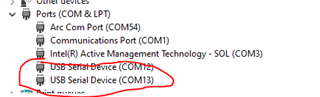
    Does it at all show up in "Device Manager" in when you connect the Thingy:91 and just turning it ON?


    Do you have an external debugger or an nRF9160DK + a 10-pin connector to maybe flash the device via that?

    Best regards,
    Martin L.

Related