

Trying to build asset tracker for Thingy91 following the instructions at
https://developer.nordicsemi.com/nRF_Connect_SDK/doc/latest/nrf/ug_thingy91.html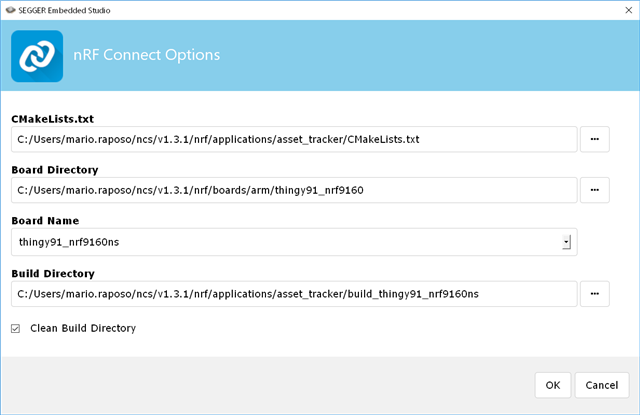
I get:
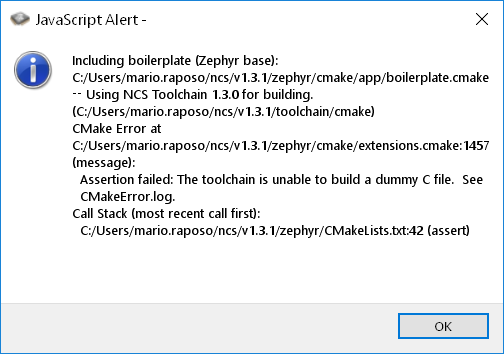
and: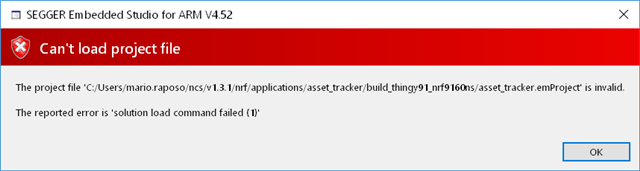
Output:
Loading solution asset_tracker.emProject
Executing load commands
cmake -GNinja -DBOARD=thingy91_nrf9160ns -DBOARD_DIR=C:/Users/mario.raposo/ncs/v1.3.1/nrf/boards/arm/thingy91_nrf9160 -DZEPHYR_TOOLCHAIN_VARIANT=gnuarmemb -DGNUARMEMB_TOOLCHAIN_PATH=C:/Users/mario.raposo/ncs/v1.3.1/toolchain/opt -BC:/Users/mario.raposo/ncs/v1.3.1/nrf/applications/asset_tracker/build_thingy91_nrf9160ns -HC:/Users/mario.raposo/ncs/v1.3.1/nrf/applications/asset_tracker -DEXTRA_KCONFIG_TARGETS=menuconfig_ses -DEXTRA_KCONFIG_TARGET_COMMAND_FOR_menuconfig_ses=C:/Users/mario.raposo/ncs/v1.3.1/toolchain/segger_embedded_studio/html/configure_nordic_project_menuconfig.py
Including boilerplate (Zephyr base (cached)): C:/Users/mario.raposo/ncs/v1.3.1/zephyr/cmake/app/boilerplate.cmake
-- Application: C:/Users/mario.raposo/ncs/v1.3.1/nrf/applications/asset_tracker
-- Using NCS Toolchain 1.3.0 for building. (C:/Users/mario.raposo/ncs/v1.3.1/toolchain/cmake)
-- Zephyr version: 2.3.0-rc1 (C:/Users/mario.raposo/ncs/v1.3.1/zephyr)
-- Board: thingy91_nrf9160ns
-- Found west: C:/Users/mario.raposo/ncs/v1.3.1/toolchain/opt/bin/Scripts/west.exe (found suitable version "0.7.2", minimum required is "0.7.1")
-- Found dtc: C:/Users/mario.raposo/ncs/v1.3.1/toolchain/opt/bin/dtc.exe (found suitable version "1.4.7", minimum required is "1.4.6")
-- Found toolchain: gnuarmemb (C:/Users/mario.raposo/ncs/v1.3.1/toolchain/opt)
-- Found BOARD.dts: C:/Users/mario.raposo/ncs/v1.3.1/nrf/boards/arm/thingy91_nrf9160/thingy91_nrf9160ns.dts
-- Generated zephyr.dts: C:/Users/mario.raposo/ncs/v1.3.1/nrf/applications/asset_tracker/build_thingy91_nrf9160ns/zephyr/zephyr.dts
-- Generated devicetree_unfixed.h: C:/Users/mario.raposo/ncs/v1.3.1/nrf/applications/asset_tracker/build_thingy91_nrf9160ns/zephyr/include/generated/devicetree_unfixed.h
Parsing C:/Users/mario.raposo/ncs/v1.3.1/nrf/applications/asset_tracker/Kconfig
Loaded configuration 'C:/Users/mario.raposo/ncs/v1.3.1/nrf/applications/asset_tracker/build_thingy91_nrf9160ns/zephyr/.config'
No change to configuration in 'C:/Users/mario.raposo/ncs/v1.3.1/nrf/applications/asset_tracker/build_thingy91_nrf9160ns/zephyr/.config'
No change to Kconfig header in 'C:/Users/mario.raposo/ncs/v1.3.1/nrf/applications/asset_tracker/build_thingy91_nrf9160ns/zephyr/include/generated/autoconf.h'
-- Cache files will be written to: C:/Users/mario.raposo/ncs/v1.3.1/zephyr/.cache
CMake Error at C:/Users/mario.raposo/ncs/v1.3.1/zephyr/cmake/extensions.cmake:1457 (message):
Assertion failed: The toolchain is unable to build a dummy C file. See
CMakeError.log.
And CMakeError.log:
Compiling the C compiler identification source file "CMakeCCompilerId.c" failed.
Compiler: C:/Users/mario.raposo/ncs/v1.3.1/toolchain/opt/bin/arm-none-eabi-gcc.exe
Build flags:
Id flags:
The output was:
1
c:/users/mario.raposo/ncs/v1.3.1/toolchain/opt/bin/../lib/gcc/arm-none-eabi/9.2.1/../../../../arm-none-eabi/bin/ld.exe: c:/users/mario.raposo/ncs/v1.3.1/toolchain/opt/bin/../lib/gcc/arm-none-eabi/9.2.1/../../../../arm-none-eabi/lib\libc.a(lib_a-exit.o): in function `exit':
exit.c:(.text.exit+0x2c): undefined reference to `_exit'
collect2.exe: error: ld returned 1 exit status
Compiling the CXX compiler identification source file "CMakeCXXCompilerId.cpp" failed.
Compiler: C:/Users/mario.raposo/ncs/v1.3.1/toolchain/opt/bin/arm-none-eabi-gcc.exe
Build flags:
Id flags:
The output was:
1
c:/users/mario.raposo/ncs/v1.3.1/toolchain/opt/bin/../lib/gcc/arm-none-eabi/9.2.1/../../../../arm-none-eabi/bin/ld.exe: c:/users/mario.raposo/ncs/v1.3.1/toolchain/opt/bin/../lib/gcc/arm-none-eabi/9.2.1/../../../../arm-none-eabi/lib\libc.a(lib_a-exit.o): in function `exit':
exit.c:(.text.exit+0x2c): undefined reference to `_exit'
collect2.exe: error: ld returned 1 exit status

