This post is older than 2 years and might not be relevant anymore
More Info: Consider searching for newer posts

Failed to manually build blinky example

Had tried to build it from the IDE before.  Couldn't do it.
Tried to build manually, got exactly the same error I was getting in the IDE.

Parsing C:/Users/mario.raposo/zephyrproject/zephyr/Kconfig
Loaded configuration 'C:/Users/mario.raposo/zephyrproject/zephyr/build/zephyr/.config'
No change to configuration in 'C:/Users/mario.raposo/zephyrproject/zephyr/build/zephyr/.config'
No change to Kconfig header in 'C:/Users/mario.raposo/zephyrproject/zephyr/build/zephyr/include/generated/autoconf.h'
CMake Error at ../../../cmake/extensions.cmake:1557 (message):
Assertion failed: The toolchain is unable to build a dummy C file. See
CMakeError.log.
Call Stack (most recent call first):
../../../CMakeLists.txt:42 (assert)


-- Configuring incomplete, errors occurred!
See also "C:/Users/mario.raposo/zephyrproject/zephyr/build/CMakeFiles/CMakeOutput.log".
See also "C:/Users/mario.raposo/zephyrproject/zephyr/build/CMakeFiles/CMakeError.log".

Parents
  • Hi Mario,

    What version of ncs do you have?
    What version of cmake do you have?
    Can you build other example projects?

    I see that you have a dot "." in you path. C:/Users/mario.raposo/... Try to change the "." to a underscore "_" and se if you still have the same build errors. 

    The error:

    CMake Error at ../../../cmake/extensions.cmake:1557 (message):

    is the following 

     check_if_directory_is_writeable(${test_user_dir} ok)
          if(${ok})
            # The directory is write-able
            set(user_dir ${test_user_dir})
            break()
          else()                          // This is line 1557
            # The directory was not writeable, keep looking for a suitable
            # directory
          endif()


    Regards,
    Joathan

Reply
  • Hi Mario,

    What version of ncs do you have?
    What version of cmake do you have?
    Can you build other example projects?

    I see that you have a dot "." in you path. C:/Users/mario.raposo/... Try to change the "." to a underscore "_" and se if you still have the same build errors. 

    The error:

    CMake Error at ../../../cmake/extensions.cmake:1557 (message):

    is the following 

     check_if_directory_is_writeable(${test_user_dir} ok)
          if(${ok})
            # The directory is write-able
            set(user_dir ${test_user_dir})
            break()
          else()                          // This is line 1557
            # The directory was not writeable, keep looking for a suitable
            # directory
          endif()


    Regards,
    Joathan

Children
  • 1. ncs 1.3.1 (Can I get 1.4.0 somewhere?)
    2. cmake version 3.18.4
    3. None of them build.

    The latest issue I have is when trying to build the cloud_client example:

    Parsing C:/Users/mario.raposo/ncs/v1.3.1/nrf/samples/nrf9160/cloud_client/Kconfig
    Loaded configuration 'C:/Users/mario.raposo/ncs/v1.3.1/nrf/samples/nrf9160/cloud_client/build_thingy91_nrf9160ns/zephyr/.config'
    No change to configuration in 'C:/Users/mario.raposo/ncs/v1.3.1/nrf/samples/nrf9160/cloud_client/build_thingy91_nrf9160ns/zephyr/.config'
    No change to Kconfig header in 'C:/Users/mario.raposo/ncs/v1.3.1/nrf/samples/nrf9160/cloud_client/build_thingy91_nrf9160ns/zephyr/include/generated/autoconf.h'
    CMake Error at C:/Users/mario.raposo/ncs/v1.3.1/zephyr/cmake/extensions.cmake:1479 (message):
    No such file or directory: LIBGCC_FILE_NAME: ''

  • I can't change the directory.
    I point for the new one and it always defaults to "C:/Users/mario.raposo/"

  • Changed my path to \Nordic and I get the same error when I do a manual build:

    -- Cache files will be written to: C:/Nordic/ncs/zephyr/.cache
    -- Found dtc: C:/ProgramData/chocolatey/bin/dtc.exe (found suitable version "1.4.7", minimum required is "1.4.6")
    -- Found toolchain: gnuarmemb (C:\gnuarmemb)
    -- Found BOARD.dts: C:/Nordic/ncs/nrf/boards/arm/thingy91_nrf9160/thingy91_nrf9160ns.dts
    -- Generated zephyr.dts: C:/Nordic/ncs/zephyr/build/zephyr/zephyr.dts
    -- Generated devicetree_unfixed.h: C:/Nordic/ncs/zephyr/build/zephyr/include/generated/devicetree_unfixed.h
    Parsing C:/Nordic/ncs/zephyr/Kconfig
    Loaded configuration 'C:/Nordic/ncs/nrf/boards/arm/thingy91_nrf9160/thingy91_nrf9160ns_defconfig'
    Merged configuration 'C:/Nordic/ncs/zephyr/samples/basic/blinky/prj.conf'
    Configuration saved to 'C:/Nordic/ncs/zephyr/build/zephyr/.config'
    Kconfig header saved to 'C:/Nordic/ncs/zephyr/build/zephyr/include/generated/autoconf.h'
    -- The C compiler identification is GNU 8.3.1
    -- The CXX compiler identification is GNU 8.3.1
    -- The ASM compiler identification is GNU
    -- Found assembler: C:/gnuarmemb/bin/arm-none-eabi-gcc.exe
    CMake Error at ../../../cmake/extensions.cmake:1557 (message):
    Assertion failed: The toolchain is unable to build a dummy C file. See
    CMakeError.log.
    Call Stack (most recent call first):
    ../../../CMakeLists.txt:42 (assert)


    -- Configuring incomplete, errors occurred!
    See also "C:/Nordic/ncs/zephyr/build/CMakeFiles/CMakeOutput.log".
    See also "C:/Nordic/ncs/zephyr/build/CMakeFiles/CMakeError.log".
    FATAL ERROR: command exited with status 1: 'C:\Program Files\CMake\bin\cmake.EXE' '-DWEST_PYTHON=c:\users\mario.raposo\appdata\local\programs\python\python37\python.exe' '-BC:\Nordic\ncs\zephyr\build' '-SC:\Nordic\ncs\zephyr\samples\basic\blinky' -GNinja

  • Hi Mario,

    You can follow the latest NCS versions on our Github here, it is not recommended to work on master unless you absolutely needs the latest fixes/features. Check out latest tag on Github to work on a stable version. Or use the nRF connect for desktop and Toolchain manager to get the latest recommended version witch is v1.3.1 at the moment.


    There is a previous Devzone ticket where the solution is to delete the CMake cache.
    "Can you try to delete ~/Library/Caches/zephyr before building and see if that helps?"


    Have you followed the instructions here, https://developer.nordicsemi.com/nRF_Connect_SDK/doc/latest/nrf/gs_installing.html#gs-installing 

    Do you have the nrf Command line tools?
    See this section for instructions on how to set up command line build environment.


    If none of the above helps can you provide the CMakeError.log file ?

    Regards,
    Jonathan

  • There is a previous Devzone ticket where the solution is to delete the CMake cache.
    "Can you try to delete ~/Library/Caches/zephyr before building and see if that helps?"


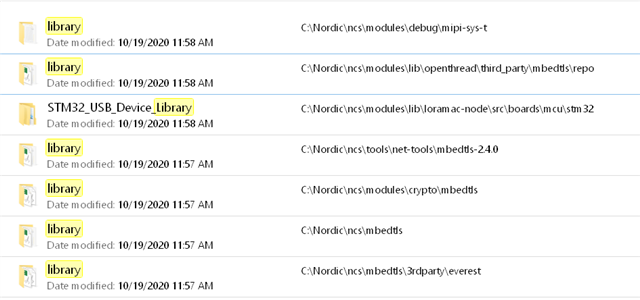
       A: I've tried that before, but first, there are only these Library folders on my installation:


       None of them have a .cache folder on it.
       There is a cache folder at C:\Nordic\ncs\zephyr\.cache, which I deleted but it did not help me

    Have you followed the instructions here, https://developer.nordicsemi.com/nRF_Connect_SDK/doc/latest/nrf/gs_installing.html#gs-installing 

        Yes I did.

    Do you have the nrf Command line tools?
    See this section for instructions on how to set up command line build environment.

        I'll look at it, but my goal is to be able to build and debug at real time (breakpoints, etc...)

    If none of the above helps can you provide the CMakeError.log file ?

        I can't. At this point I am stuck.
        The Open IDE option on the Toolchain manager is not there anymore.
        I tried to remove and re-install, delete the installation folder and re-install, but now the option is gone.

Related