This post is older than 2 years and might not be relevant anymore
More Info: Consider searching for newer posts

Message already scheduled for a reliable transfer

Hi there!

Okay, I've been trying a lot to figure this out, but without any success. I have absolutely no idea what could be the problem whatsoever. The problem is that the simple_on_off client is unable to reliably send messages to the simple_on_off server; both with reliable and unreliable transfers.

It worked twice; the messages would be sent and received every time. The times in between, only one or two messages would be sent and received and then it would just return NRF_ERROR_INVALID_STATE, which means a reliable transfer is already scheduled. A message should be sent every 20 seconds.
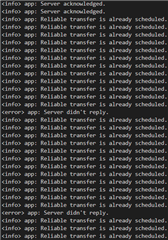
I should note that I'm using FreeRTOS. However, the above described is just a small part of the project and everything (including scanning for beacons and provisioning) has worked thus far, so I don't expect it to have something to do with FreeRTOS.

I also expect it to be a problem on the client side and not the server side since I can just send messages with the app or restart the client and everything works. Maybe it's a problem with the configuration of the mesh network? I have literally no idea...

Thanks in advance,

Jochem

Parents
  • Hi JVKran, 

    Could you let me know how often do you retry to send the reliable message ? What's the timeout you set when you send a reliable message ? 

    I think it would be quite easy to check which side caused the issue by testing with following steps: 

    1 - Test implementing simple-on-off model in a simple application (you can modify light switch server example for that). Test and makes sure that you can send and receive messages reliably. 

    2 - After you have a server that work reliably you can test it with your RTOS client so that we know which side causes the issue. 

    I'm not an expert in RTOS but I suspect that if there is another task that has more priority and if it occupy the CPU for too long it may affect mesh performance. Have you tried our FreeRTOS mesh example here ?

Reply
  • Hi JVKran, 

    Could you let me know how often do you retry to send the reliable message ? What's the timeout you set when you send a reliable message ? 

    I think it would be quite easy to check which side caused the issue by testing with following steps: 

    1 - Test implementing simple-on-off model in a simple application (you can modify light switch server example for that). Test and makes sure that you can send and receive messages reliably. 

    2 - After you have a server that work reliably you can test it with your RTOS client so that we know which side causes the issue. 

    I'm not an expert in RTOS but I suspect that if there is another task that has more priority and if it occupy the CPU for too long it may affect mesh performance. Have you tried our FreeRTOS mesh example here ?

Children
  • Hi Hung,

    Thanks for replying so fast! I'm trying to send it every 20 seconds and the timeout is set to 60 seconds. The FreeRTOS mesh example you linked is exactly what i took as a base to build around; worked really well.

    When I'm finished with what I'm doing now I'll take some time to take the light switch client example and modify it to use the simple on off client. The server keeps working and receiving messages sent from within the mesh app; I'm pretty sure it's the client side that's causing problems.

    On the client side, the SoftDevice task is the only one. I doubt it has to do something with the RTOS but as stated, I'll try modifying the light switch client example. 

    I'll report back when I tried the example.

    Kind regards,

    Jochem

  • Sorry that I misunderstood that you mentioned the server could be the issue. 

    What you can do is to print out some more log in the access level to catch all the messages in and out of the client and server. 
    If you look into access.c in mesh_msg_handle() you can find the log at LOG_LEVEL_DBG1 level that print out any RX packets. 

    Same with TX, it's printed out inside packet_tx(). By enabling log for access module and log level DBG1 , you can monitor what exactly goes out of the client, and if the server receives that and response or not (you can printout more info about the packet by modifying the log )

  • Doesn't matter, can happen ; ). Okay, thanks for the tips. I'll try them out and report back!

  • It appears that the acknowledgement of the server didn't reach the client. Am not really sure what the issue was, but hey; it's at least solved. I'll list my steps below for fellow-developers.

    • Enabled the debug messages in access.c.
    • Found that the opcodes weren't valid.
    • Tried out the bare simple_on_off_client and server.

    I must've made a mistake while adding functionalities to the client and server... Anyway, thanks for the tip about the debug messages! That did it.

  • I want to add that I currenty suspect the RTOS from being the culprit. I rewrote the code to use the buttons for several message transfers and the problem arose again. Increasing the stack depth did it... Never had any issues again.

Related