This post is older than 2 years and might not be relevant anymore
More Info: Consider searching for newer posts

nRF52840 SDK16 s140 -Buttonless OTA DFU Implementation fails

Hi everyone,

I am trying to integrate the DFU service into my application on order to achieve buttonless OTA DFU but I am not able to implement it so far and I need your support. 

1. I generated the pyblic key and compile the secure_bootloader_ble_s140_pca10056 successfully

2. I created the bootloader settings file

3. I modified my application in order to initialize the DFU service and include the handler function based on the ble_app_buttonless_dfu_pca10056_s140 example

4. I merged into a single file the secure bootloader, the settings page, the softdevice and the application

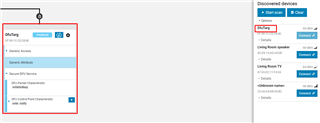
However when I flash my nRF52840 it advertises as DfuTarg and I see only the secure DFU service. I was expecting to see the advertising name I have define inside my application as well as my services along with the secure DFU service

Before starting with the buttonless example, I compiled the secure bootloader in order to get started with button OTA DFU. I am not sure if this is related  somehow but for the buttonless implementation I used the same secure_bootloader_ble_s140_pca10056.hex

Any advice?

Nick

Parents
  • Hello Nick,


    1. I generated the pyblic key and compile the secure_bootloader_ble_s140_pca10056 successfully

     Can you show me how you generated this? (what commands)


    2. I created the bootloader settings file

     and this?


    3. I modified my application in order to initialize the DFU service and include the handler function based on the ble_app_buttonless_dfu_pca10056_s140 example

     Did you do these modifications before or after you created the bootloader settings file?


    4. I merged into a single file the secure bootloader, the settings page, the softdevice and the application

     That should be fine.


    However when I flash my nRF52840 it advertises as DfuTarg and I see only the secure DFU service. I was expecting to see the advertising name I have define inside my application as well as my services along with the secure DFU service

     This suggests that the bootloader has "rejected" the application, because the bootloader settings are incorrect. Please show me how you generated the settings, and make sure that you used the .hex file that you program into the nRF to generate your settings. If you recompile the application, you must re-generate the settings.

    If you mean that you have done all this correctly, can you please try the bootloader found in SDK\examples\dfu\secure_bootloader\pca10056_s140_ble_debug?

    What does the log say after you program that bootloader, the softdevice, application and bootloader settings generated with the latest application?

    Best Regards,

    Edvin

  • Hi Edvin and thank you for your effort

    Can you show me how you generated this? (what commands)

    I first generated the private key

    nrfutil.exe keys generate private.key

    and then based on the private key I generated the public key

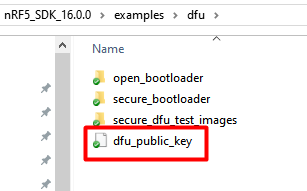
    nrfutil keys display --key pk --format code private.key --out_file dfu_public_key.c

    Finally I replaced the existing public key with the key I generated and compiled the bootloader.

    and this?

    To generate the bootloader setting file I followed the Generating and displaying bootloader settings and I used the following command

    nrfutil settings generate --family NRF52840 --application app.hex --application-version 0 --bootloader-version 0 --bl-settings-version 2 settings.hex

    Another question now is generated.. The --application-version used for setting file must be the same as the application version used for the .zip file? Also, it is correct to set the --bootloader-version 0?

    Did you do these modifications before or after you created the bootloader settings file?

    Xmm I am not sure. I remember that I generated the settings file after I modified and compiled the applicaiton file but I think that I've dove some additional changes in a later stage (after creating the settings file)

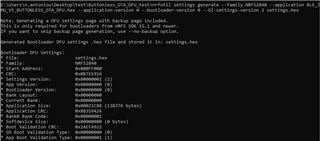
    For that reason I regenerated the settings page now using the latest application:

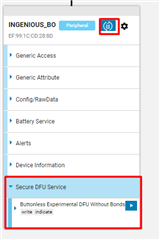
    and after merging the files I flash my target and voila!!

    It seems to work!! :) I assume that the issue was with the settings page..

    So before trying to upload the .zip file could you answer the question I asked before regarding versioning?

    Nick


  • First, remember that whenever you do a tiny change, which result in a change in the application hex file, you need to re-generate your bootloader_settings for the bootloader to accept the application.

    Now, that is if you want to program your application directly. You can write whatever you like in the --application-version when you generate the bootloader settings manually. The application-version (and bootloader-version) is used to prevent downgrades in future DFUs. When you generate an application image (or bootloader image) for DFU updates, you generate a packet with an application-version (or bootloader-version if you are updating the bootloader itself). 

    The bootloader will never accept an image that contains an application-version lower than the current application version. When you perform A DFU, the bootloader will generate new bootloader settings on it's own, using the new image's (zip folder's) application-version. Whether or not the bootloader will accept an application-version equal to what it already has depends on the sdk_config.h define in your bootloader:

    #define NRF_DFU_APP_ACCEPT_SAME_VERSION

    So let's say you have set NRF_DFU_APP_ACCEPT_SAME_VERSION to 1 (which is the default value in SDK16), and you have manually generated bootloader settings with application-version 1, you can generate dfu images with application version 1, 2, 3 or any number higher or equal to 1. If you transfer an image that has application version 2, the bootloader will no longer accept application-version = 1. 

    Hopefully this cleared some of your questions. 

    Best regards,

    Edvin

  • Hi Edvin,

    You were clear thanks!!.

    I have one last question before closing the ticket. Do I need to enable indications of Secure DFU Service before load the .zip file? If I don't, what is the purpose of indication?

    Is there any difference in the procedure when applying DFU with bonds or without bonds?

    Nick

  • Hello,


    Nikosant03 said:
    I have one last question before closing the ticket. Do I need to enable indications of Secure DFU Service before load the .zip file? If I don't, what is the purpose of indication?

     You can't write to the buttonless service characteristic without enabling indications. It would be possible to implement something similar without indications, but that is the way it is done in the buttonless_dfu example. 


    Nikosant03 said:
    Is there any difference in the procedure when applying DFU with bonds or without bonds?

     That is an interresting question. You need to be careful, and think through things if you want to require bonds when performing DFU (that means that the bootloader requires bonding). 

    First, the bootloader is something that you created, and it requires that the application is signed by the private key, which only you have. So it is not possible to upload any other firmware via DFU. This is a security in itself. 

    So you need to ask yourself what you want to protect by enabling the bond requirement in the bootloader. 

    Of course, there is a risk that if you are connected, and initiate a DFU, this causes the device to reset, and start advertising as your DFU target. At this point, someone else may connect to it, and try to upload some other FW (let us call it malware). This will not work, because the malware is not signed by your private key. The bootloader will reject the image, and reset. At this point, it still holds the old FW, so if the DFU times out, it will start advertising with it's old application again. 

    You can of course deny this by requiring bonding so that noone else can connect to your device. That is the good thing about this. However, there is a disadvantage as well, which you need to consider. 

    Let us say that you (or a customer) wants to perform DFU. They have the signed image that you generated. They initiate the procedure, but something happens that causes the DFU to fail. Perhaps the device ran out of battery, or the connection was disrupted causing a disconnect. (user moving too far away from the device while the DFU is ongoing). At this point, the DFU had started, but it was aborted during the transfer. At that point, the nRF doesn't contain the old image anymore, because the devices doesn't have space for both applications. The disconnect causes the DFU to time out, but it doesn't have any application, so it starts advertising in DFU mode. So far nothing bad has really happened. But what if the user decides that they want a clean restart, and deletes the bonding information from the phone. If that happens, then you have bricked the device. The nRF only accepts connections from bonded devices, but doesn't have an application, so it is not possible to create new bonds. The nRF has bonding data stored. The bonding data belongs to a phone that no longer has the bonding data, so the phone is not able to connect. The device is bricked. 

    In my opinion, the requirement of bonds in the bootloader is not a good idea. What I would do, however, is to consider requiring bonds on the buttonless DFU service/characteristic. This way, only bonded devices will be able to put the device in DFU mode. And still, the nRF will only accept the DFU images that you have signed with your private key. Any change to the app (malware) will corrupt the CRC, and the image is no longer valid, as you have already discovered in this ticket. 

    Best regards,

    Edvin

Reply
  • Hello,


    Nikosant03 said:
    I have one last question before closing the ticket. Do I need to enable indications of Secure DFU Service before load the .zip file? If I don't, what is the purpose of indication?

     You can't write to the buttonless service characteristic without enabling indications. It would be possible to implement something similar without indications, but that is the way it is done in the buttonless_dfu example. 


    Nikosant03 said:
    Is there any difference in the procedure when applying DFU with bonds or without bonds?

     That is an interresting question. You need to be careful, and think through things if you want to require bonds when performing DFU (that means that the bootloader requires bonding). 

    First, the bootloader is something that you created, and it requires that the application is signed by the private key, which only you have. So it is not possible to upload any other firmware via DFU. This is a security in itself. 

    So you need to ask yourself what you want to protect by enabling the bond requirement in the bootloader. 

    Of course, there is a risk that if you are connected, and initiate a DFU, this causes the device to reset, and start advertising as your DFU target. At this point, someone else may connect to it, and try to upload some other FW (let us call it malware). This will not work, because the malware is not signed by your private key. The bootloader will reject the image, and reset. At this point, it still holds the old FW, so if the DFU times out, it will start advertising with it's old application again. 

    You can of course deny this by requiring bonding so that noone else can connect to your device. That is the good thing about this. However, there is a disadvantage as well, which you need to consider. 

    Let us say that you (or a customer) wants to perform DFU. They have the signed image that you generated. They initiate the procedure, but something happens that causes the DFU to fail. Perhaps the device ran out of battery, or the connection was disrupted causing a disconnect. (user moving too far away from the device while the DFU is ongoing). At this point, the DFU had started, but it was aborted during the transfer. At that point, the nRF doesn't contain the old image anymore, because the devices doesn't have space for both applications. The disconnect causes the DFU to time out, but it doesn't have any application, so it starts advertising in DFU mode. So far nothing bad has really happened. But what if the user decides that they want a clean restart, and deletes the bonding information from the phone. If that happens, then you have bricked the device. The nRF only accepts connections from bonded devices, but doesn't have an application, so it is not possible to create new bonds. The nRF has bonding data stored. The bonding data belongs to a phone that no longer has the bonding data, so the phone is not able to connect. The device is bricked. 

    In my opinion, the requirement of bonds in the bootloader is not a good idea. What I would do, however, is to consider requiring bonds on the buttonless DFU service/characteristic. This way, only bonded devices will be able to put the device in DFU mode. And still, the nRF will only accept the DFU images that you have signed with your private key. Any change to the app (malware) will corrupt the CRC, and the image is no longer valid, as you have already discovered in this ticket. 

    Best regards,

    Edvin

Children
No Data
Related