This post is older than 2 years and might not be relevant anymore
More Info: Consider searching for newer posts

How to read characteristic value

Hi, all

I'm using nRF52832 pc10040, s132.

This is ble_app_uart_c example, and I'm trying to read my own beacon device's characteristic value.

ble_uuid_t p_uuid = {.uuid = 0x1601, .type = BLE_UUID_TYPE_BLE};
ble_gattc_handle_range_t p_handle_range = {.start_handle = 0x0001, .end_handle = 0xFFFF};

err_code = sd_ble_gattc_char_value_by_uuid_read(p_ble_nus_evt->conn_handle, &p_uuid, &p_handle_range);
            
if(err_code != NRF_SUCCESS)
{
    NRF_LOG_INFO("Failed to send read request to peer error = %d", err_code);
    printf("\n\rFailed to send read request to peer error = %d\n\r", err_code);
}

I successfully retrieved device name using line 4: 'sd_ble_gattc_char_value_by_uuid_read'.

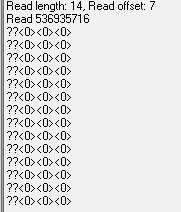
I also read the value of '0' before my device sent data.
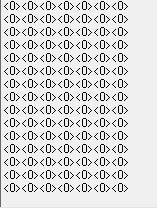

But if I try to read the moment the device sends data, I can't get the value right.
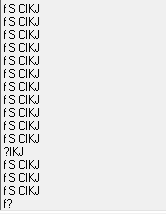
I have to read this type of value.

case BLE_GATTC_EVT_CHAR_VAL_BY_UUID_READ_RSP :
            for(uint32_t j = 0; j <=  p_read_rsp->len; j++) {
                for (uint32_t i = 0; i < p_read_rsp->offset; i++)
                {
                    while(app_uart_put( p_read_rsp->data[i]) != NRF_SUCCESS);
                }
                printf("\r\n");       
            }
            break;

this is my output part code.

How can I get this value?

Parents Reply Children
  • Hi, Edvin

    What is the p_read_rsp->offset when you hit this for-loop?

    I just don't understand what offset means, so I tried 'for-loop'.

    Have you tried to debug and see what the data in the p_read_rsp->data looks like?

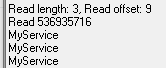
    When I tried to see my device name which is 'MyService',

    I can see my device name through 'p_read_rsp->data'.

      The picture is the result below.

    case BLE_GATTC_EVT_CHAR_VAL_BY_UUID_READ_RSP :
        printf("Read length: %d, Read offset: %d\r\n", p_read_rsp->len, p_read_rsp->offset);
        printf("Read %d\r\n", p_read_rsp->data);
               
        for(uint32_t j = 0; j <=  p_read_rsp->len; j++) {
            for (uint32_t i = 0; i < p_read_rsp->offset; i++)
            {
                while(app_uart_put( p_read_rsp->data[i]) != NRF_SUCCESS);
            }
            printf("\r\n");       
        }
        break;

    (I don't understand why offset fits the length of the data...)

    I tried to show the characteristic value, just like the name but it's not coming out properly.

  • If the event is the BLE_GATTC_EVT_CHAR_VAL_BY_UUID_READ_RSP. You may setup the characteristic handle during discovery event. In your case,maybe like this

    if (p_evt->evt_type == BLE_DB_DISCOVERY_COMPLETE &&
    p_evt->params.discovered_db.srv_uuid.uuid == Your_UUID_SERVICE &&
    p_evt->params.discovered_db.srv_uuid.type == BLE_UUID_TYPE_BLE) 
    {
    ble_gatt_c_evt_t evt;

    evt.evt_type = BLE_GATT_C_EVT_DISCOVERY_COMPLETE;
    evt.conn_handle = p_evt->conn_handle;

    uint32_t i;
    for (i = 0; i < p_evt->params.discovered_db.char_count; i++)
    {
    const ble_gatt_db_char_t * p_char = &(p_evt->params.discovered_db.charateristics[i]);
    switch (p_char->characteristic.uuid.uuid)
    {
    case Your_NUS_UUID:
    evt.params.peer_db.gatt_handle = p_char->characteristic.handle_value;

    ;
    break;

    default:
    break;
    }
    }

    If you don't define the characteristics handle, the event case will not match the characteristic uuid which you want.

  • This is my code, and I think I defined the characteristic handle line 10..

    static void ble_nus_c_evt_handler(ble_nus_c_t * p_ble_nus_c, ble_nus_c_evt_t const * p_ble_nus_evt)
    {
        ret_code_t err_code;
    
        switch (p_ble_nus_evt->evt_type)
        {
            case BLE_NUS_C_EVT_DISCOVERY_COMPLETE:
                NRF_LOG_INFO("Discovery complete.");
                printf("Discovery\r\n");
                err_code = ble_nus_c_handles_assign(p_ble_nus_c, p_ble_nus_evt->conn_handle, &p_ble_nus_evt->handles);
                APP_ERROR_CHECK(err_code);
    
                /**********added**********/            
                //nrf_delay_ms(10000);
                //ble_uuid_t p_uuid = {.uuid = BLE_UUID_GAP_CHARACTERISTIC_DEVICE_NAME, .type = BLE_UUID_TYPE_BLE};
                ble_uuid_t p_uuid = {.uuid = 0x1601, .type = BLE_UUID_TYPE_BLE};
                ble_gattc_handle_range_t p_handle_range = {.start_handle = 0x0001, .end_handle = 0xFFFF};
    
                err_code = sd_ble_gattc_char_value_by_uuid_read(p_ble_nus_evt->conn_handle, &p_uuid, &p_handle_range);
                
                if(err_code != NRF_SUCCESS)
                {
                    NRF_LOG_INFO("Failed to send read request to peer error = %d", err_code);
                    printf("\n\rFailed to send read request to peer error = %d\n\r", err_code);
                }
                /**************************/
    
                err_code = ble_nus_c_tx_notif_enable(p_ble_nus_c);
                APP_ERROR_CHECK(err_code);
                NRF_LOG_INFO("Connected to device with Nordic UART Service.");
                printf("connect2\r\n");     
        
                break;
        .....
    }

    you may take the reference code from SDK (Central or Peripheral) ble_app_gatts  example

    I will study again with that example.

  • Do you know what data the characteristic you are reading holds? Is it "E5 2F 46 C4 00 00 00"? Or is that just an example?

    It looks like you are trying to print them as numbers when you use %d, but when you use app_uart_put() it will print the hexadecimal value, so depending on your UART terminal, it may look different due to how it interprets non-ascii values. 

    I am a bit confused by your parameter names. Where do you receive this event, and what parameters does that callback contain? The BLE_GATTC_EVT_CHAR_VAL_BY_UUID_READ_RSP event should contain something like a ble_evt_t, possibly called p_ble_evt, and it should contain:

    p_ble_evt->gattc_evt.params.char_val_by_uuid_read_rsp.value_len
    and
    p_ble_evt->gattc_evt.params.char_val_by_uuid_read_rsp.handle_value,

    but not "len". Where do you get this callback?

    And does your peripheral support reading and not only notifications? What is your peripheral? Is it something you wrote yourself? Is it running on a Nordic chip?

    Let us say that the event does contain a pointer to the data, "p_value", and a length variable "len".

    If your data contains ascii characters (only) you can use:

    NRF_LOG_RAW_INFO("received: ");
    for (uint8_t i=0; i<len; i++)
    {
        NRF_LOG_RAW_INFO("%c", p_data[i]);
    }
    NRF_LOG_RAW_INFO("\r\n");

    If you want to print the hexadecimal values:

    NRF_LOG_RAW_INFO("received hex values: 0x");
    for (uint8_t i=0; i<len; i++)
    {
        NRF_LOG_RAW_INFO("%02x:", p_data[i]);
    }

  • I saw you that you had nus_c_rx_notif_enable

    That means you may read the characteristic by notify.....

    Well,...You can also get the event case BLE_GATTC_EVT_HVX:

    That can get the value more easy.

Related