This post is older than 2 years and might not be relevant anymore
More Info: Consider searching for newer posts

Using a Thingy52, are these modifications possible within the firmware or otherwise?

Hello Everyone,

I am using a Thingy52 to take environmental readings, which are used to programmatically respond to changes. I have noticed that the blue bluetooth led flashes every time I read the environmental data. I have also noticed using the NodeJS examples, that if I wait for an extended period of time, then query the Thingy52, it does not wake up without me shaking it awake.

I am coming from a C# and JavaScript background so I'm in a little over my head. I was going to approach learning to make changes to the firmware with 2 goals.

1) DIsable all LEDS completely in some way such that the device can be set up to NEVER emit any light whatsoever.

2) Either:

A) Disable the deep sleep mode that seems to stop the NodeJS examples from working unless I manually shake the device to wake it up.It will be plugged in to a continuous power source.

or

B) Learn how to use NodeJS and the examples to wake the device from sleep.

I was curious to know if any/all of these modifications are possible, or if the Bluetooth led flash is something controlled by hardware that I cannot modify?

If anyone can confirm that I can achieve my goals, and possibly give me a foothold of where to begin or what to look for, it would be much appreciated.

If it matters, I do not have a dev kit, so likely must flash using OTA.

Thank you for any advice, or help you can provide.

Steve

Parents
  • Hello,

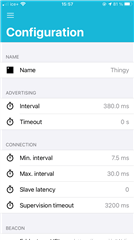
    The easiest way to disable the deep sleep mode is probably to connect to the thingy with our Thingy app on iOS or Android, then set the "Advertising timeout" to 0 in the configuration menu. With this configuration it will always remain connectable.

    Configuration menu on iOS

    And if you go to the "UI" menu you can disable all LED indications.

    Best regards,

    Vidar

Reply
  • Hello,

    The easiest way to disable the deep sleep mode is probably to connect to the thingy with our Thingy app on iOS or Android, then set the "Advertising timeout" to 0 in the configuration menu. With this configuration it will always remain connectable.

    Configuration menu on iOS

    And if you go to the "UI" menu you can disable all LED indications.

    Best regards,

    Vidar

Children
  • Thank you for the pointer to the advertising parameter. I'm trying it now and it seems to be what I was looking for to solve that issue!

    For the LED I am afraid it is more complex.

    It is not your Thingy LED, but the tiny led on the bottom of the board that is related to Bluetooth activity.

    For example, even with the LED off in the UI, when I have the app open on my phone and have it taking readings, there is a blink coming from the small led on the bottom that coincides with the app reading the data over blue tooth. For every refresh there is a flash until I close the app.

    If I change the refresh rate in the app and set the interval to 5000ms, the flashing of the diode slows to match.

    It is not bright, but in a light proof room, it is quite obvious. I don't want to cover it, or enclose it as I worry it will impact the environmental readings.

    I know pretty much every device I have ever seen has some sort of activity indicator, so I suspected, if it can be disabled at all, it would probably be in firmware.

     I was concerned this might not be possible at all regardless of my programming abilities.

  • I see, but I'm afraid it will be more difficult to get the small LED indication to stay off as the thingy only accepts signed OTA updates. That is, OTA of custom apps is not supported unless you program a new bootloader through the debug interface first.

    Steve52 said:
    It is not bright, but in a light proof room, it is quite obvious. I don't want to cover it, or enclose it as I worry it will impact the environmental readings.

     What if you take out the PCB and just cover the LED (with tape/permanent marker, etc)?. That shouldn't impact the other sensors.

  • Thanks! I was considering the physical approach to disabling the LED should it not be doable with the tools/skills at my disposal.

    That said, I was working with it over the weekend, and have realized now that the led I am concerned with only flashes when reading the color/light intensity sensor. If I don't access that sensor, there is no flash at all.

    I am thinking now that the flash is necessary for that sensor to take a reading?

  • Sorry, I assumed the LED was used for indication only, but you're right, it is used by the color sensor during sampling. The light  is being turned by color_start() function at this line here: https://github.com/NordicSemiconductor/Nordic-Thingy52-FW/blob/126120108879d5bf5d202c9d5cab65e4e9041f58/source/modules/m_environment.c#L684 

Related