This post is older than 2 years and might not be relevant anymore
More Info: Consider searching for newer posts

Connecting of nRF52840DK board to ZigBee product

Hello,

I am a student and I am trying to experiment using a nRF52840DK to replace a device in a ZigBee network but unable to do so with the available examples.

I do not really know how should I change the examples to suit my needs.

I was thinking of replicating my "Door/Window sensor" or a "Wireless ZigBee Hub".

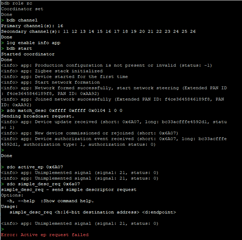
I tried using the CLI agent but do not know how to establish a connection with the devices.

May I know is it possible to be done? 

Thank you.

Regards,

Terence

Parents
  • Hi Terence,

    If you are new with Zigbee I recommend starting out with the Zigbee CLI Agent example. This example can work as either a Zigbee router you can add to an existing zigbee network or as a coordinator to setup a new network.

    You should also setup a Zigbee sniffer, for instance you can use the nRF Sniffer for 802.15.4 with a nRF52840 dongle, which is an easy and cheap solution for sniffing. If you have questions while developing you can add sniffer traffic dumps to your tickets and it will be easier to get help.

    I recommend you familiarize yourself with both the BDB specification and the ZCL specification if you are planning to develop your own Zigbee products. You can download both of them from the Zigbee Alliance website. If you want to replicate a device you should first try to find out what clusters that device has implemented.

    I don't know how far you have come in your development. To start out you can perhaps familiarize yourself on how to add a new Zigbee device to an existing Zigbee network. You can use the Zigbee CLI as a router or the Zigbee light bulb example for example. Check that the zigbee example is running on the same channel as your coordinator (sniffer gives the answer), check that the Zigbee network is opened (association permit in beacon packet is set to true, sniffer will also give you the answer here), and check if the coordinator replies to TC key rotation packets (request/verify key).

    Best regards,

    Marjeris

Reply
  • Hi Terence,

    If you are new with Zigbee I recommend starting out with the Zigbee CLI Agent example. This example can work as either a Zigbee router you can add to an existing zigbee network or as a coordinator to setup a new network.

    You should also setup a Zigbee sniffer, for instance you can use the nRF Sniffer for 802.15.4 with a nRF52840 dongle, which is an easy and cheap solution for sniffing. If you have questions while developing you can add sniffer traffic dumps to your tickets and it will be easier to get help.

    I recommend you familiarize yourself with both the BDB specification and the ZCL specification if you are planning to develop your own Zigbee products. You can download both of them from the Zigbee Alliance website. If you want to replicate a device you should first try to find out what clusters that device has implemented.

    I don't know how far you have come in your development. To start out you can perhaps familiarize yourself on how to add a new Zigbee device to an existing Zigbee network. You can use the Zigbee CLI as a router or the Zigbee light bulb example for example. Check that the zigbee example is running on the same channel as your coordinator (sniffer gives the answer), check that the Zigbee network is opened (association permit in beacon packet is set to true, sniffer will also give you the answer here), and check if the coordinator replies to TC key rotation packets (request/verify key).

    Best regards,

    Marjeris

Children
Related