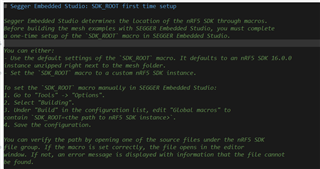
I want to test the mesh,but Idon't know hao to fine the path to nRF5SDK instance
..\nrf5_SDK_for_Mesh_v4.2.0_src\examples\sensor\server\sensor_server_nrf52832_xxAA_s132_7_0_1.emProject
I want to test the mesh,but Idon't know hao to fine the path to nRF5SDK instance
..\nrf5_SDK_for_Mesh_v4.2.0_src\examples\sensor\server\sensor_server_nrf52832_xxAA_s132_7_0_1.emProject
Hi,
Have you downloaded the nRF5 SDK? The nRF5 SDK and nRF5 SDK for Mesh are two different downloads. You can find the download for the nRF5 SDK here. Please note that Mesh v4.2.0 is built for nRF5 SDK v16.0.0, so you should download and use that version of the SDK. Using another version might cause errors.
If you've downloaded the SDK, the SDK_ROOT should be the location of your SDK folder, for instance SDK_ROOT=C:/nRF5_SDK_16.0.0. In SES (Segger Embedded Studio) you can set this by going to Tools > Options > Building > Global Macros.
Best regards,
Marte
Dear Marte
It's ok,thank you,
Best regards
zeroone
Dear Marte
It's ok,thank you,
Best regards
zeroone