This post is older than 2 years and might not be relevant anymore
More Info: Consider searching for newer posts

Problem with DFU via USB (nRF52840 & Windows 7)

Hi,

I've searched the forum to see if anyone else has had the same issue as I'm having but couldn't find anything. I'm trying to do DFU via USB with the nRF52840 on a custom board. I flashed the MBR hex and built and flashed the secure serial bootloader hex, and my device appears on my Windows 7 Device Manager as 'nRF52 SDFU USB (COM41)' when I power it up, so I think I've got something right so far, but this is what I get when I call nrfutil to program the board :
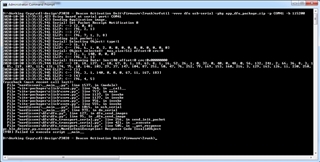
I am using the latest release of nrfutil.exe. I added the -vvvv because I read that it gives more debug info (?). I built the usb bootloader using a fresh public key, and used the new private key when I generated the package.

I've tried this with the softdevice present instead of the mbr.hex on its own, and with my application pushed up to 0x27000 instead of 0x1000, but get the same errors so I think it's a USB issue, but Windows detects the device so I'm puzzled.

Any suggestions? 

Thanks

- Pete

Parents
  • Hi Peter, 

    The bootloader was responded with "Invalid Object" it's most likely because of the init packet was not accepted. Can either be because the signed hash was not match with the public key in the bootloader, or if you have the wrong softdevice ID. 

    My suggestion is to test with a very simple application that blink the LED. Configure it to start at address 0x1000 and don't use the softdevice. We can come back to use the softdevice after we have DFU working. 

    Next please double check that you used the correct public-private key pair in the bootloader and when you generate the .zip DFU image file. 

    Please include all the steps you do to generate the keys, generate .zip file etc. 

Reply
  • Hi Peter, 

    The bootloader was responded with "Invalid Object" it's most likely because of the init packet was not accepted. Can either be because the signed hash was not match with the public key in the bootloader, or if you have the wrong softdevice ID. 

    My suggestion is to test with a very simple application that blink the LED. Configure it to start at address 0x1000 and don't use the softdevice. We can come back to use the softdevice after we have DFU working. 

    Next please double check that you used the correct public-private key pair in the bootloader and when you generate the .zip DFU image file. 

    Please include all the steps you do to generate the keys, generate .zip file etc. 

Children
Related