This post is older than 2 years and might not be relevant anymore
More Info: Consider searching for newer posts

How can I shorten the length of the passkey?

Hello

I'm using sdk v17 and trying to shorten PASSKEY.

Currently, my PASSKEY is 6 letters long. I want to shorten it to 4 letters, is this possible?

Or how do I get rid of the password I enter the first time connect to the BLE? The password for this is '0000' or '1234', but I failed both. (I removed the codes about the 'static passkey' and ran them.)
There must be a setup part for this password, but I can't found.

Can you help me with this problem?
Thank you.

Parents
  • Hi

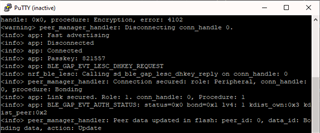
    This passkey should be the one generated by the application and should appear between the Connected and BLE_GAP_EVT_LESC_DHKEY_REQUEST upon connecting to the device (see screenshot below). Have you by chance removed or edited the following snippet of code in your project?

            case BLE_GAP_EVT_PASSKEY_DISPLAY:
            {
                char passkey[PASSKEY_LENGTH + 1];
                memcpy(passkey, p_ble_evt->evt.gap_evt.params.passkey_display.passkey, PASSKEY_LENGTH);
                passkey[PASSKEY_LENGTH] = 0;
    
                NRF_LOG_INFO("Passkey: %s", nrf_log_push(passkey));
            } break;

    Best regards,

    Simon

  • Aha, I think I deleted it during the passkey test.
    Does that code generate passkey randomly?

    What should I do to get rid of that passkey altogether? (I want to remove passkey so everyone can connect easily.)

    Thank you.

Reply Children
Related