This post is older than 2 years and might not be relevant anymore
More Info: Consider searching for newer posts

Source code (main.c) of "thingy91_nbiot_legacy_pco_dfu"

Hi everyone!

I'm running my Nordic Thingy 91 with "thingy91_nbiot_legacy_pco_dfu" and it works great!

Now, i want to make some specifics editions in the main code in order to add one new feature for my project. My question is:

Where can i find the "main.c" file to add my new function? And then compile and flash.

Parents Reply Children
  • Hi again, Alejandro!

    It's my pleasure! I was not clear on the exact way to build for Thingy:91 in my previous comment. See the edit for updated info!

    When the Thingy:91 Asset Tracker receives data from a subscription it will get the event CLOUD_EVT_DATA_RECEIVED in the cloud_event_handler in main.c. As the data is in JSON format it should be decoded using the cJSON library. You can see how this is handled in the cloud_decode_command(...) which is called in case of the aforementioned event. 

    For simple prototyping I recommend that you do a check in main.c on the resulting root object from cJSON_Parse(...) to see if the contents match your desired command and then just do the GPIO operation there. However, you should ultimately study how commands from the cloud are handled in the cloud_codec module and try to implement your functionality in that manner.

    As for GPIO you can take a look at this implementation using the onboard NMOS transistors. Here is also a thread on the available GPIOs.

    Good luck and do tell if you need any more help!

    Best regards,
    Carl Richard

  • Hi Carl, thank you again!

    I'm following this implementation to work with onboard NMOS transistors and i have the main.c used in that application. How can i correctly use it?

    I'm also following how to compile and program from source code but i don't know how i have to structure folders or what another configurations files I have to use in order to correctly compile and then flash the main.c application that I want to test.

    Thanks in advance,

    Alejandro.

  • Hi again, Alejandro!

    I saw that you've gotten an answer from Simon in the aformentioned thread. Did this help you on your way? 

    As he says you should try to use NCS 1.4.0, even though that may require some small changes. I also believe that you must add CONFIG_GPIO=y to the prj.conf. 

    Best regards,
    Carl Richard

  • Hi Carl! Thanks for your reply!

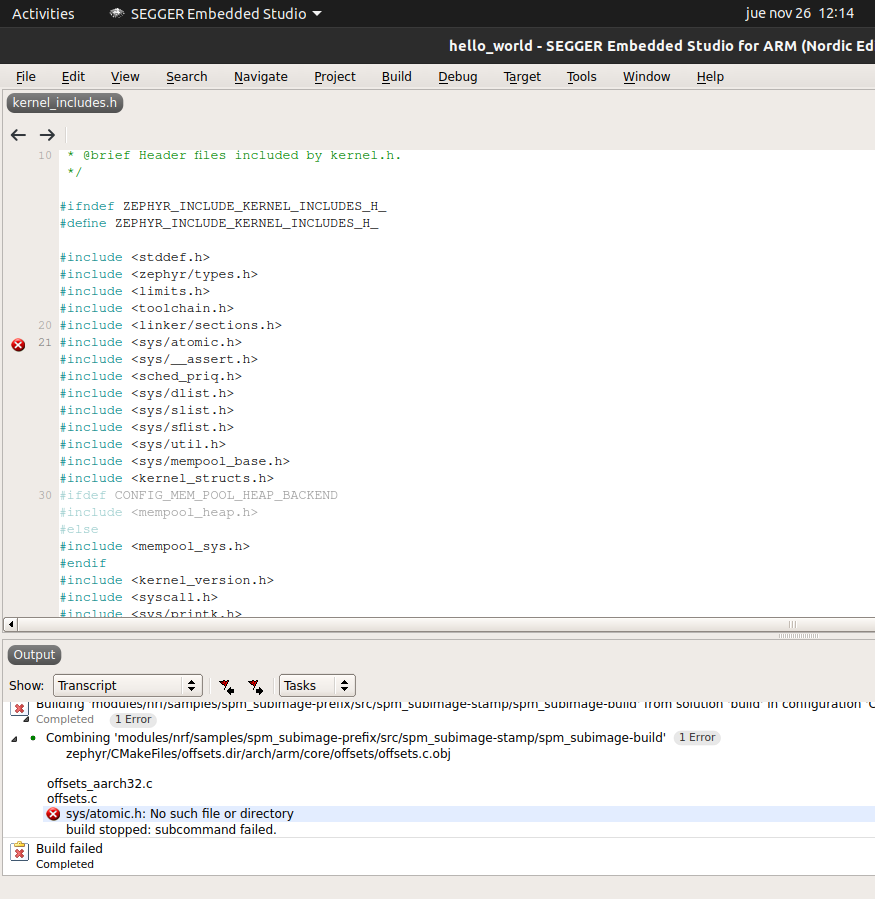
    I tried to build from Segger Embedded Studio and this is my output:

    What could be the error here?

  • Hmm. I'm not sure what could cause this. How have you updated your code?

    I had to do quite a lot of changes in order to compile it, so you could have a look at my main.c:

    #include <zephyr.h>
    #include <sys/printk.h>
    #include <drivers/gpio.h>
    
    static const struct device *gpio_dev;
    static bool nmos_state = false;
    
    void toggle_nmos() {
        nmos_state = !nmos_state;
    
        if (nmos_state) {
            // turn on 
            printk("Setting GPIO pin to 1, %d\n", gpio_pin_set(gpio_dev, 16, 1));
        }
        else {
            // turn off
            printk("Setting GPIO pin to 0, %d\n", gpio_pin_set(gpio_dev, 16, 0));
        }
    }
    
    void main(void)
    {
        gpio_dev = device_get_binding("GPIO_0");
        gpio_pin_configure(gpio_dev, 16, GPIO_OUTPUT);
    
        while (true) {
            toggle_nmos();
            k_sleep(K_MSEC(3000));
        }
    }


    Best regards,
    Carl Richard

Related