This post is older than 2 years and might not be relevant anymore
More Info: Consider searching for newer posts

Nordic Thingy:91 MCUBoot not working

Hello,

I had recently gotten a Nordic Thingy: 91 and I was following this tutorial to help me get started.

https://www.youtube.com/watch?v=xQ7hDzRULJQ

When it came to updating the firmware, I was running into some issues with MCUBoot.

I had done the following process:

1) I turned off my Nordic Thingy:91

2) I plugged my Nordic Thingy:91 into my computer with a USB

3) I opened the Programmer in the Mac OS nRF Connect application

4) I made sure MCUBoot was enabled in the programmer

5) I held down SW3 (the big black button) and while holding it down, I flipped the switch on the Nordic Thingy:91 to ON

6) I then went to Select Device and selected the Nordic Thingy:91 in the programmer,

7) From there I clicked Update Modem, selected the firmware, and clicked write

After doing this, I get the following result:
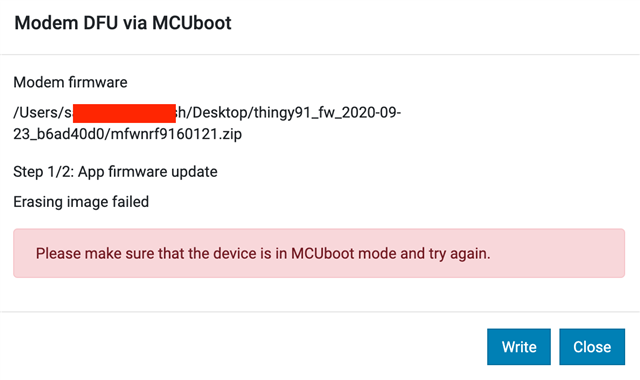
For context as well: When I hold down the button and turn on the device, I notice the LED does not turn off. I am assuming that means the device had entered Serial Recovery Mode.

Do you know what I may be doing wrong or why this is not working?

  • I assume it does not appear both when you put it in DFU mode and when you do not?

    Do you have an external programmer that can be used to program the nRF52840 (such as an nRF52 52840 or 91 DK)?

    On Linux, you should be able to use 'lsusb' or 'usb-devices' to list all the connected USB devices. If you use those commands, does the Thingy get listed then?

    What about if you use 'dmesg' to read the kernel log? If you connect the Thingy to the computer right before you run 'dmes', do you see any log indicating that a new USB device was connected?

  • Hi

    So I tried programming the thingy in nrf52 mode with my debugger that I had from my nrf52480 DK board and that seems to restore the USB connection. I think what happened was when I try to flash anything to the thingy through the nrf connect programmer, what ends up happening is that it bricks the USB connectivity and/or the DFU for some reason.

    Luckily, I am able to restore this by flashing the thingy with the nrf52480 DK board and nrfprog. I, unfortunately, do not have an nrf91 DK board to flash my thing with though.

    So this brings up two questions then:

    1)  Would it be possible to flash an nrf91 app with an nrf52480 DK programmer? And if so, what mode should the thingy be in to do so?

    2) Would you maybe have any idea to why the nrf connect programer would be behaving in a way that would brick my USB connectivity and/or DFU?

  • saremshal said:
    1)  Would it be possible to flash an nrf91 app with an nrf52480 DK programmer? And if so, what mode should the thingy be in to do so?

     Unfortunately, that does not work. The on-board programmer on the nRF52xxx DKs does not support the Cortex-M33.

    But, with the nRF52840 now working, you should be able to update the nRF9160 using DFU.

    What does the nRF9160 do at the moment? Does the LED light up in any colors?


    saremshal said:
    2) Would you maybe have any idea to why the nrf connect programer would be behaving in a way that would brick my USB connectivity and/or DFU?

     No, I don't know how you managed to get to this state. I have tried to reproduce it myself, but have not been able to do so.

Related