

Hi,
I'm working on DFU mesh no serial example (dfu_no_serial_nrf52833_xxAA_s113_7_0_1 ) and want to know any way to check it maybe by using nRF Toolbox or nRF Connect mobile application?
for now my steps are next one:
1. nrfjprog --eraseall
2. nrfjprog --program s113_nrf52_7.0.1_softdevice.hex --chiperase
3. nrfjprog --program mesh_bootloader_gccarmemb_nrf52833_xxAA.hex
4. nrfjprog --program dfu_no_serial_nrf52833_xxAA_s113_7.0.1.hex
5. nrfjprog --program device_page_nrf52833_xxAA_s113_7.0.1.hex
6. nrfjprog --reset
7. python bootloader_verify.py 68xxxxx00 COM25

after all of these steps, the application is starting and log output is the next one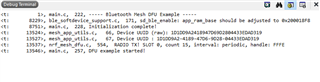
while scanning with nrfConnect app device is appear as 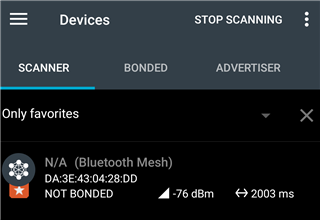
1. seems it does not support connecting to it, should it? to be able to connect and upload zip update
2. maybe something goes wrong on this stage ? 8229>, ble_softdevice_support.c, 171, sd_ble_enable: app_ram_base should be adjusted to 0x200018F8

