This post is older than 2 years and might not be relevant anymore
More Info: Consider searching for newer posts

I couldn't load the 9160 project successfully

I want to load the GPS routine project of 9160, but it fails. The error prompt is as follows:
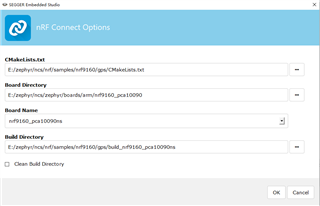
one step

When I click OK, the following prompt appears
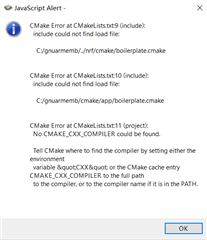
two step
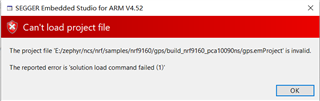
three step

Why does this happen? Is my engineering configuration wrong? Or is there something wrong with the computer system? When I installed the 9160 development environment, I installed everything that should be installed. At present, I don't know what is the problem?

help me ,thank you !

Parents
  • Hi,

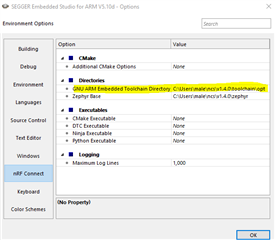
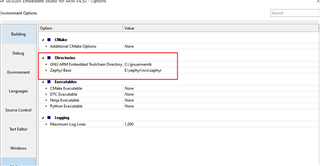
    Looks like you are missing a path variable for your compiler. (this is described in one of the steps when installing manually)

    Which NCS tag are you using?

    The quickest fix for this issue would be:

    I would highly recommend you to download NCS v1.4.0 from the Toolchain Manager app in nRF Connect for Desktop.

    There you would also get the latest Segger Emb. Studio update included.

Reply
  • Hi,

    Looks like you are missing a path variable for your compiler. (this is described in one of the steps when installing manually)

    Which NCS tag are you using?

    The quickest fix for this issue would be:

    I would highly recommend you to download NCS v1.4.0 from the Toolchain Manager app in nRF Connect for Desktop.

    There you would also get the latest Segger Emb. Studio update included.

Children
Related