This post is older than 2 years and might not be relevant anymore
More Info: Consider searching for newer posts

How to enter the interface MCU bootloader mode on nRF9160DK

Hi team,

How to enter the interface MCU bootloader mode on nRF9160DK. My DK can not find out the Jlink com virtual port.

Thanks,

Jun

  • Hi Jun,

    Sorry for the late reply.

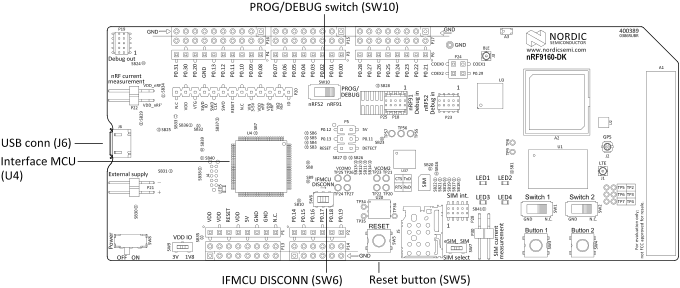
    For your board to be in the Firmware development mode, please verify that SW6 is in the left position. Here is the description from the nRF9160 DK User Guide:

    Firmware development mode

    The firmware development mode is the default with the IFMCU DISCONN switch (SW6) in the left position.

    The primary interface for programming and debugging the nRF9160 DK is the USB port (J6). The USB port is connected to an interface MCU which embeds a SEGGER J-Link-OB (On Board) debug probe.

    Figure 1. nRF9160 DK firmware development mode

    (Note that this switch is named 'SW1' on some board versions. However, I assume the position is still the same as in the image below.)

    Please let me know if you are still not able to find the JLINK.

    Best regards,

    Håkon

Related