This post is older than 2 years and might not be relevant anymore
More Info: Consider searching for newer posts

Thingy91 requires reset running mqtt_simple

Hi,

We are using the Thingy91, which is running the mqtt_simple (nRF SDK 1.4 and modem firmware 1.2.2) example, to push data direct to our AWS instance. Everything is running smoothly aside from the following issue:

I ran a power consumption test over the weekend which published data to our instance every 10 seconds and noticed that approx. every 22 hours the Thingy91 stopped publishing data to our instance. After a power cycle (on/off switch) it resumed posting. Do you know why this could be?

The mqtt_simple firmware does not interact with the ADP5360 PMIC via I2C like the asset_tracker firmware does. Could the PMIC be causing the issue?

Perhaps, we need to reset the radio using a specific AT command? I have successfully implemented AT command functionality within mqtt_simple which we can use if need be.

One additional question: According to this documentation, the EEPROM onboard the Thingy apparently is critical for correct operation and should not be changed. Can you please elaborate what information is stored there and if this will affect our units running the mqtt_simple firmware in the field?

Thanks,

Robert

Parents
  • Hi,


    Perhaps, we need to reset the radio using a specific AT command?

     No, that is not necessary.


    The mqtt_simple firmware does not interact with the ADP5360 PMIC via I2C like the asset_tracker firmware does. Could the PMIC be causing the issue?

     I don't think so. If you look in the board files, you will see that it initializes the PMIC. So as long as the application is compiled for the Thingy:91, that should not be a problem.


    I ran a power consumption test over the weekend which published data to our instance every 10 seconds and noticed that approx. every 22 hours the Thingy91 stopped publishing data to our instance. After a power cycle (on/off switch) it resumed posting. Do you know why this could be?

     Not without more information.

    Do you have any logs you can share? Can you produce some?

    Could you take a modem trace, so we can see what happens on the modem side?

    As you are using a Thingy:91, you must make sure that you are running the connectivity_bridge application on the nRF52840. Otherwise you will not be able to get a modem trace from the Thingy.

    Is all the communication going from the device to the cloud? Or do you send data both ways?

    What QoS level are you using?

    What SIM card are you using, and what network are you connected to?

    Are you using eDRX and/or PSM? Are you doing anything else to save power?

    How is your logic for sending the data? Could you share some code of the modifications you have done to the sample?


    One additional question: According to this documentation, the EEPROM onboard the Thingy apparently is critical for correct operation and should not be changed. Can you please elaborate what information is stored there and if this will affect our units running the mqtt_simple firmware in the field?

     I have asked our developers for more information, but I do not belive that it is the problem. My suspicion is that the data is used by the asset_tracker application and nRF Cloud. But I will come back to you on this when I know for certain.

    Best regards,

    Didrik

  • Hi Didrik,

    I have conducted a number of tests over the past few days to confirm what I am seeing. I've confirmed that it is an issue that occurs with the default mqtt_simple firmware (nRF Connect Toolchain Version v1.4.0) provided in the SDK. I have removed all firmware modifications and still see the issue.

    I have tested both the Thingy91 and the nRF9160 DK which yielded the same results. 

    My setup is as follows.

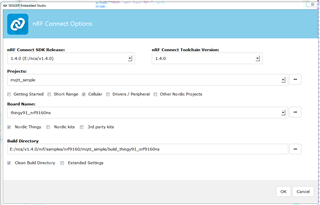
    Project settings for Thingy91, as an example:

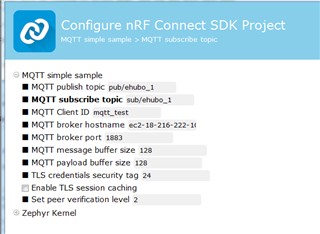
    I configured publish/subscribe topic,mqtt client id and broker to point at our AWS instance.

    The AWS instance is running Mosquitto MQTT broker. I launched a mosquitto_sub client which is subscribed to the unit's topic and prints the messages that it receives to a log file.

    mosquitto_sub -h localhost -t "pub/test" -v | while IFS= read -r line; do printf '%s %s\n' "$(date)" "$line"; done >> pub_mqtt.log


    Additionally, mosquitto_pub is set to publish a single message to the unit every hour.

    #!/bin/bash
    exec 3>&1 4>&2
    trap 'exec 2>&4 1>&3' 0 1 2 3
    exec 1>log_mqtt.out 2>&1
    
    while true;
    do
            NOW=$(date +"%m-%d-%Y %H:%M:%S")
            echo "Current date: $NOW"
            mosquitto_pub -h localhost -t "sub/test" -m "abc"
            sleep 3600
    done
    

    In my most recent test, the pub_mqtt.log shows that the unit stops posting after 23 hours.

    Sat Nov 14 22:36:43 UTC 2020 pub/test abc
    Sat Nov 14 23:36:44 UTC 2020 pub/test abc
    Sun Nov 15 00:36:44 UTC 2020 pub/test abc
    Sun Nov 15 01:36:44 UTC 2020 pub/test abc
    Sun Nov 15 02:36:43 UTC 2020 pub/test abc
    Sun Nov 15 03:36:44 UTC 2020 pub/test abc
    Sun Nov 15 04:36:43 UTC 2020 pub/test abc
    Sun Nov 15 05:36:45 UTC 2020 pub/test abc
    Sun Nov 15 06:36:43 UTC 2020 pub/test abc
    Sun Nov 15 07:36:44 UTC 2020 pub/test abc
    Sun Nov 15 08:36:43 UTC 2020 pub/test abc
    Sun Nov 15 09:36:44 UTC 2020 pub/test abc
    Sun Nov 15 10:36:43 UTC 2020 pub/test abc
    Sun Nov 15 11:36:44 UTC 2020 pub/test abc
    Sun Nov 15 12:36:43 UTC 2020 pub/test abc
    Sun Nov 15 13:36:44 UTC 2020 pub/test abc
    Sun Nov 15 14:36:43 UTC 2020 pub/test abc
    Sun Nov 15 15:36:44 UTC 2020 pub/test abc
    Sun Nov 15 16:36:43 UTC 2020 pub/test abc
    Sun Nov 15 17:36:44 UTC 2020 pub/test abc
    Sun Nov 15 18:36:46 UTC 2020 pub/test abc
    Sun Nov 15 19:36:45 UTC 2020 pub/test abc
    Sun Nov 15 20:36:45 UTC 2020 pub/test abc
    Sun Nov 15 21:36:45 UTC 2020 pub/test abc

    All of my other tests looked very similar. When the unit froze, I attempted to manually publish a single message in the terminal via mosquitto_pub with no response. However, after I switched the Thingy91 on/off it resumed posting.

    So the setup above is fairly simple and easy to recreate.

    Do you have any logs you can share? Can you produce some?

    Could you take a modem trace, so we can see what happens on the modem side?

    I have not yet taken a modem trace but will do so if need be. For the most part, everything is set to default as far as testing goes. I am connected to the Thingy91 via an external debugger (nrf9160DK) which does not allow me to run LTE Link Monitor to monitor the status of the Thingy. I will therefore monitor the status of the nrf9160DK running the firmware as opposed to the Thingy overnight.  

    Is all the communication going from the device to the cloud? Or do you send data both ways?

    Default mqtt_simple firmware which echos message sent.

    What QoS level are you using?

    The default which is QoS 0. 

    What SIM card are you using, and what network are you connected to?

    iBasis SIM cards that came with the Thingy91 and DK. The unit currently is connected to Verizon Wireless but also will connect to AT&T Mobility.

    Are you using eDRX and/or PSM? Are you doing anything else to save power?

    Whatever the default settings are in mqtt_simple firmware.

    How is your logic for sending the data? Could you share some code of the modifications you have done to the sample?

    No changes, logic for sending/receiving data listed above.

    UPDATE:

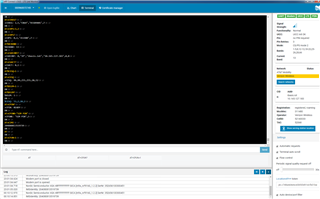
    Running mqtt_simple on the nRF9160 DK with LTE Link Monitor running in the background yielded this error:

    2020-11-16T06:03:59.412Z DEBUG modem << Received: abc
    2020-11-16T06:03:59.415Z DEBUG modem << Publishing: abc
    2020-11-16T06:03:59.418Z DEBUG modem << to topic: pubs/ehubo_1 len: 12
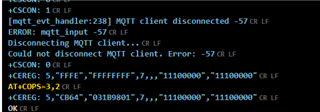
    2020-11-16T06:03:59.466Z DEBUG modem << [mqtt_evt_handler:238] MQTT client disconnected -57
    2020-11-16T06:03:59.468Z DEBUG modem << ERROR: mqtt_live -57
    2020-11-16T06:03:59.469Z DEBUG modem << Disconnecting MQTT client...
    2020-11-16T06:03:59.470Z DEBUG modem << Could not disconnect MQTT client. Error: -57
    2020-11-16T06:04:06.106Z DEBUG modem << +CSCON: 0

    Could this be the problem? The unit is still connected to LTE and the AT commands returned good results as seen in the logs.

    2020-11-16T04_58_17.025Z-log.txt

    I am using modem firmware mfwnrf9160122.zip for the DK.

    Thank you for your support.

    Robert

  • UPDATE:

    Another over night test with LTE Link Monitor running yielded a MQTT client disconnected error.

    Assuming this is the issue, what is the best way to counteract disconnects automatically?


Reply Children
No Data
Related