Dear sir ,
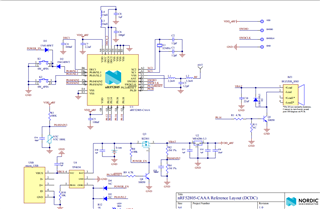
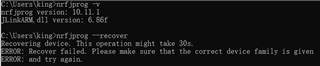
Get the customer's board, I can find the device at the nRF Connect for the first time, then program hex, but fail, and then I can't find the device again. I try two customer's board,but the same problem was happened. and The same operation is OK on the nRF52 DK.
nRF5_SDK_17.0.2_d674dde
s112_nrf52_7.2.0_softdevice.hex
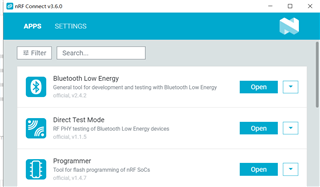
nRF Connect 3.6.0
nRF-Command-Line-Tools_10_11_1_Installer.exe
log:
2020-11-14T01:15:57.487Z INFO Segger version: J-Link V9 compiled Dec 13 2019 11:14:50
2020-11-14T01:15:57.494Z INFO Core probed: 69611139.
2020-11-14T01:15:57.494Z INFO Core RAM: 24KiB.
2020-11-14T01:15:57.494Z INFO Core ROM: 192KiB in pages of 4KiB.
2020-11-14T01:15:57.654Z INFO Model: NRF52805_xxAA_REV1.
2020-11-14T01:15:58.404Z INFO Core0: Reading device non-volatile memory. This may take a few seconds.
2020-11-14T01:15:58.458Z INFO Core0: UICR has been read. Click read button to read full non-volatile memory.
2020-11-14T01:15:58.630Z INFO SoftDevice detected, id 0x103 (S112 v7.2.0)
2020-11-14T01:15:58.658Z INFO Writing procedure starts for core0
2020-11-14T01:16:07.316Z ERROR HighLevel_probe_init
2020-11-14T01:16:07.317Z ERROR . HighLevel_get_connected_probes
2020-11-14T01:16:07.317Z ERROR . . nRFXX_enum_emu_snr
2020-11-14T01:16:07.318Z ERROR . . . Segger_enum_emu_snr
2020-11-14T01:16:07.318Z ERROR . . . . Segger_enum_emu_snr
2020-11-14T01:16:07.318Z ERROR . . . . . Segger_get_num_emus
2020-11-14T01:16:07.318Z ERROR HighLevel_probe_init: jlink_path parameter is NULL, using default JLINKARM DLL path given with or obtained in NRFJPROG_dll_open() function.
2020-11-14T01:16:07.319Z ERROR
2020-11-14T01:16:07.319Z ERROR HighLevel_probe_init: Using JLINKARM DLL at "C:\\Program Files (x86)\\SEGGER\\JLink\\JLinkARM.dll".
2020-11-14T01:16:07.319Z ERROR
2020-11-14T01:16:07.319Z ERROR HighLevel_probe_init: Creating new probe
2020-11-14T01:16:07.320Z ERROR
2020-11-14T01:16:07.320Z ERROR Debug_Probe-69611139_logger_open
2020-11-14T01:16:07.320Z ERROR Debug_Probe-69611139_logger_open: nRFJProg logger opened to callback at address 0X5E7E2080
2020-11-14T01:16:07.320Z ERROR HighLevel_probe_init: Initialize new probe.
2020-11-14T01:16:07.321Z ERROR
2020-11-14T01:16:07.321Z ERROR Debug_Probe-69611139_initialize
2020-11-14T01:16:07.321Z ERROR . Debug_Probe-69611139_base_debug_probe_initialize
2020-11-14T01:16:07.321Z ERROR . Debug_Probe-69611139_base_debug_probe_initialize: Copying Segger dll to temporary folder to allow a new probe connection.
2020-11-14T01:16:07.321Z ERROR
2020-11-14T01:16:07.322Z ERROR . Debug_Probe-69611139_base_debug_probe_initialize: Copy "C:\\Program Files (x86)\\SEGGER\\JLink\\JLinkARM.dll"->"C:\\Users\\king\\AppData\\Local\\Temp\\nrfjprogdll\\highlevel\\debug\\69611139\\jlinkarm\\s3lk.1j"
2020-11-14T01:16:07.322Z ERROR
2020-11-14T01:16:07.322Z ERROR . Debug_Probe-69611139_base_debug_probe_initialize: Using Segger dll at "C:\\Users\\king\\AppData\\Local\\Temp\\nrfjprogdll\\highlevel\\debug\\69611139\\jlinkarm\\s3lk.1j".
2020-11-14T01:16:07.322Z ERROR
2020-11-14T01:16:07.323Z ERROR . Debug_Probe-69611139_base_debug_probe_initialize: Copied from "C:\\Program Files (x86)\\SEGGER\\JLink\\JLinkARM.dll".
2020-11-14T01:16:07.323Z ERROR
2020-11-14T01:16:07.323Z ERROR . Debug_Probe-69611139_base_debug_probe_initialize: Copy "C:\\Users\\king\\AppData\\Local\\Programs\\nrfconnect\\resources\\app.asar.unpacked\\node_modules\\pc-nrfjprog-js\\build\\Release\\jlinkarm_unknown_nrfjprog.dll"->"C:\\Users\\king\\AppData\\Local\\Temp\\nrfjprogdll\\highlevel\\debug\\69611139\\s3lk.1k"
2020-11-14T01:16:07.323Z ERROR
2020-11-14T01:16:07.323Z ERROR . Debug_Probe-69611139_base_debug_probe_initialize: Load library at "C:\\Users\\king\\AppData\\Local\\Temp\\nrfjprogdll\\highlevel\\debug\\69611139\\s3lk.1k".
2020-11-14T01:16:07.324Z ERROR
2020-11-14T01:16:07.324Z ERROR . Debug_Probe-69611139_base_debug_probe_initialize: Read the device's family.
2020-11-14T01:16:07.324Z ERROR
......
2020-11-14T04:05:08.642Z INFO Application data folder: C:\Users\king\AppData\Roaming\nrfconnect\pc-nrfconnect-programmer
2020-11-14T04:05:08.867Z DEBUG App pc-nrfconnect-programmer v1.4.7 official
2020-11-14T04:05:08.868Z DEBUG App path: C:\Users\king\.nrfconnect-apps\node_modules\pc-nrfconnect-programmer
2020-11-14T04:05:08.868Z DEBUG nRFConnect 3.6.0 is supported by the app (^3.6.0)
2020-11-14T04:05:08.868Z DEBUG nRFConnect path: C:\Users\king\AppData\Local\Programs\nrfconnect\resources\app.asar
2020-11-14T04:05:08.868Z DEBUG HomeDir: C:\Users\king
2020-11-14T04:05:08.868Z DEBUG TmpDir: C:\Users\king\AppData\Local\Temp
2020-11-14T04:05:08.908Z INFO Using nrfjprog library 10.9.0, pc-nrfjprog-js 1.7.3
2020-11-14T04:05:21.162Z INFO Using nrfjprog to communicate with target
2020-11-14T04:05:22.246Z ERROR Could not fetch memory size of target devkit: Error: Error occured when get library info. Errorcode: CouldNotOpenDevice (0x4)
Lowlevel error: CANNOT_CONNECT (fffffff5)