

Hello,
I am using the ble_app_beacon example on a nRF52840 dongle.
Without changing the code I am able to load and use it on my dongle.
Now, I am trying to add some info to the beacon just to make some tests and in particular I am tring to give it a name like "TEST".
In order to do this, I defined it at the beginning of the main.c file with the other informations:
#define APP_DEVICE_NAME                 "TEST"

#define APP_BLE_CONN_CFG_TAG            1
#define NON_CONNECTABLE_ADV_INTERVAL    MSEC_TO_UNITS(100, UNIT_0_625_MS)  /**< The advertising interval for non-connectable advertisement (100 ms). This value can vary between 100ms to 10.24s). */

#define APP_BEACON_INFO_LENGTH          0x17                               /**< Total length of information advertised by the Beacon. */
#define APP_ADV_DATA_LENGTH             0x15                               /**< Length of manufacturer specific data in the advertisement. */
#define APP_DEVICE_TYPE                 0x02                               /**< 0x02 refers to Beacon. */
#define APP_MEASURED_RSSI               0xC3                               /**< The Beacon's measured RSSI at 1 meter distance in dBm. */
#define APP_COMPANY_IDENTIFIER          0x0059                             /**< Company identifier for Nordic Semiconductor ASA. as per www.bluetooth.org. */
#define APP_MAJOR_VALUE                 0x01, 0x02                         /**< Major value used to identify Beacons. */
#define APP_MINOR_VALUE                 0x03, 0x04                         /**< Minor value used to identify Beacons. */
#define APP_BEACON_UUID                 0x01, 0x12, 0x23, 0x34, \
                                        0x45, 0x56, 0x67, 0x78, \
                                        0x89, 0x9a, 0xab, 0xbc, \
                                        0xcd, 0xde, 0xef, 0xf0            /**< Proprietary UUID for Beacon. */
Then, I added it to the m_beacon_info function:
static uint8_t m_beacon_info[APP_BEACON_INFO_LENGTH] =                    /**< Information advertised by the Beacon. */
{
    APP_DEVICE_NAME,     // Name of the device
    APP_DEVICE_TYPE,     // Manufacturer specific information. Specifies the device type in this
                         // implementation.
    APP_ADV_DATA_LENGTH, // Manufacturer specific information. Specifies the length of the
                         // manufacturer specific data in this implementation.
    APP_BEACON_UUID,     // 128 bit UUID value.
    APP_MAJOR_VALUE,     // Major arbitrary value that can be used to distinguish between Beacons.
    APP_MINOR_VALUE,     // Minor arbitrary value that can be used to distinguish between Beacons.
    APP_MEASURED_RSSI    // Manufacturer specific information. The Beacon's measured TX power in
                         // this implementation.
};
By doing this, I get the following error at the beginning of the file, where I defined all the variables:
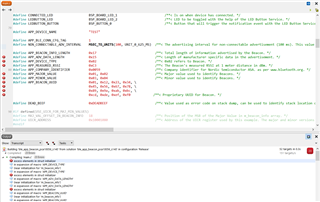
How can I solve this in order to display the beacon name or customize the displayed information?
I already tried to change APP_BEACON_INFO_LENGTH but it didn't work.
Thanks for the help.

