This post is older than 2 years and might not be relevant anymore
More Info: Consider searching for newer posts

nRF-9160-DK - LED 3 Blinking

After flashing the nRF-9160-DK with the required firmware ( as instructed in this video https://www.youtube.com/watch?v=rMvW3HXLErk&feature=youtu.be), the LED 3 is flashing. Does that mean that all the firmware is correctly loaded?

Parents
  • Hi,

    I assume the project on your nRF9160 DK is the Asset Tracker application. If so, LED 3 blinking indicates that the device is connecting to the LTE network. When LED 3 stays on, the connection is established. You can see what the different LEDs indicate in the Asset Tracker application here.

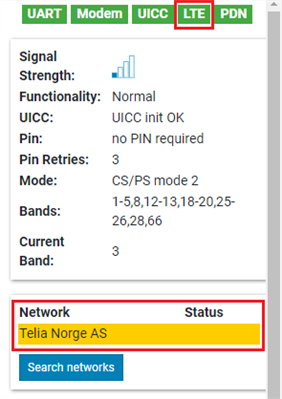
    You can also check LTE connection using the LTE Link Monitor in nRF Connect for Desktop, by looking at the LTE tab on the right. If it's green, then the device is connected to the LTE Network. You can also see which Network you're connected to further down.

    Best regards,

    Marte

Reply
  • Hi,

    I assume the project on your nRF9160 DK is the Asset Tracker application. If so, LED 3 blinking indicates that the device is connecting to the LTE network. When LED 3 stays on, the connection is established. You can see what the different LEDs indicate in the Asset Tracker application here.

    You can also check LTE connection using the LTE Link Monitor in nRF Connect for Desktop, by looking at the LTE tab on the right. If it's green, then the device is connected to the LTE Network. You can also see which Network you're connected to further down.

    Best regards,

    Marte

Children
No Data
Related