This post is older than 2 years and might not be relevant anymore
More Info: Consider searching for newer posts

MCU hanging due to Segger RTT log

I am using NRF52840 custom board and SEGGER RTT log for debugging.

I set the NRF_LOG_BACKEND_RTT_ENABLED 1 and NRF_LOG_ENABLED 1 

The following is a screenshot of my settings
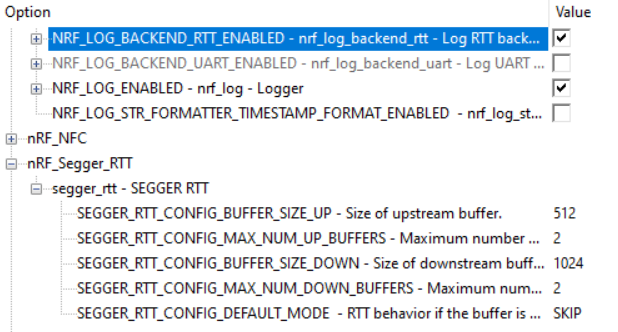
I am able to have my debug log printing on RTT viewer. However, if I disconnect my device to J-Link debugger, the mcu keeps running for around 10 seconds and then stops.

Coincidentally, I found two ways seemed to resolve this issue.

1. decrease SEGGER_RTT_CONFIG_BUFFER_SIZE_DOWN to 16 

2. set NRF_LOG_BACKEND_RTT_ENABLED and NRF_LOG_ENABLED to 0

I have no idea what the correct setting should be.

Any help is appreciated.

Thank you!

Parents
  • Hi

    if I disconnect my device to J-Link debugger, the mcu keeps running for around 10 seconds and then stops.

     It is the nRF52840 you are referring to that keeps running, correct?

    I think the correct workaround would be to decrease the SEGGER_RTT_CONFIG_BUFFER_SIZE_DOWN (to 16) as this is what is used in most of our example projects. It might be that the MCU needs some time to go through the entirety buffer when this parameter is set too high.

    If you set the NRF_LOG_ENABLED to 0 are you able to see any log messages at all?

    Best regards,

    Simon

Reply
  • Hi

    if I disconnect my device to J-Link debugger, the mcu keeps running for around 10 seconds and then stops.

     It is the nRF52840 you are referring to that keeps running, correct?

    I think the correct workaround would be to decrease the SEGGER_RTT_CONFIG_BUFFER_SIZE_DOWN (to 16) as this is what is used in most of our example projects. It might be that the MCU needs some time to go through the entirety buffer when this parameter is set too high.

    If you set the NRF_LOG_ENABLED to 0 are you able to see any log messages at all?

    Best regards,

    Simon

Children
No Data
Related