Beware that this post is related to an SDK in maintenance mode
More Info: Consider nRF Connect SDK for new designs
This post is older than 2 years and might not be relevant anymore
More Info: Consider searching for newer posts

nRF52840 UART DFU fault

Hi,

We are attempting to update the nRF52840 on our Thingy91 over the UART connection from the 9160. All development on the nRF52 is done in the nRF5 SDK 17.0.2. I have flashed the secure uart debug bootloader. I can enter it from the application, and I believe successfully send the init packet. I follow the example provided here for the DFUMaster_UART on the 9160 side. Currently, I generate the firmware update packages with nrfutil (debug mode) and put the data into a .h file on the 9160. I have tested this method successfully with the BLE debug bootloader from my phone and it works. However, when trying to send the application image over UART I get:
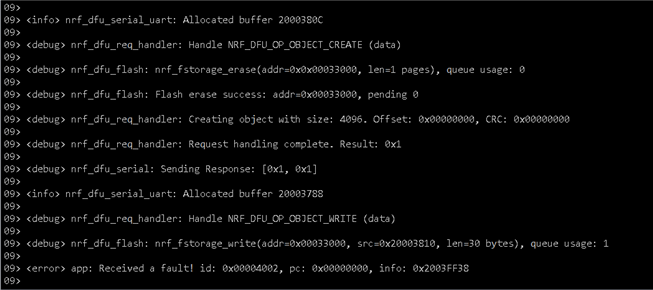
This is directly after the successful init packet execution. Please let me know how I can find out more about what could be causing this fault, thanks!

Parents
  • Hello, 

    A fault ID of 0x4002 matches "NRF_FAULT_ID_SDK_ASSERT" (An error stemming from a call to ASSERT (nrf_assert.h). The info parameter is a pointer to an @ref assert_info_t variable.)

    Can you please add the DEBUG define to the preprocessor. This would give more information about the error printed in the output log. E.g. if GCC is used, update the Makefile: CFLAGS += -DDEBUG

    ​With the DEBUG define set, the output log should specify which line in which file that triggered this assert. 
    Kind regards,
    Øyvind
  • Hello Øyvind,

    Thank you for your response. I have tried adding the DEBUG define to the preprocessor definitions in Segger, however, the log does not display any additional information. Could there be any other settings, maybe in sdk_config that I need to change to see the assert information? I have not changed anything about the UART debug bootloader other than allowing it to enter from the application (using GPREGRET).

    Thanks,

    Corey

  • In sdk_config.h you should be able to enable log output by configuring the following:

    // <e> NRF_LOG_BACKEND_UART_ENABLED - nrf_log_backend_uart - Log UART backend
    //==========================================================
    #ifndef NRF_LOG_BACKEND_UART_ENABLED
    #define NRF_LOG_BACKEND_UART_ENABLED 1
    #endif
    
    // <e> NRF_LOG_ENABLED - nrf_log - Logger
    //==========================================================
    #ifndef NRF_LOG_ENABLED
    #define NRF_LOG_ENABLED 1
    #endif
    
    // <o> NRF_LOG_DEFAULT_LEVEL  - Default Severity level
     
    // <0=> Off 
    // <1=> Error 
    // <2=> Warning 
    // <3=> Info 
    // <4=> Debug 
    
    #ifndef NRF_LOG_DEFAULT_LEVEL
    #define NRF_LOG_DEFAULT_LEVEL 4
    #endif

    I have not used the nRF5 SDK in a while, so have not confirmed this functionality. 

    Let me know how this works for you. 

    -Øyvind

Reply
  • In sdk_config.h you should be able to enable log output by configuring the following:

    // <e> NRF_LOG_BACKEND_UART_ENABLED - nrf_log_backend_uart - Log UART backend
    //==========================================================
    #ifndef NRF_LOG_BACKEND_UART_ENABLED
    #define NRF_LOG_BACKEND_UART_ENABLED 1
    #endif
    
    // <e> NRF_LOG_ENABLED - nrf_log - Logger
    //==========================================================
    #ifndef NRF_LOG_ENABLED
    #define NRF_LOG_ENABLED 1
    #endif
    
    // <o> NRF_LOG_DEFAULT_LEVEL  - Default Severity level
     
    // <0=> Off 
    // <1=> Error 
    // <2=> Warning 
    // <3=> Info 
    // <4=> Debug 
    
    #ifndef NRF_LOG_DEFAULT_LEVEL
    #define NRF_LOG_DEFAULT_LEVEL 4
    #endif

    I have not used the nRF5 SDK in a while, so have not confirmed this functionality. 

    Let me know how this works for you. 

    -Øyvind

Children
No Data
Related