This post is older than 2 years and might not be relevant anymore
More Info: Consider searching for newer posts

nRF Modem stuck when FOTA update fails

Currently working on an IOT solution based on the nrf 9160 SIP that supports both firmware and modem firmware updates in combination with Zephyr and the nrf SDK. During the development process, I came across the following issues and have no clue how to solve them without rebooting the device which would be a not wanted solution.

My system runs on
NRF 9160
Zephyr 2.3
NRF SDK 1.3.2
sdk-nrfxlib 1.3.1

The first problem that when I try to push the modem firmware to the device with a version match (device version 1.2.2, update version 1.2.2) the chip rejects the update but the modem will get stuck in the following state after a DFU socket has been created and the firmware version has been checked.

The error message states: "E: send failed, modem errno 8, dfu err -11" followed with an info message that states the following "I: Deleting firmware image, this can take several minutes". This is where the problem starts. The modem will sometimes get stuck in this state and based on observations with multiple devices won't be several minutes but indefinitely(one has been stuck in the state for 24+ hours). An image of the output for reference.
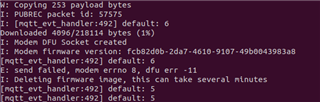
The second problem that occurs is when the update fails and the modem doesn't get stuck, when I then try to update for example the firmware of my device the modem will reject the FOTA call from the nrfSDK and won't start the procedure. This has to do with DFU errors.

Parents
  • Hello,

    The first problem that when I try to push the modem firmware to the device with a version match (device version 1.2.2, update version 1.2.2) the chip rejects the update but the modem will get stuck in the following state after a DFU socket has been created and the firmware version has been checked.

     Does the problem happen also when you update to a newer version of the modem firmware? I know that it isn't possible to update to a previous version, not sure about updating to the same version (and I have no idea why you would want to do that anyway).

  • No this does not happen when I upload a newer version.

    Why I would be updating the same version is because I had an early release version and tried to push the official release version. This version had the same version number and bugged out I would like to not have this issue if a similar situation occurs in the future.

    The second reason that I'm searching for solutions for problems like this is to cover all bases in regards to stability issues especially in regards to end-users, accidents, server faults and to make sure it won't happen if the problem is forgotten about when time passes.   

  • Ok, I will report this to the modem team to see if they know something about this.

  • Here is their advice;

    "For the customer I would recommend  to run something along the line of
    `dfu_target_init(MCUBOOT_IMG_TYPE)`
    `dfu_target_close(false)`

    Before the device connects to the network or shutdown the link and do those commands so that he can ensure that device is not busy with a network link before starting trying to delete as this is identified as the causes this error condition. It's a bit weird that it doesn't time out, but I think this keep checking the modem for replies and if it doesn't receive it. It will time out. The customer could also add their own hard time out to dfu_target_modem. This would allow them to have an escape hatch."

Reply
  • Here is their advice;

    "For the customer I would recommend  to run something along the line of
    `dfu_target_init(MCUBOOT_IMG_TYPE)`
    `dfu_target_close(false)`

    Before the device connects to the network or shutdown the link and do those commands so that he can ensure that device is not busy with a network link before starting trying to delete as this is identified as the causes this error condition. It's a bit weird that it doesn't time out, but I think this keep checking the modem for replies and if it doesn't receive it. It will time out. The customer could also add their own hard time out to dfu_target_modem. This would allow them to have an escape hatch."

Children
Related