This post is older than 2 years and might not be relevant anymore
More Info: Consider searching for newer posts

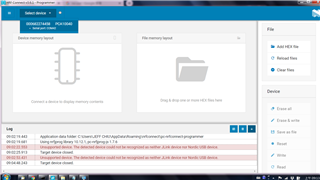
Unsupported device. The detected device could not be recognized as neither JLink device nor Nordic USB device.

Hi

After nRF Connect for desktop was upgraded to v3.6.1, programmer application cannot recognize all DK boards, including PCA10040/PCA10056/PCA10090.

It showed the error message as title. What caused this error? And, how to fix it?

The OS of my notebook is Windows 7 professional edition. 

Before v3.6.1, programmer can work normally. It can read, erase and write hex files.

I don't know what happened.

Thanks.
Parents
  • Hi, Jeffery!

    Could you open the terminal and try to run the command "nrfjprog --recover" for the boards and then try again? You may have to install the nRF Command Line Tools first.
    Please report the results back to me!

    Best regards,
    Carl Richard

  • Hi Richard

    1. I did try installing nRF Command line(10.12.1 x64) before or after sk connect v3.6.1. Unfortunately, it's no use.

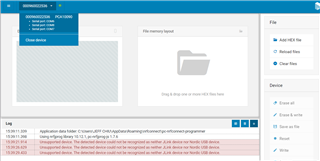
    2. Also, run "nrfjprog --recover" and then did programmer again. It's same. Unsupported device. as below.

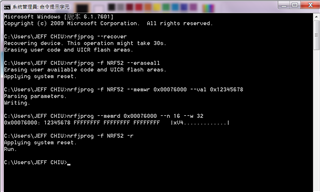
    3. I found "nrfjprog" can perform reading, writing and erasing well in DOS terminal as below although sdk connect v3.6.1

        programmer cannot recognize the devices.

    4. My computer is WIN7 professional. My colleagues' computer are WIN10. They used sdk connect v3.6.1 programmer

        fine. Would you verify WIN7 before release v3.6.1?

    5. At sdk connect v3.6.0 and below, everything has been good.  Did others realize this issue?


Reply
  • Hi Richard

    1. I did try installing nRF Command line(10.12.1 x64) before or after sk connect v3.6.1. Unfortunately, it's no use.

    2. Also, run "nrfjprog --recover" and then did programmer again. It's same. Unsupported device. as below.

    3. I found "nrfjprog" can perform reading, writing and erasing well in DOS terminal as below although sdk connect v3.6.1

        programmer cannot recognize the devices.

    4. My computer is WIN7 professional. My colleagues' computer are WIN10. They used sdk connect v3.6.1 programmer

        fine. Would you verify WIN7 before release v3.6.1?

    5. At sdk connect v3.6.0 and below, everything has been good.  Did others realize this issue?


Children
Related