This post is older than 2 years and might not be relevant anymore
More Info: Consider searching for newer posts

Slow DFU using nrfutil

Hi,

I am preparing Windows desktop application which will use nrfutil for DFU of the products (containing secure dfu bootloader). I tested nrfutil v6.1.0, v6.0.1 and even very old v3.2.0 and in all cases update takes very long time - 100 kB firmware is updated in more than 10 minutes. If I do it via nRF Connect app on iPhone or Android, it tooks literally tens of seconds. I tried also nRF Connect for Windows and the situation is the same, also about 10 minutes. I tried it on nRF52832 DK, nRF52833 DK and nRF52840 DK, results are the same.

I tried to compile nrfutil from the sources with decreased conn interval in BLEGapConnParams (changed it to 7.5 both min and max) but it also didn't solve the problem.

Any ideas?

Parents
  • Hi,

    DFU with pc-nrfutil is known to be quite slow, but nRF connect on windows should be on par with nRF connect on Android and iOS, so that's more suprising. Which SDK is the bootloader on the target based on?

    Thanks,

    Vidar

  • Today I tried to downgrade to pc-ble-driver-py v0.14.1 and pc-nrfutil v6.0.1 and compile executable nrfutil. Behaviour is still the same, update still lasts 10 minutes. 

    Florian Zierer wrote here that in his case in v6.0.1 problem was solved, so I don't know, what could be wrong now..

  • Hello,

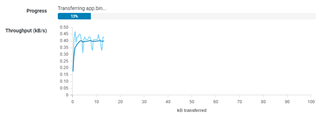
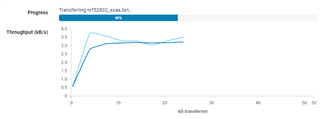
    Sorry for the delayed response. I've done some testing with SDK 12.3.0 now, and in my case, it took about three times longer to do DFU from nRF connect on desktop compared to when I tested DFU with nRF connect on iOS. The reason for this discrepancy is likely due to the fact that the pc apps can send fewer packets per connection event. But, the throughput on nRF connect for desktop averaged at around 0.4 KB/s, so for me it would "only" take ~4 minutes to upload a 100k image. Do you see a lower transfer speed in nrf connect?

    nRF connect for desktop SDK 12.3.0

    nRF connect for desktop with SDK 17.0.2 for comparison ( supports long ATT MTU)

Reply
  • Hello,

    Sorry for the delayed response. I've done some testing with SDK 12.3.0 now, and in my case, it took about three times longer to do DFU from nRF connect on desktop compared to when I tested DFU with nRF connect on iOS. The reason for this discrepancy is likely due to the fact that the pc apps can send fewer packets per connection event. But, the throughput on nRF connect for desktop averaged at around 0.4 KB/s, so for me it would "only" take ~4 minutes to upload a 100k image. Do you see a lower transfer speed in nrf connect?

    nRF connect for desktop SDK 12.3.0

    nRF connect for desktop with SDK 17.0.2 for comparison ( supports long ATT MTU)

Children
  • Hello Vidar,

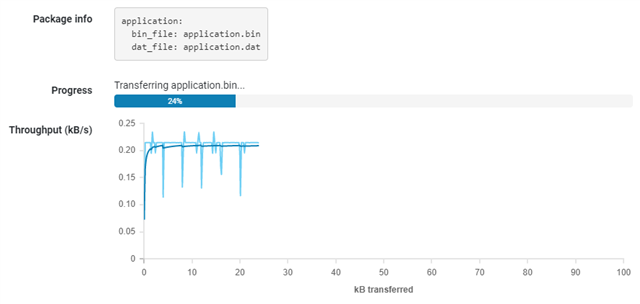
    thank you for testing. I just tested it with nRF Connect v3.6.1 and updated device running on SDK v12.0.0 based application and bootloader. And update speed is about 0.20 kB/s.

    As I said, using nRF Connect on iOS or some Android phone it is much faster (I would say maybe 10x faster, but I can measure it, if needed).

  • I've just tried update of the same file via nRF Connect on iOS and it took less then one minute to update. In the app I see that update is divided into 25 data objects and each object is transmitted every 2-3 seconds.

  • Yes, unfortunately, this seems to be as expected as nRF connect on desktop/nrfutil is not capable of sending as many BLE packets per connection event as iOS and Android is. I will report this internally and request that we try to remove this limitation.

Related