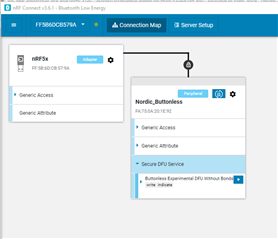
I Upgraded the software to V3.6.1. The button "Start DFU" is missing from the SFU mode screen. After choosing a Zip file there's nowhere to continue.
Had to downgrade the software back to 3.5.0
I Upgraded the software to V3.6.1. The button "Start DFU" is missing from the SFU mode screen. After choosing a Zip file there's nowhere to continue.
Had to downgrade the software back to 3.5.0
Hello,
Thanks for reporting. Is it version 3.6.1 of the nRF connect for desktop app? Also, what SDK version is the DFU target implementation based on?
Best regards,
Vidar
Hi Vidar,
Yes, I'm referring to the desktop app. The SDK version is 15.2.0
Thanks
Thanks for confirming. But was unable to replicate this here for some reason. I tested with the buttonless template example in SDK 15.2.0.

Do you remember if the Secure DFU service appeared in your case?
Hi,
Sorry for misleading you
but i meant that our APP SDK is 15.2.0
Our DFU is based on the 15.0.0 SDK
nRF5_SDK_15.0.0_a53641a\examples\dfu\secure_bootloader
No worries! but I wasn't able to replicate it with 15.0.0 bootloader either. Is the "Secure DFU Service" displayed when the DFU button is missing?