This post is older than 2 years and might not be relevant anymore
More Info: Consider searching for newer posts

How to use nRF51 DK buttons for my purposes only

All the SDK health device examples appear to have a rather complicated relation between the BSP buttons and the behavior of the device (advertising, connected, etc.) which means the BSP module must have intimate knowledge of these states somehow. Then it does all other kinds of things that I do not want it to do. In other words pressing button 1 does different things depending upon the state to the extent I get a BSP DISCONNECT EVENT!!!

All I want is to respond to a button press as I want to do it. I do NOT want the buttons to assume ahead of time that I am using button one to wake or sleep or disconnect if its a long push and I am connected, etc. I want a simple event that says I just pressed button one or button two etc. I have four buttons on my DK. What I do in response to those events is up to me. Being able to do that allows me to simulate what the actual device will do when I work with the real sensor on the production unit.

My guess is that I ditch the BSP button module and just use the app_button module, but it's probably not that simple. Any where I can get guidance?

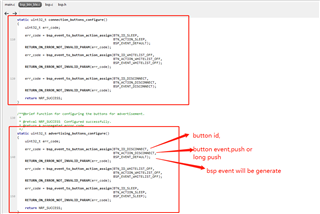
  • The key code is as below:

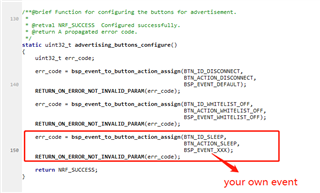
    here bind the button id's action and bsp event.

    `BTN_ID_SLEEP` is 0,means button1 on DK,`BTN_ACTION_SLEEP` is `BSP_BUTTON_ACTION_RELEASE`, so when 

    button1 is relased in adv statue, the BSP_EVENT_SLEEP will be generate.

    If you want to generate a event just as BSP_EVENT_XXX,you can change the code to 100

    make sure that you have add the BSP_EVT_XXX to bsp_event_t 。

    Then when you press the button1 and relase it , you will get a BSP_EVT_XXX on bsp_event_handle。

  • Hi

    The correct way to disable the BSP BLE Button Module should be to simple set BSP_BTN_BLE_ENABLED to 0 in you sdk_config.h file, and then you should be able to set the buttons to what you would like. What SDK version are you using?

    Best regards,

    Simon

  • For the moment I just used the debugger and trapped the event when I pressed the various buttons on the DK. I found that I could use the events for buttons 3 and 4 as they had simple identifiers. I can use those and do what I need to do. In the end none of this code will be of use in the production device - this is just for testing. So the less work I do here the happier I am.

    I will just need to catch button event BSP_EVENT_KEY_2

Related