This post is older than 2 years and might not be relevant anymore
More Info: Consider searching for newer posts

Difference between DFU and Segger Studio Build and Run/Debug

Hello,


I have a custom nrf52832 board with a SparkFun HX711 load cell.

I've developed my firmware using Segger Studio testing my data through a BLE connection with the option Build and Debug or Run. Let's call writing the firmware using Segger's Studio "Build and Run" functionality "method A".

Using method A I'm seeing my data correctly displayed.

Now I want to be able to update my firmware using buttonless DFU. So I followed Nordic's tutorial, avaiable here: Nordic's Secure DFU bootloader guide. Let's call writing the firmware via buttonless DFU "method B".

I managed to update the firmware via DFU correctly. But when sending data after using method B, I see the data I'm receiving is wrong. It's like I'm missing packets.

There's no difference between the code of the firmware between method A and B.

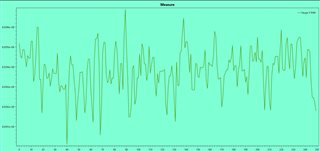
I'm going to attach an image for method A and B after what I see when the load cell is resting at a 100Hz rate.

Data displayed using method A:


Data displayed using method B:
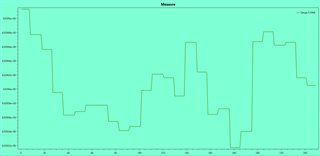


Does this makes any sense? I do believe both method A and B outcome should be the same.


Thanks.

Parents
  • So have you tried debugging the B  version to see what's going on?

    Looks like it might be running at different (slower) speed?

    Starting from a bootloader isn't a "cold start" - you have to take account of what state the bootloader has left things in ...

  • Hello Awneil, Thanks for the fast reply.

    I'm going to try to print some timestamps when the load cell is reading the data to check if the issue is here.

    Now I'm receiving the number of packets I'm expecting, it's just like the data doesn't update as fast as it did before.

    I don't understand your last sentence. What do you mean by cold start and the state of the bootloader?

    I mean I update the firmware correctly. I can reset the device as many times as I want that the result is always the same.

Reply
  • Hello Awneil, Thanks for the fast reply.

    I'm going to try to print some timestamps when the load cell is reading the data to check if the issue is here.

    Now I'm receiving the number of packets I'm expecting, it's just like the data doesn't update as fast as it did before.

    I don't understand your last sentence. What do you mean by cold start and the state of the bootloader?

    I mean I update the firmware correctly. I can reset the device as many times as I want that the result is always the same.

Children
  • Hello,

    I agree with Awneil. You should try to debug your B version. Your application samples some data and sends it over BLE, I assume. Based on your figures, it looks like B has less samples than A (Less frequently sampled). So you need to debug to check whether:

    1: B doesn't sample as often as A.

    2: B samples as often as A, but is not able to send all the data through BLE. Hint: Check the return value of the function that is sending data, probably sd_ble_gatts_hvx().

    To debug in SES while you have the bootloader programmed, make sure that B is flashed either by performing the DFU, or by flashing directly in addition to generating and flashing bootloader settings (using nrfutil). Then press "Target" -> "Attach Debugger".

    If you hit build and run, then Segger will flash the application, and the bootloader will reject the application, because no bootloader settings are matching the application.

    Best regards,

    Edvin

  • What do you mean by cold start

    Starting immediately after a power-up or System Reset - when all the chips systems, registers, and peripherals will be in the defined initial states.

    With a bootloader, it's that bootloader that runs immediately after a reset or power-up; not your code - your code doesn't get to start until after the bootloader has run.

    Therefore the bootloader may have changed some stuff from its reset defaults. If your code is relying upon the reset defaults, it won't behave as expected...

Related