This post is older than 2 years and might not be relevant anymore
More Info: Consider searching for newer posts

SEGGER v5.30a not showing preprocessor option

Hello,

I have imported a blinky project in SEGGER. I have added one user library to the project. Now I want to use this library in the main. c. 

But I am not able to include the library (or header file) in the main. c. While searching how to add, I have found some option in which they say 

  • In Project Explorer, right-click your project and select Edit Options.
  • In the Project Options window, select the Common configuration (sorted under Private Configurations).
  • Select Preprocessor

But In my SEGGER embedded studio, I am not seeing any option for the preprocessor. I am using SEGGER v5.30a
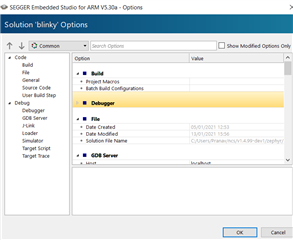
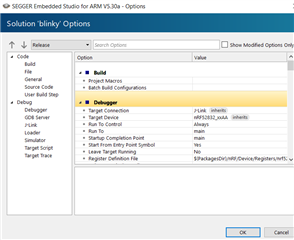
Any advice on how to do it?

Thanks in advance!

 Pranav Maturkar

Parents
  • Hi

    Okay, you're using the nRF Connect SDK, that makes sense. Sorry, I just assumed you were using the nRF5 SDK as that's the most common SDK for nRF52 development. 

    When using NCS, SES no longer will have the preprocessor definitions in the option tab, and you'll have to configure your project in the CMakeLists.txt and prj.conf files instead. In the Nordic SES version, you can also use the "Configure nRF Connect SDK Project" option in the SES "Project" tab.

    Best regards,

    Simon

Reply
  • Hi

    Okay, you're using the nRF Connect SDK, that makes sense. Sorry, I just assumed you were using the nRF5 SDK as that's the most common SDK for nRF52 development. 

    When using NCS, SES no longer will have the preprocessor definitions in the option tab, and you'll have to configure your project in the CMakeLists.txt and prj.conf files instead. In the Nordic SES version, you can also use the "Configure nRF Connect SDK Project" option in the SES "Project" tab.

    Best regards,

    Simon

Children
No Data
Related