This post is older than 2 years and might not be relevant anymore
More Info: Consider searching for newer posts

Secure Bootloader does not start application

Hello community!

I have curious problems with the bootloading process in SDK 17.0.2. What I am trying to do is the following:

1. Create a bootloader settings page with nrfutil 6.1.0:

nrfutil settings generate --family NRF52840 --application APP.hex --application-version 0 --bootloader-version 0 --bl-settings-version 2 BLS.hex

2. Merge the secure bootloader (UART DFU version), the settings page, the application (ble_app_blinky) and the softdevice (s140 version 7.2.0) together:

mergehex --merge BL.hex BLS.hex SD.hex --output BL_BLS_SD.hex
mergehex --merge BL_BLS_SD.hex APP.hex --output Production.hex

3. Erase flash and program the nrf52840 with the merged hex file:

nrfjprog --family nrf52 --recover
nrfjprog --reset --program Production.hex

4. Restart the board.

My expectation: After the restart, the application should start running.

What happens:  The bootloader gets stuck in DFU mode.

At the same time, I also check the memory layout with the desktop application nRF Connect - Programmer. It shows the following weird image:
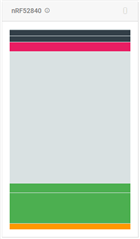
Flash programmed with merged hex files I read the following values when I hover over the different sections (from bottom to top):

1. Region name: MBR or Application / Address range: 0x00000000 - 0x00000AFF / Size: 2816 bytes

2. Region name: Application / Address range: 0x00000FF8 - 0x0002663F / Size: 153160 bytes

3. Region name: Application / Address range: 0x00027000 - 0x0002CB27 / Size: 23336 bytes

4. Region name: Bootloader / Address range: 0x000F8000 - 0x000FD83F / Size: 22592 bytes

5. Region name: MBR Parameters / Address range: 0x000FE000 - 0x000FE32F / Size: 816 bytes

6. Address range: 0x000FF000 - 0x000FF32F / Size: 816 bytes

Out of curiosity, I decide to test the DFU process to see what happens. I proceed to send the DFU zip file via UART:

nrfutil pkg generate --hw-version 52 --sd-req 0x0100 --application-version 0 --application APP.hex --key-file private_key.pem app_dfu_package.zip 
nrfutil dfu serial -pkg app_dfu_package.zip -p COM5 -b 115200

It works fine and the application starts running. But, when I check the memory layout again, this is the ugliness that greets me (bottom to top):

Flash after a DFU process1. Region name: MBR or Application / Address range: 0x00000000 - 0x00000AFF / Size: 2816 bytes

2. Region name: Application / Address range: 0x00000FF8 - 0x0002663F / Size: 153160 bytes

3. Region name: Application / Address range: 0x00027000 - 0x0002CB1F / Size: 23328 bytes

4. Region name: Application / Address range: 0x0002D000 - 0x00032B1F / Size: 23328 bytes

5. Region name: Bootloader / Address range: 0x000F8000 - 0x000FD83F / Size: 22592 bytes

6. Region name: MBR Parameters / Address range: 0x000FE000 - 0x000FE05B / Size: 92 bytes

7. Address range: 0x000FE25C - 0x000FE32F / Size: 212 bytes

8. Address range: 0x000FF000 - 0x000FF05B / Size: 92 bytes

9. Address range: 0x000FF25C - 0x000FF32F / Size: 212 bytes

I have to add to the story that I have successfully implemented a similar bootloading process before, but that time I was using SDK 15.0.0 (now 17.0.2), secure bootloader with BLE DFU (now UART DFU), and probably an older version of the nRF Command Line Tools.

Please help me find what the problem is!

  • Hello,

    It looks like you are correct. There is an issue with mergehex (probably introduced in version 10.12.x, where it sometimes generates invalid merged files. Until fixed, can you please try to remove nrfjprog  and mergehex, and use version 10.11.1 instead?

    mergehex is part of nRF Command line tools, and you can find and download the different versions here.

    Best regards,

    Edvin

  • Hi Edvin,

    Indeed, uninstalling version 10.12.1 of the nRF Command line tools and then installing 10.11.1 has partially solved the problem: nRF Connect -> Programmer does not complain anymore, and as soon as I program the merged hex file onto my device, the application starts running. Very nice!

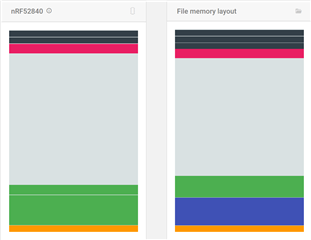
    But one problem still remains, which is that the way flash memory looks still resembles a horror movie. If you look at the picture below, on the right side you can see how the merged hex file (Production.hex) looks, according to the Programmer. The yellow, blue and green regions are correctly recognized as MBR, SoftDevice and Application. The red region is also correctly recognized as Bootloader region. However, there are three black lines instead of two: The first (from bottom) black section and the last are not recognized as any region. The middle one is an MBR Parameters region.

    On the left side, you can see that the SoftDevice region is not recognized anymore, but instead, Application region is written there. The green section above it is also an Application region. It is followed by a red Bootloader region, a black MBR Parameters region and, an unrecognized region.

    memory layout with version 10.11.1 of the nRF Command line tools

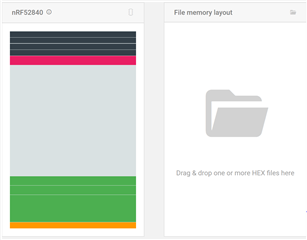
    When on top of this I do a UART DFU process, then the memory looks like this:

    Flash memory layout after UART DFU process

    Yellow: MBR Parameters;

    Three green regions, each of them Application regions;

    Red: Bootloader region;

    1st black: MBR Parameters

    2nd, 3rd and 4th black: not recognized.

  • Hello,

    Can you please provide a flash dump of the nRF when there are 3 or 4 black lines? I suspect that this is just the way that nRF Connect for Desktop -> Programmer interprets the flash, and it doesn't reflect the number of actual flash pages used by the nRF.

    Also attach a flash dump from when there are only two black lines.

    To capture a flash dump, you can use the command "nrfjprog --readcode my_flash_dump.hex".

    Best regards,

    Edvin

  • Hi,

    Here is a flash dump right after programming the Production.hex onto the device:

    Production_flash_dump.hex

    Here is a flash dump after performing a DFU update (the application hex is the same in both cases):

    After_DFU_flash_dump.hex

    Please note that the black lines are not the only thing that looks weird. I also find it weird that the application region takes up the SoftDevice region.

  • Lex said:
    I also find it weird that the application region takes up the SoftDevice region.

     It does not, it is just nRF Connect -> programmer that struggles to distinguish the application from the softdevice. You can check out the flash content from your hex files, and see that the softdevice region is equal between the two.

    The number of black lines near the top is also just nRF Connect that is trying to make sense of something it is not able to. There is nothing wrong in the flash of the nRF. The coloring and naming of the different regions in the flash is just a "nice to have" feature in nRF Connect for Desktop that is not working optimal. 

    As you see in the black lines on the top, there are some parts that have changed from 0xFF to 0x00, which is confusing nRF Connect, but this is just the way that the bootloader updates these settings. There is nothing wrong (as I can tell) in the flash here. It will not be filled/used up or anything. The bootloader will manage this for you.

    So as long as the bootloader and application is working, I wouldn't be concerned about any of this. 

    BR,

    Edvin

Related