Beware that this post is related to an SDK in maintenance mode
More Info: Consider nRF Connect SDK for new designs
This post is older than 2 years and might not be relevant anymore
More Info: Consider searching for newer posts

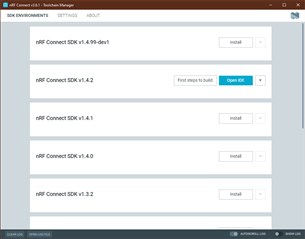
nRF Connect v3.6.1 Toolchain Manager will not allow me to add hardware

I browsed the Infocenter and found 'lots' of information and the instruction to install nRF Connect so I did. I hadn't decided which DK I needed to do what I wanted so when NCS asked I skipped the hardware. I now have NCS installed off the root of D:\ncs but when I tried to add the nRF52840-Dongle (I have that hardware) there doesn't appear be any instructions on adding hardware.  I installed nRF Connect SDK v1.142 which is the version that will work with Verizon firmware for the nRF9160 but where is the nRF52840 SDK? I downloaded the nRF52840 SDK but what do I do with it? How do I add Hardware?

More reading...

FYI: It appears I need the nRF9160-DK to work with the nRF9160 since there is no access to anything in the nRF9160 on the Thingy:91 so I ordered the nRF9160-DK

  • Hello,  

    I hadn't decided which DK I needed to do what I wanted so when NCS asked I skipped the hardware.

     Can you please share what guide you used to install nRF Connect SDK? I'm not sure I understand how you skipped the hardware, as this is always included in nRF Connect SDK


    I tried to add the nRF52840-Dongle (I have that hardware) there doesn't appear be any instructions on adding hardware.

    Have you seen the documentation for nRF Connect SDK? It includes several User Guides, including working with nRF52.


    I installed nRF Connect SDK v1.142 which is the version that will work with Verizon firmware for the nRF9160

     Yes, this is correct. nRF Connect SDK v1.4.2 and modem FW v1.1.4 is currently certified to use on the Verizon Network. 


    where is the nRF52840 SDK? I downloaded the nRF52840 SDK but what do I do with it?

     I'm not sure what you mean with nRF52840 SDK, do you mean the nRF5 SDK? There are currently two SDK that we support; nRF5 SDK, our stable SDK for nRF52 and nRF51 devices, and the nRF Connect SDK which is currently focused on nRF91-series and nRF53-series but does support nRF52 devices as well. Please see User Guide in the link above.


    It appears I need the nRF9160-DK to work with the nRF9160 since there is no access to anything in the nRF9160 on the Thingy:91 so I ordered the nRF9160-DK

     The nRF9160 Development Kit is designed to have access to most pins and ports, while the Thingy:91 Prototype platform is made to showcase the possibilities of the Thingy:91. Both are possible to use for testing and development, however, the Thingy:91 will not have access to pins and ports. Also, the Thingy:91 does not include a JLink device as the nRF9160DK does. Please see the user guides for nRF9160 DK and the Thingy:91. And for the Thingy:91 please read the documentation on how to program the device. 
    The nRF9160DK does also allow you to use it as a programmer with the onboard JLink device.


    Let me know if you anything is unclear. 

    Kind regards,
    Øyvind

  • No Device

    No Device

    SDK installed

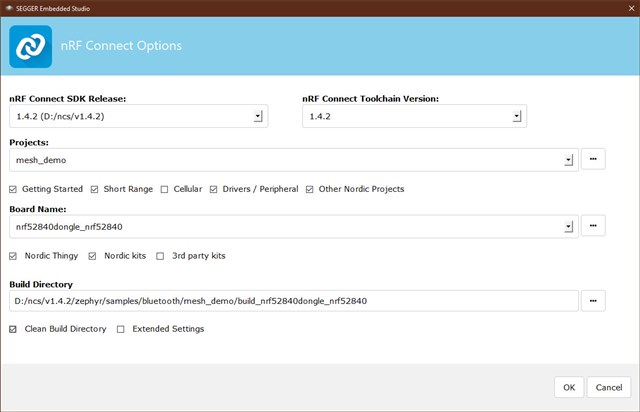
    Options in SES - Have to run SES !

    Options in SES

    After compiling several examples I wondered why I couldn't edit the *.c files, I clicked the No Editor ICON in the bottom right corner and my browser started downloading SES from the internet. I saved it but now what? Why did I apply for a license then have to download a new compiler?

  • I tried to edit my reply but couldn't

    The No Editor ICON in the bottom right of SES, when you mouse over and wait it pops up with text telling you there is an updated version of the compiler ...

  • I installed the SES  'Update' which turns out to be useless, all the Nordic 'stuff' is missing. So I uninstalled the 'Update' SES which turned out to be a full blown install on C:\Program Files.

  • Thank you for providing this information. 

    The Toolchain Manager provides a sandbox solution which is easy to install for customers. It includes everything you need to start with NCS, including Segger Embedded Studio - Nordic Edition 5.10d. No devices are selected by the Toolchain Manager app, this is correct as it installs the nRF Connect SDK for you which includes supported devices.

     Please note that when choosing a project within SES, you need to be aware of what sample you choose and what device is supported. There are samples in the Zephyr repository, and there are samples in the nRF repository. Please make sure to read the sample documentation. 

    Also, when working with the nRF52840 Dongle, please read its board documentation here

    KevinA said:
    After compiling several examples I wondered why I couldn't edit the *.c files,

     Can you please elaborate on what you mean with this? Are you not able to open the *.c files or do you get an error when editing?


    KevinA said:
    No Editor ICON in the bottom right corner and my browser started downloading SES from the internet.

     Please ignore this message. SES includes everything you need to start with, and no additional downloads are needed.

    Kind regards,
    Øyvind

Related