This post is older than 2 years and might not be relevant anymore
More Info: Consider searching for newer posts

Issue with adding LTE Device to Nrf Cloud

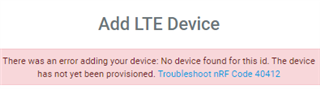
I'd added my nrf9160 to nrf cloud. For some reason I had to delete it, now when I try to connect it again it's giving me the following error.
Parents
  • Hi,

    You can find the error codes for nRF Cloud (nRF Codes) here. The error 40412 is that no device was found for this id. The device has not yet been provisioned. Reasons why you might get this error are:

    • You entered the device id and/or ownership code (PIN or HWID) incorrectly.
    • Before attempting association, you did not wait for the LEDs to indicate the device was provisioned.
    • Corrupt modem firmware.
    • Corrupt, wrongly flashed, or illegitimate device certificates.
    • Poor LTE connection

    If you entered the correct PIN and HWID, could you please do to the following:

    • Download and flash the latest modem firmware (v1.2.3).
    • If you have another sample or application than the asset tracker application on your board, please flash that application to your board.
    • Make sure you have an LTE connection. You can see this in the LTE Link Monitor application in nRF Connect for Desktop. In the upper right corner, the "LTE" indicator should be green.
    • Observe the LEDs on the board when you try to connect. LED 3 on indicates that the device is connected to the LTE network, while LED 3 and LED 4 blinking indicates that the device is connecting to nRF Cloud. You can find an overview of the application states indicated by the LEDs here.
    • If it still doesn't work, please try to flash new device certificates to your board. You can obtain them from the CreateDeviceCertificate endpoint.

    Best regards,

    Marte

Reply Children
Related