This post is older than 2 years and might not be relevant anymore
More Info: Consider searching for newer posts

When ble_nus_data_send does not work???

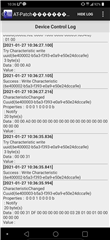
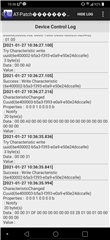
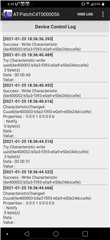
As below, BLE Data RX works fine, but TX doesn't.
When does this happen?

Currently BLE connect/disconnect and RX is working fine.
The power does not turn off due to this phenomenon.

Not all products exhibit the above symptoms. This was the first time this happened (1 sample).

After receiving, the green LED turns on/off and it is judged that the received data has been received well.

Also, when Rx Data is received, Rx Data is immediately returned (APP) to Tx.

Thank you.

* SDK15.2.0 , nRF52840

static void nus_data_handler (ble_nus_evt_t * p_evt)
{
    uint32_t err_code;
    if (p_evt-> type == BLE_NUS_EVT_RX_DATA)
    {
        if (p_evt-> params.rx_data.p_data [2] == BLE_FACTORY_START) / * * /
        {
            ble_test_mode = true;
            send_data_battery [2] = p_evt-> params.rx_data.p_data [2];
            err_code = ble_nus_data_send (& m_nus, send_data_battery, &length, m_conn_handle);
         }

       ....

}

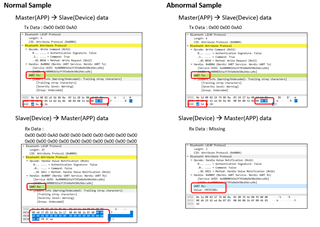
* Abnormal sample and normal working sample
Parents
  • You mean that ble_nus_data_send() didn't work, isn't it?

    But I doubt your send_data_battery matrix definition.

    According to your project code, BLE_FACTORY_START is equal to 0xa0.(According to your write char. 0x02)

    And send_data_battery [2] equal to 0xa0.

    But you never define 길이(length) how can it work?

    So you have to assign all of the send_data_battery elements, and the data matrix length.

  • Thank you for answer.
    send_data_battery is 20 bytes, and &length is also fixed 20 bytes.
    Only the second byte of send_data_battery is in use. The rest is filled with 0x00.
    All samples operate normally, but ble_nus_data_send does not operate in one sample.

    Please refer to the attached picture above.
    It was received from APP, but the Length is 0.

  • Woops,.....I never send or receive nus data with 0x00 or non-asci code. So I  am not sure your application is workable or not? But I suggest you the data with ascii code. Or apply the ble gatt function by yourself.

    For example

    nus rx data:

    0,0,a0,...........(length 20)string format not data hex format. 

    using strtok() to pick up 3rd element.

    nus tx data:

    0,0,a0,........(length 20)

    using ble_nus_data_send ().

    I had done the old project with nus before. You may follow my example as follow:

    Our project command "CT"

    nus rx data:

    CT bat

    nus tx data:

    CT bat_ack=aa

    By the way, take care MTU setting , if your data length is longer than SDK example.

  • Thanks for the answer.
    It works fine for all other samples.
    An abnormal phenomenon occurred in one sample.
    Please give me more details about what you suggested.
    Since it is in the current product status, it is not possible to separate and debug.
    Please ask for more details for safe code in the future.
    An example sample that works well is attached.

  • I think that it's must be some bug in your case with non-ascii code(utf.c problems). If your application code in your mobile side(android or ios) is not fixed. You may change the format to ascii code. It's more safe way for your solution. By the way,...It's the nRF Toolbox (android & ios) available. You may use this tool for debug( especial the NUS service, define hot key or so on).

    Finally, if you don't want to change your code to string format, you have to make sure ble_nus_data_send ()

    length

    uint16_t length = (uint16_t)index;
    err_code = ble_nus_data_send(&m_nus, data_array, &length, m_conn_handle);

Reply
  • I think that it's must be some bug in your case with non-ascii code(utf.c problems). If your application code in your mobile side(android or ios) is not fixed. You may change the format to ascii code. It's more safe way for your solution. By the way,...It's the nRF Toolbox (android & ios) available. You may use this tool for debug( especial the NUS service, define hot key or so on).

    Finally, if you don't want to change your code to string format, you have to make sure ble_nus_data_send ()

    length

    uint16_t length = (uint16_t)index;
    err_code = ble_nus_data_send(&m_nus, data_array, &length, m_conn_handle);

Children
No Data
Related