This post is older than 2 years and might not be relevant anymore
More Info: Consider searching for newer posts

sleep_mode_enter causes fatal error

Hello, I use sleep_mode_enter() to put the device into sleep mode, however, the RTT print a fatal error after sd_power_system_off(), I don't know whether the device is in sleep mode. Besides, the WAKEUP BUTTON I set is pin6, but when I touch the touchpad which connects pin5, the device will also recover from the sleep mode.
I use twi to control the mpu6050, and Pin6 generates interrupt with BSP_EVENT_KEY_1, Pin5 generates interrupt with BSP_EVENT_KEY_3
the wakeup button id I set is like this
#define BTN_ID_WAKEUP 0 /**< ID of button used to wake up the application. */
#define BTN_ID_SLEEP 0 /**< ID of button used to put the application into sleep mode. */
#define BTN_ID_DISCONNECT 0 /**< ID of button used to gracefully terminate a connection on long press. */
#define BTN_ID_WAKEUP_BOND_DELETE 1 /**< ID of button used to wake up the application and delete all bonding information. */
#define BTN_ID_WHITELIST_OFF 1 /**< ID of button used to turn off usage of the whitelist. */
the button pin I set is like this
#define BUTTON_START 6
#define BUTTON_1 6
#define BUTTON_2 14
#define BUTTON_3 5
#define BUTTON_4 25
#define BUTTON_STOP 25
and sleep recover button actice state is like this
#define BUTTONS_ACTIVE_STATE 1
The device I use is nRF52810, the example I use is nRF5_SDK_17.0.2_d674dde\examples\ble_peripheral\ble_app_hids_mouse\pca10040e\s112\arm5_no_packs

Parents
  • Hi,

    Wakeup from System OFF mode will trigger a chip reset. If you get a fatal error after calling sd_power_system_off(), this means that the function returned (which it should not). If you are testing this while in debug mode, the chip will enter "Emulated System OFF mode". If you want to test emulated System OFF, you need to put an endeless while-loop after the call to sd_power_system_off() (before APP_ERROR_CHECK), to prevent the application from running any further code.

    To test normal System OFF mode, exit the debug-mode and reset the chip.

    Best regards,
    Jørgen

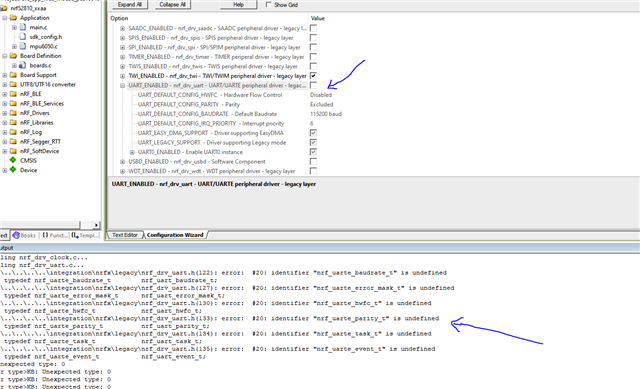
  • Thank you very much, It works! But I still have a doubt, the device in sleep mode can detect the sense of the pin5 if I don't call nrf_gpio_cfg_default(5), does it mean the device enter into the sleep mode failed? And when I disable the uart in sdk_config.h, there will be some errors like this, when I delete these command, there are some new errors.

  • ticture said:
    But I still have a doubt, the device in sleep mode can detect the sense of the pin5 if I don't call nrf_gpio_cfg_default(5), does it mean the device enter into the sleep mode failed?

    If the device is reset when the chip wakes from sleep by the button push, it did enter System OFF mode correctly. The sd_power_system_off() function does not configure any GPIOs for wakeup, etc. Any GPIO that have sense functionality enabled when the chip enters System OFF mode, can be used as a wakeup source. You should make sure that only the pins you want to use as wakeup sources is configured before entering System OFF mode.

    Regarding the UART error, I believe that you have to remove the source file (nrf_drv_uart.c) from the project to get rid of these error. 

Reply
  • ticture said:
    But I still have a doubt, the device in sleep mode can detect the sense of the pin5 if I don't call nrf_gpio_cfg_default(5), does it mean the device enter into the sleep mode failed?

    If the device is reset when the chip wakes from sleep by the button push, it did enter System OFF mode correctly. The sd_power_system_off() function does not configure any GPIOs for wakeup, etc. Any GPIO that have sense functionality enabled when the chip enters System OFF mode, can be used as a wakeup source. You should make sure that only the pins you want to use as wakeup sources is configured before entering System OFF mode.

    Regarding the UART error, I believe that you have to remove the source file (nrf_drv_uart.c) from the project to get rid of these error. 

Children
No Data
Related