

it show Error[Pe661]: expected an integer constant ...\components\ble\peer_manager\security_manager.c 444
how to fill it?
it show Error[Pe661]: expected an integer constant ...\components\ble\peer_manager\security_manager.c 444
how to fill it?
Hello,
I guess this is because of one of three possible reasons:
1. You have added that file yourself, without adding it to the path in the compiler/IDE. If that is the case, please add the path to the .h file to your project's include path. If you are not sure how to do this, please let me know what compiler/IDE you are using.
2. You have moved (copied) the folder that contains the project file. It is important that if you copy and paste a project, because you want to keep the original, that you paste it back so that it has the same number of folders up to the SDK's root folder. Whenever I want to edit a project, while I want to keep the original project, I copy them into a folder that I call "test" which is located in the "examples" folder. This way, the project files is the same number of files down from the SDK.
3. The path to the file is too long. Try extracting the SDK closer to the hard drive. E.g. the path for my SDK is: C:\Nordicsemi\SDKs\17.0.2\examples... Windows can't handle paths that are about 250 characters long. Since there is a lot of long names, please make sure that the SDK is extracted close to your hard drive (path wise).
Best regards,
Edvin
I add all the include files,the include file is ok, i use IAR,and opened :\SDK17.0.2\examples\multiprotocol\ble_ant_app_hrm,
this error happen in" security_manager.c" file,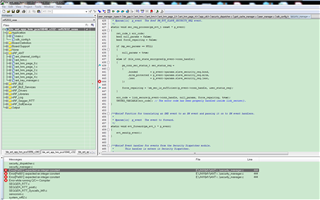
I add all the include files,the include file is ok, i use IAR,and opened :\SDK17.0.2\examples\multiprotocol\ble_ant_app_hrm,
this error happen in" security_manager.c" file,
That is strange. I don't see this error, but I don't have IAR installed on the computer in my home office.
What version of IAR do you use? Is that version compatible according to the release notes for the SDK?
( - IAR: IAR Workbench 7.80.4)
Does it have if you try to compile the armgcc project? (or any of the other projects).
Does it only happen on the multiprotocol\ble_ant_app_hrm example? Can you try to compile the SDK\examples\ble_peripheral\ble_app_uart example, as this should also use the security manager.
Best regards,
Edvin
thanks,use iar 8.32 ,now it is ok.
another problem:I use \SDK17.0.2\examples\ant\ant_plus\ant_hrm\hrm_tx,I want to real time send serial number,how to do it?
Just checking:
You are aware that you are using an ANT+ project, right? Is this intentional? Do you have access to the ANT+ Softdevice, S340?
If you want to send custom data, such as a serial number, you probably have to add a custom service and characteristic service for this, if you don't include it in the advertisement or something.
For custom adding custom services, it is discussed many times here on devzone. Please search for "adding custom service" or similar.
Best regards,
Edvin

