This post is older than 2 years and might not be relevant anymore
More Info: Consider searching for newer posts

Programming nrf52840 using nrfconnect application

Hi,

I have an nrf52840 based custom board. For flashing the hex file into our board, we used the nrf52840DK and nrfconnect ubuntu application. In this case I able to program the board successfully and working properly and getting the debug prints on the JLinkRTT viewer. 

But recently my colleague tried flashing the same custom board using an nRF52832 DK using the same nrfconnect ubuntu application (flashing the same hex here). But we are not getting any debug prints in RTT viewer after flashed with this setup. 

We tried flashing the board using the same setup from the segger IDE  and seen that debug prints are getting properly.

So are there any dependency/constraints while using the nrfconnect application?

[we are using this one : "nrfconnect361x8664.AppImage" ]

Parents
  • Hi, 

    Does the application run with the SD? If so, do you also program the SD image?

    We tried flashing the board using the same setup from the segger IDE  and seen that debug prints are getting properly.

    Do you also get the log from J-Link RTT viewer if you press "build and run"? 

    Do you see any error log while programming with the nRF Connect app? If so, are you able to provide the log?

    -Amanda H.

Reply
  • Hi, 

    Does the application run with the SD? If so, do you also program the SD image?

    We tried flashing the board using the same setup from the segger IDE  and seen that debug prints are getting properly.

    Do you also get the log from J-Link RTT viewer if you press "build and run"? 

    Do you see any error log while programming with the nRF Connect app? If so, are you able to provide the log?

    -Amanda H.

Children
  • Thanks for the reply, 

    Does the application run with the SD? If so, do you also program the SD image?

    Yes, SD is included in our project. I didn't do anything to program SD image separately. How can I do that?. 

    Can you give the instructions to try this.

    Do you also get the log from J-Link RTT viewer if you press "build and run"? 

    Yes,

    Connected main board to nRF52832 DK,

    Opened and cleaned the project,

    selected build and run from segger IDE, 

    And it is found the debug prints on the RTT viewer

    Do you see any error log while programming with the nRF Connect app? If so, are you able to provide the log?

    Please see the attached log file

    2021-02-02T05:56:20.429Z INFO Application data folder: /home/jeevan/.config/nrfconnect/pc-nrfconnect-programmer
    2021-02-02T05:56:20.512Z INFO Using nrfjprog library 10.12.1, pc-nrfjprog-js 1.7.6
    2021-02-02T05:56:20.520Z DEBUG App pc-nrfconnect-programmer v1.4.8 official
    2021-02-02T05:56:20.520Z DEBUG App path: /home/jeevan/.nrfconnect-apps/node_modules/pc-nrfconnect-programmer
    2021-02-02T05:56:20.520Z DEBUG nRFConnect 3.6.1 is supported by the app (^3.6.0)
    2021-02-02T05:56:20.520Z DEBUG nRFConnect path: /tmp/.mount_nrfconDZZMu9/resources/app.asar
    2021-02-02T05:56:20.521Z DEBUG HomeDir: /home/jeevan
    2021-02-02T05:56:20.521Z DEBUG TmpDir: /tmp
    2021-02-02T05:56:21.447Z VERBOSE Could not fetch serial number for serial port at /dev/ttyS0
    2021-02-02T05:56:21.448Z VERBOSE Could not fetch serial number for serial port at /dev/ttyS1
    2021-02-02T05:56:21.448Z VERBOSE Could not fetch serial number for serial port at /dev/ttyS10
    2021-02-02T05:56:21.449Z VERBOSE Could not fetch serial number for serial port at /dev/ttyS11
    2021-02-02T05:56:21.449Z VERBOSE Could not fetch serial number for serial port at /dev/ttyS12
    2021-02-02T05:56:21.449Z VERBOSE Could not fetch serial number for serial port at /dev/ttyS13
    2021-02-02T05:56:21.449Z VERBOSE Could not fetch serial number for serial port at /dev/ttyS14
    2021-02-02T05:56:21.450Z VERBOSE Could not fetch serial number for serial port at /dev/ttyS15
    2021-02-02T05:56:21.450Z VERBOSE Could not fetch serial number for serial port at /dev/ttyS16
    2021-02-02T05:56:21.450Z VERBOSE Could not fetch serial number for serial port at /dev/ttyS17
    2021-02-02T05:56:21.450Z VERBOSE Could not fetch serial number for serial port at /dev/ttyS18
    2021-02-02T05:56:21.451Z VERBOSE Could not fetch serial number for serial port at /dev/ttyS19
    2021-02-02T05:56:21.451Z VERBOSE Could not fetch serial number for serial port at /dev/ttyS2
    2021-02-02T05:56:21.451Z VERBOSE Could not fetch serial number for serial port at /dev/ttyS20
    2021-02-02T05:56:21.451Z VERBOSE Could not fetch serial number for serial port at /dev/ttyS21
    2021-02-02T05:56:21.451Z VERBOSE Could not fetch serial number for serial port at /dev/ttyS22
    2021-02-02T05:56:21.452Z VERBOSE Could not fetch serial number for serial port at /dev/ttyS23
    2021-02-02T05:56:21.452Z VERBOSE Could not fetch serial number for serial port at /dev/ttyS24
    2021-02-02T05:56:21.452Z VERBOSE Could not fetch serial number for serial port at /dev/ttyS25
    2021-02-02T05:56:21.452Z VERBOSE Could not fetch serial number for serial port at /dev/ttyS26
    2021-02-02T05:56:21.452Z VERBOSE Could not fetch serial number for serial port at /dev/ttyS27
    2021-02-02T05:56:21.453Z VERBOSE Could not fetch serial number for serial port at /dev/ttyS28
    2021-02-02T05:56:21.453Z VERBOSE Could not fetch serial number for serial port at /dev/ttyS29
    2021-02-02T05:56:21.453Z VERBOSE Could not fetch serial number for serial port at /dev/ttyS3
    2021-02-02T05:56:21.453Z VERBOSE Could not fetch serial number for serial port at /dev/ttyS30
    2021-02-02T05:56:21.453Z VERBOSE Could not fetch serial number for serial port at /dev/ttyS31
    2021-02-02T05:56:21.454Z VERBOSE Could not fetch serial number for serial port at /dev/ttyS4
    2021-02-02T05:56:21.454Z VERBOSE Could not fetch serial number for serial port at /dev/ttyS5
    2021-02-02T05:56:21.454Z VERBOSE Could not fetch serial number for serial port at /dev/ttyS6
    2021-02-02T05:56:21.454Z VERBOSE Could not fetch serial number for serial port at /dev/ttyS7
    2021-02-02T05:56:21.454Z VERBOSE Could not fetch serial number for serial port at /dev/ttyS8
    2021-02-02T05:56:21.454Z VERBOSE Could not fetch serial number for serial port at /dev/ttyS9
    2021-02-02T05:56:27.382Z INFO Using nrfjprog to communicate with target
    2021-02-02T05:56:28.881Z INFO Using J-Link Software version 6.88
    2021-02-02T05:56:30.051Z INFO Segger serial:  682828354
    2021-02-02T05:56:30.052Z INFO Segger speed:  2000  kHz
    2021-02-02T05:56:30.052Z INFO Segger version:  J-Link OB-SAM3U128-V2-NordicSemi compiled Mar 17 2020 14:43:00
    2021-02-02T05:56:30.053Z INFO Core probed: 682828354
    2021-02-02T05:56:30.054Z INFO Core RAM: 256KiB
    2021-02-02T05:56:30.054Z INFO Core ROM: 1024KiB in pages of 4KiB
    2021-02-02T05:56:30.187Z INFO Model: NRF52840_xxAA_REV2.
    2021-02-02T05:56:31.412Z INFO Core0: Reading device non-volatile memory. This may take a few seconds.
    2021-02-02T05:56:32.697Z INFO Core0: UICR has been read. Click read button to read full non-volatile memory.
    2021-02-02T05:57:00.610Z INFO Parsing HEX file:  /home/jeevan/Projects/eost_nowm/nRF5_SDK_17.0.2_d674dde/nova_wm/ses/Output/Debug/Exe/nova_wm.hex
    2021-02-02T05:57:00.802Z INFO File was last modified at  2/2/2021, 11:19:56 AM
    2021-02-02T05:57:39.985Z INFO Recovery procedure finished
    2021-02-02T05:57:39.999Z INFO Using nrfjprog to communicate with target
    2021-02-02T05:57:41.245Z INFO Using J-Link Software version 6.88
    2021-02-02T05:57:42.438Z INFO Segger serial:  682828354
    2021-02-02T05:57:42.438Z INFO Segger speed:  2000  kHz
    2021-02-02T05:57:42.439Z INFO Segger version:  J-Link OB-SAM3U128-V2-NordicSemi compiled Mar 17 2020 14:43:00
    2021-02-02T05:57:42.441Z INFO Core probed: 682828354
    2021-02-02T05:57:42.442Z INFO Core RAM: 256KiB
    2021-02-02T05:57:42.442Z INFO Core ROM: 1024KiB in pages of 4KiB
    2021-02-02T05:57:42.576Z INFO Model: NRF52840_xxAA_REV2.
    2021-02-02T05:57:43.805Z INFO Core0: Reading device non-volatile memory. This may take a few seconds.
    2021-02-02T05:57:45.041Z INFO Core0: UICR has been read. Click read button to read full non-volatile memory.
    2021-02-02T05:57:45.209Z INFO Writing procedure starts for core0
    2021-02-02T05:57:48.896Z INFO Write procedure finished
    2021-02-02T05:57:48.904Z INFO Using nrfjprog to communicate with target
    2021-02-02T05:57:50.146Z INFO Using J-Link Software version 6.88
    2021-02-02T05:57:51.351Z INFO Segger serial:  682828354
    2021-02-02T05:57:51.352Z INFO Segger speed:  2000  kHz
    2021-02-02T05:57:51.352Z INFO Segger version:  J-Link OB-SAM3U128-V2-NordicSemi compiled Mar 17 2020 14:43:00
    2021-02-02T05:57:51.352Z INFO Core probed: 682828354
    2021-02-02T05:57:51.352Z INFO Core RAM: 256KiB
    2021-02-02T05:57:51.353Z INFO Core ROM: 1024KiB in pages of 4KiB
    2021-02-02T05:57:51.476Z INFO Model: NRF52840_xxAA_REV2.
    2021-02-02T05:57:52.763Z INFO Core0: Reading device non-volatile memory. This may take a few seconds.
    2021-02-02T05:57:54.042Z INFO Core0: UICR has been read. Click read button to read full non-volatile memory.

  • Hi, 

    jeevan t raj said:
    Yes, SD is included in our project. I didn't do anything to program SD image separately. How can I do that?. 

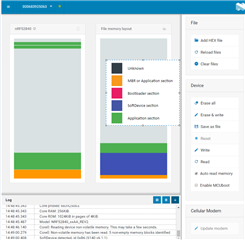
    If your application runs with SD, please add the SD image the same as you do for your application image. You should see the memory layout like the following figure. 


    -Amanda H.

  • If your application runs with SD, please add the SD image the same as you do for your application image. You should see the memory layout like the following figure

    Hi Amanda,

    That was the issue. I added the SD hex also. So now I am getting the debug prints as properly.

    Thanks for pointing out that. :+1

    Just to confirm, while we pressed 'Build and run' from segger IDE, do the SD and application binary is written into the controller flash?

  • Yes, you can check the log in the Segger. 

    -Amanda H.

Related