This post is older than 2 years and might not be relevant anymore
More Info: Consider searching for newer posts

Unable to receive notification in a laptop with nRF Connect for Desktop and nRF52840 dongle

Hi,

When I use Texas Instruments CC2650 MODA (using Bluetooth 4.2) as the the transmitter, a smartphone (iPhone or an Android phone) that has nRF Connect app as a receiver can receive streamed data after enabling notification.

However, when using different laptops (MacBook Pro, Windows 7 or Windows 10) with a nRF52840 dongle inserted and have nRF Connect for Desktop installed, I can read and write but cannot stream data after enabling notification.

I wonder if anyone encounters this issue? Is there a solution to receive notification from a laptop with a nRF52840 dongle and nRF Connect for Desktop installed?

Note that the same MacBook Pro with LightBlue software can receive notification from CC2650MODA, with no need of a dongle.

The following table summarizes the results using different receivers 

Type of receiver nRF Connect

iPhone

nRF Connect app

 Notification works

Android

nRF Connect app

 Notification works

MacBook Pro

with nRF82840 dongle

nRF Connect for Desktop installed

 Can write 

 Can read

 Notification does not work 

Laptop with Windows 7

with nRF82840 dongle

nRF Connect for Desktop installed

 Can write 

 Can read

 Notification does not work

Laptop with Windows 10

with nRF82840 dongle

nRF Connect for Desktop installed

 Can write 

 Can read

 Notification does not work

Raspberry Pi 3B+

 Can write 

 Can read

 Notification does not work

Thanks,

Philex

Parents
  • Hi Philex

    I did a test on my end, using an nRF52840 DK as a peripheral running a heart measurement service, and the nRFConnect for Desktop on my Windows 10 computer with an nRF52840 Dongle as the central. I did not have any issues with writing, reading or notifications on my end.

    What kind of error do you see in the nRFConnect app when trying to do notifications?

    What kind of peripheral is this, and what service and notification are you trying to run when having this issue.

    The behavior to be similar for the nRFConnect for Desktop makes sense, as they're all built on the same SoftDevice and connectivity firmware, while the nRFConnect for Mobile is rather different. Have you also tried (if possible) using a DK as the central. I assume though, that the kind of notifications/service you are using are not supported by the nRFConnect application, although I'm not sure without seeing any error codes of any kind.

    Best regards,

    Simon

Reply
  • Hi Philex

    I did a test on my end, using an nRF52840 DK as a peripheral running a heart measurement service, and the nRFConnect for Desktop on my Windows 10 computer with an nRF52840 Dongle as the central. I did not have any issues with writing, reading or notifications on my end.

    What kind of error do you see in the nRFConnect app when trying to do notifications?

    What kind of peripheral is this, and what service and notification are you trying to run when having this issue.

    The behavior to be similar for the nRFConnect for Desktop makes sense, as they're all built on the same SoftDevice and connectivity firmware, while the nRFConnect for Mobile is rather different. Have you also tried (if possible) using a DK as the central. I assume though, that the kind of notifications/service you are using are not supported by the nRFConnect application, although I'm not sure without seeing any error codes of any kind.

    Best regards,

    Simon

Children
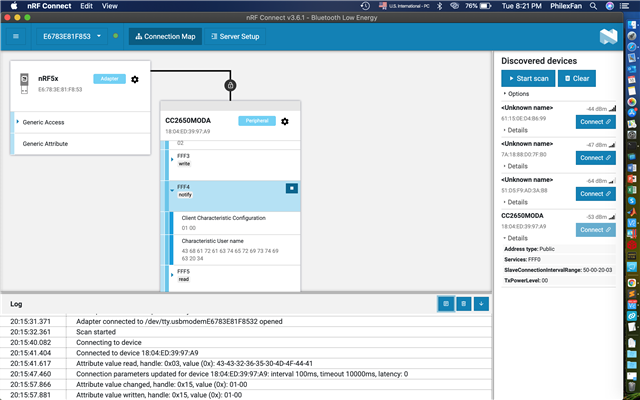
  • Thank you Simonr for the information. The peripheral I used is TI CC2650MODA which has Bluetooth 4.2 with firmware built-in. The method I used my laptop with nRF Connect for Desktop to enable notification from a connected CC2650MODA is shown below. You can see that I press the button in the FFF4 (notify), so the value of Client Characteristic Configuration has changed to 0100. Ideally there should be some values poping out in the FFF4 section (at least my iPhone with nRF connect app does the job). Any idea why 

    Log file is attached here for your reference too. 2021-02-16T12_15_25.240Z-log.txt

  • Hi Simon,

    One thing that might worth mentioning: 

    The size of 1 packet sent out from the peripheral is 28 bytes. iPhone (with nRF Connect app) can well receive the 28-byte packets. Do you think it's because the packet's byte is longer than 20, so a laptop plus nRF Connect for Desktop cannot receive it?

    Thanks,

    Philex

Related