This post is older than 2 years and might not be relevant anymore
More Info: Consider searching for newer posts

Waking a Thingy 52 from python

I have the thingy52.py script running on a Raspberry Pi 4, and I can successfully poll the sensors when the Thing52 is awake (recently tapped) but when I try to poll in a once-per-hour cron job, I find that the script cannot connect to the T52. (The T52 is plugged in to the wall through USB.)

I presume this is because the T52 goes into a sleep mode. The iOS application is able to connect when the device has gone to sleep, so there must be a way to do it, but it seems the thingy52.py script is not be taking those steps.

Can anyone share an example of communicating with a T52 (in python is possible) in a way that will also wake the device if necessary?

Thank you for any suggestions or pointers.

  • Hello,

    I don't think the Thingy52 phone app can actually connect to a thingy that is in sleep mode. If so, it is not advertising, and there is no way to connect to it. Please note that the thingy wakes up on an accelerometer, so perhaps it was moved (it doesn't take much. Just a bump in the table that it is laying on is sufficient, I think).

    However, it is possible  to disable the sleep time in the thingy app (or in the application code, of course). It is also possible to do this from the raspberry pi. Allow me to copy an answer I gave in a similar (non-public) question a while back. As it answers specific questions, the wording may be a bit off, but it looks like it will be applicable for you as well:

    -------------------------------------

    When the device disconnects, it automatically starts advertising. The default behavior when the Thingy advertises, and doesn't get any connection requests, they will go to sleep.

    You can see this in m_ble.c in on_adv_evt() on line 323:

    static void on_adv_evt(ble_adv_evt_t ble_adv_evt)
    {
        uint32_t      err_code;
        m_ble_evt_t evt;
    
        switch (ble_adv_evt)
        {
            case BLE_ADV_EVT_FAST:
                NRF_LOG_INFO("on_adv_evt: BLE_ADV_EVT_FAST\r\n");
                break;
            case BLE_ADV_EVT_IDLE:
                NRF_LOG_INFO("on_adv_evt: BLE_ADV_EVT_IDLE\r\n");
                evt.evt_type = thingy_ble_evt_timeout;
                m_evt_handler(&evt);
    
                err_code = ble_advertising_start(BLE_ADV_MODE_FAST);
                APP_ERROR_CHECK(err_code);
    
                break;
            default:
                break;
        }
    }

    It hits the BLE_ADV_EVT_IDLE, which triggers the event handler in main.c on line 229:

    static void thingy_ble_evt_handler(m_ble_evt_t * p_evt)
    {
        switch (p_evt->evt_type)
        {
            case thingy_ble_evt_connected:
                NRF_LOG_INFO(NRF_LOG_COLOR_CODE_GREEN "Thingy_ble_evt_connected \r\n");
                break;
    
            case thingy_ble_evt_disconnected:
                NRF_LOG_INFO(NRF_LOG_COLOR_CODE_YELLOW "Thingy_ble_evt_disconnected \r\n");
                NRF_LOG_FINAL_FLUSH();
                nrf_delay_ms(5);
                NVIC_SystemReset();
                break;
    
            case thingy_ble_evt_timeout:
                NRF_LOG_INFO(NRF_LOG_COLOR_CODE_YELLOW "Thingy_ble_evt_timeout \r\n");
                sleep_mode_enter();         // <-- THIS ONE ENTERS SLEEP MODE
                NVIC_SystemReset();
                break;
        }
    }

    As mentioned, you can either change this by changing the source code, but luckily, the thingy can be configured during runtime as well.

    If you experiment with this using the Nordic's Thingy app, and connect to a thingy, you can press the menu button (three horisontal lines) in the top left corner, and select "configuration", and set the "Advertising" -> "Timeout" to 0.

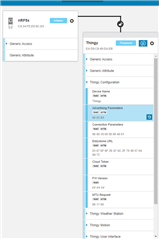
    If you try to connect to the device with nRF Connect, you will see that it has a service called "Thingy Configuration" with a characteristic called "Advertising Parameters":

    The default value of this is 0x 60 02 B4

    The two first bytes (LSB) is 0x0260 = 608 decimal, is the advertising interval in units of 0.625 ms, that is 380ms

    The last byte 0xB4 is the advertising timeout. 0xB4 = 180, which is the timeout in seconds.

    So if you want it to advertise with the same advertising interval, but never time out, write (0x) 60 02 00 to this characteristic, and it will update the advertising configurations.

    To save you some work, the thingy configuration service is the service with:

    UUID: EF6801009B3549339B1052FFA9740042

    and the Advertising characteristic has:

    UUID: EF6801029B3549339B1052FFA9740042

    So if the RPi is connected to the thingy, you can probably use the RPi to write to this characteristic, to prevent the Thingy from going to sleep when it is not in a connection.

    Best regards,

    Edvin

Related