This post is older than 2 years and might not be relevant anymore
More Info: Consider searching for newer posts

How to enable Multiprotocol support in nRF connect zigbee example

Hello,

I am using nRF connect SDK v1.4.99-dev1. I have imported ZigBee light_bulb, light_switch,network_coordinator  project in SEGGER and successfully created 

the Zigbee network and control the light_buld with light_switch. 

I want to enable multiprotocol support in Zigbee. 

In this link  Multiprotocol support — nRF Connect SDK 1.4.99 documentation (nordicsemi.com)  they suggest the following method

Enabling multiprotocol support

To enable the multiprotocol support for either Thread or Zigbee, set the following Kconfig option: CONFIG_BT_LL_SOFTDEVICE_DEFAULT

But I am not getting How to add this and how to test the multiprotocol example. 

Can you please help me to resolve this issue?

Thank you,

Pranav.

  • Hi Pranav,

    You can add multiprotocol support in the light switch sample. In order to do this, you must modify OVERLAY_CONFIG and set overlay-multiprotocol_ble.conf. OVERLAY_CONFIG are additional Kconfig configuration fragment files. CONF_FILE can be supplied to the build system in 3 ways:

    • As a parameter to the west build or cmake invocation via the -D command-line switch. If you have multiple overlay files, you should use quotations, "file1.overlay;file2.overlay"

    • As Environment Variables.

    • As a set(<VARIABLE> <VALUE>) statement in your CMakeLists.txt

    You can find more information about this in this section about important build system variables. More information about activating sample extensions in the light switch sample can be found here.

    As for testing, you'll need a phone or a tablet with the nRF Toolbox application installed, or a similar application, such as nRF Connect for Mobile. When testing, you should be aware of the following assignments, which can be found here:

    LED 1:

    On and solid when a Bluetooth LE Central is connected to the NUS service. Available when using Nordic UART Service (NUS) in the multiprotocol configuration.

    UART command assignments:

    The following command assignments are configured and used in nRF Toolbox when Testing multiprotocol Bluetooth LE extension:

    • n - Turn on the Zigbee light bulb.

    • f - Turn off the Zigbee light bulb.

    • t - Toggle the Zigbee light bulb on or off.

    • i - Increase the brightness level of the Zigbee light bulb.

    • d - Decrease the brightness level of the Zigbee light bulb.

    If more than one light bulb is available in the network, these commands apply to all light bulbs in the network.

    In order to test multiprotocol, you should follow this guide, which tells you how to start UART, configure commands, connect to device, and control the device with the buttons assigned.

    Best regards,

    Marte

  • Hi ,

    Thank you for your reply.

    I tried  As a set(<VARIABLE> <VALUE>) statement in your CMakeLists.txt this method.

    I have added overlay-multiprotocol_ble.conf in my CMakeLists.txt.

    Still not able to enable the multiprotocol support in the Zigbee example.

    Also, the nRF Toolbox app not showing any devices to connect. 

    Am I missing something? Please help me to resolve this issue.

    Thank you,

    Pranav.

    #
    # Copyright (c) 2020 Nordic Semiconductor ASA
    #
    # SPDX-License-Identifier: LicenseRef-BSD-5-Clause-Nordic
    #
    
    cmake_minimum_required(VERSION 3.13.1)
    
    find_package(Zephyr REQUIRED HINTS $ENV{ZEPHYR_BASE})
    
    set(CONF_FILE "overlay-multiprotocol_ble.conf")
    
    project("Light Switch")
    
    # NORDIC SDK APP START
    target_sources(app PRIVATE
      src/main.c
    )
    
    target_sources_ifdef(CONFIG_BT_NUS app PRIVATE
      src/nus_cmd.c
    )
    
    target_include_directories(app PRIVATE include)
    # NORDIC SDK APP END
    

  • Hi Pranav,

    I'm sorry for the late response, I tried to add multiprotocol support myself but experienced some problems. I'm afraid it's not possible to set this option in CMakeLists.txt after all, see this issue on github for more information. I did however manage to set it both using SES and command line using other methods.

    SES

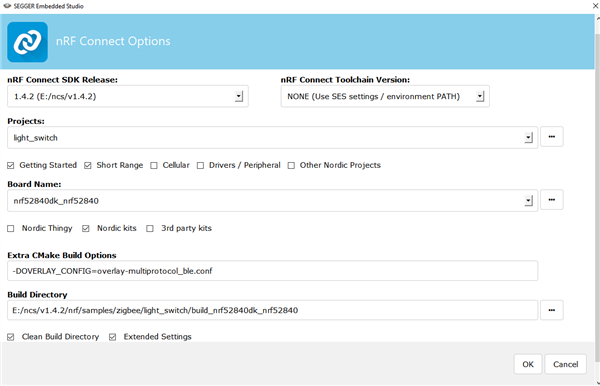
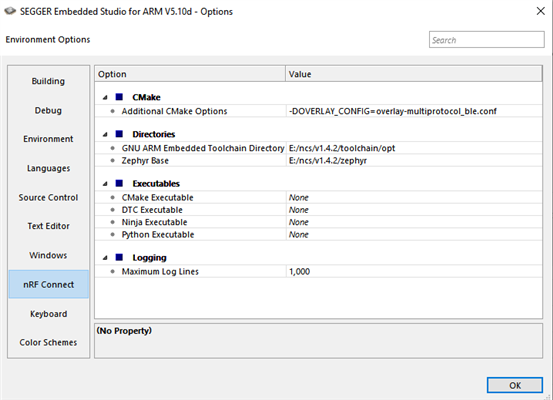
    In order to get multiprotocol support in SES, you must set -DOVERLAY_CONFIG=overlay-multiprotocol_ble.conf as a CMake build option. You can do this when you open a new nRF Connect SDK project by adding it to Extra CMake Build Options, which you can find when selecting "Extended Settings". You can also add this in an open project by going to Tools > Options... > nRF Connect and adding it to Additional CMake Build Options. Please note that there's a bug in the current version of SES, so you must set nRF Connect Toolchain Version to NONE for this to work.

    Command line with west

    You can also add multiprotocol support when building on the command line with west using the following command:

    west build -b nrf52840dk_nrf52840 -- -DOVERLAY_CONFIG=overlay-multiprotocol_ble.conf

    Make sure to switch out with the build target of your board if you're using another board than the nRF52840 DK.

    You should be able to see that multiprotocol is enabled by checking out the .config file generated in /nrf/samples/zigbee/light_switch/<build_folder>/zephyr/.config. If you see the following config set to y, then you've successfully added multiprotocol support:

    CONFIG_BT_LL_SOFTDEVICE_DEFAULT=y

    I tested this myself and was able to add multiprotocol support with both methods, and was able to test it as described in the light switch example.

    Best regards,

    Marte

Related