This post is older than 2 years and might not be relevant anymore
More Info: Consider searching for newer posts

USB is having problem working together with Radio on nrf52833.

SDK version: SDK17.0


We have low received radio message count with open USB CDC compared to when it is closed.

The low rx varies from 20% to 50%.

USB open = screen session opened

USB close = screen session closed


The issue is seen more in a crowded area where a lot of ble radio are transmitting. However, when USB CDC is closed the issue went away even in a crowded area.


Be noted that the USB received print outs have no issue and they are proper messages.

The problem is only the count of received radio messages if we compare a back to back tests are for example 2 minutes where in one USB is open and on the other USB is closed.


Anyone else has similar issue? Any help would be appreciated.

  • Hi Edvin,

    The device is in scan mode most of the time (~190ms per 200ms). In the other time period, it sends out a single advertisement. We are not in a connection.

    That being said, this behavior should not be affected by opening a usbd_cdc serial connection.

  • Hello,

    I still agree that the USB shouldn't affect this. What I am fishing for is whether you:

    1. Start advertising or enter a connection when you enable the USB

    2. Enable the USB whenever you enter a connection

    Something that would link the USB to BLE activity.

    I see that you are using quite a long scan window (190ms). What you should be aware of is that the softdevice scheduler can only schedule entire scan windows. The scheduler is dynamic, so whenever it fails to schedule one type of event (scan window, advertising event, connection event) due to a collision, this event type will have a higher priority the next time it is scheduled. Since scan windows are only possible to schedule as a whole, whenever the softdevice tries to schedule a scan window (which it will do every scan interval) it either succeeds, or it fails. If it fails, it will not try to schedule another scan window until the next scan interval starts. In your case, this means that you will lose 200ms of scanning. 

    Even though you line up your occasional advertising to fit in between the scan windows, let's say by setting the advertising interval to 200, advertisements in BLE has a random delay of 0-10ms added to each advertising interval, so the advertisement will collide with a scan window almost every time in the scheduler, so the softdevice has to pick one.

    Try decreasing your scan window and scan interval. If you keep the SCAN_WINDOW/SCAN_INTERVAL ratio, you will still scan an equal amount of time, but you will not lose as much scan time when a scan window is not successfully scheduled.

    Let us say you keep the advertising interval at whatever you are currently using, but decrease the scan interval to 40ms and scan window to 38 (same ratio), you will only miss 30ms of scanning every time an advertisement is prioritized over a scan window.

    Best regards,

    Edvin

  • Hi Edvin,

    Thanks for your thoughts - we're also confused about how this has an effect with no apparent link between USB and radio Rx. As I mentioned, we've run this code base using UART for all of our CLI and output. In that case, the only usbd functionality we were using was the initialization. Even in that case, we saw this issue, which should eliminate both #1 and #2 that you proposed. Also note - we don't use BLE connections at all, just advertise and scan.

    While we use timers, they only set a next state, they do not force it, so we won't step on our own toes.
    - Advertise state: check if there's a new advertise state, stop the ongoing scan, do an advertisement, show error if any, clear 'new state' flag
    - Scan state: check if there's a new scan state, start a scan, show error if any, clear 'new state' flag

    This structure should prevent any collisions between scanning and advertising. Even if our structure isn't set up correctly, we check the return code from nrf_ble_scan_start, and report any errors. We don't see these errors, so we should be confident we're not failing to schedule scans.

  • Is there some way for me to reproduce what you are seing using a DK?

    BR,

    Edvin

  • I apologize for the delay, but I did want to update you (and this thread in case others see something similar).

    We were unable to reproduce the issue on the dev kit and were initially confused by this.
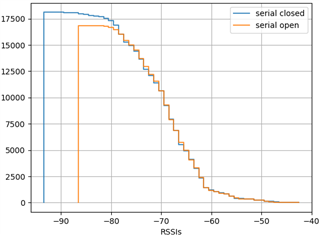
    Eventually we found that the module (& its slightly different antenna) we were using allowed us to capture lower-energy packets than the dev kits. It appears that the difference in received packets was entirely in these lower-energy packets, so the dev kits don't exhibit any change in behavior.

    It is still clear that there _is_ something about opening a usbd port that damages our ability to receive packets. Based on what we've seen I'm guessing that we're effectively raising our noise floor one way or another. No particular theory on if the usbd is causing noise that couples in, causing thermal noise, or something else.

    This plot clearly shows the effect mentioned. It should be read as "How many packets were received in an average minute at this RSSI or higher". As you can see, all the differences are on the lower end of RSSIs, which is why it cannot be replicated on a dev kit.

    For our application, we believe we will be able to tolerate this behavior, but it's still surprising and, perhaps equally important, _different_ from the behavior seen when UART is used instead.

Related