This post is older than 2 years and might not be relevant anymore
More Info: Consider searching for newer posts

Having trouble getting any NRF Connect project to connect to board

I am attempting to load up the default NRF project "AT_Client" located at ...\ncs\v1.4.2\nrf\samples\nrf9160\at_client project, however, whenever I attempt to load it with the SEGGER Embedded Studio software that the nRF Connect Tool Chain Manager installed, it keeps breaking during the cmake of the project. Following error has been posted below. Also, I cannot actually connect to my device by going to the "Target -> connect" option in the toolbar. Can I have some assistance please? I seem to be chasing my tail here...

"""

Creating solution at_client.emProject
.../ncs/v1.4.2/toolchain/opt/bin/cmake.exe -GNinja -DBOARD=thingy91_nrf9160ns -DBOARD_DIR=...\ncs\v1.4.2\nrf\boards\arm\thingy91_nrf9160 -B...\ncs\v1.4.2\nrf\samples\nrf9160\at_client\build_thingy91_nrf9160ns -S...\ncs\v1.4.2\nrf\samples\nrf9160\at_client -DNCS_TOOLCHAIN_VERSION=1.4.2 -DEXTRA_KCONFIG_TARGETS=menuconfig_ses -DEXTRA_KCONFIG_TARGET_COMMAND_FOR_menuconfig_ses=...\ncs\v1.4.2\toolchain\segger_embedded_studio/html/configure_nordic_project_menuconfig.py
-- Application: .../ncs/v1.4.2/nrf/samples/nrf9160/at_client
-- Zephyr version: 2.4.0 (.../ncs/v1.4.2/zephyr)
-- Found Python3: .../ncs/v1.4.2/toolchain/opt/bin/python.exe (found suitable exact version "3.8.2") found components: Interpreter
-- Found west (found suitable version "0.7.2", minimum required is "0.7.1")
-- Board: thingy91_nrf9160ns
-- Cache files will be written to: .../ncs/v1.4.2/zephyr/.cache
-- Found dtc: .../ncs/v1.4.2/toolchain/opt/bin/dtc.exe (found suitable version "1.4.7", minimum required is "1.4.6")
-- Found toolchain: gnuarmemb (.../ncs/v1.4.2/toolchain/opt)
-- Found BOARD.dts: .../ncs/v1.4.2/nrf/boards/arm/thingy91_nrf9160/thingy91_nrf9160ns.dts
-- Generated zephyr.dts: .../ncs/v1.4.2/nrf/samples/nrf9160/at_client/build_thingy91_nrf9160ns/zephyr/zephyr.dts
-- Generated devicetree_unfixed.h: .../ncs/v1.4.2/nrf/samples/nrf9160/at_client/build_thingy91_nrf9160ns/zephyr/include/generated/devicetree_unfixed.h
-- Configuring incomplete, errors occurred!
Including boilerplate (Zephyr base): .../ncs/v1.4.2/zephyr/cmake/app/boilerplate.cmake
-- Using NCS Toolchain 1.4.2 for building. (.../ncs/v1.4.2/toolchain/cmake)
CMake Error at .../ncs/v1.4.2/zephyr/cmake/kconfig.cmake:181 (message):
File not found: ...
Call Stack (most recent call first):
.../ncs/v1.4.2/zephyr/cmake/app/boilerplate.cmake:591 (include)
.../ncs/v1.4.2/zephyr/share/zephyr-package/cmake/ZephyrConfig.cmake:24 (include)
.../ncs/v1.4.2/zephyr/share/zephyr-package/cmake/ZephyrConfig.cmake:35 (include_boilerplate)
CMakeLists.txt:9 (find_package)


error: cmake failed
create_nordic_project.py failed (1)

"'"

Parents
  • I have an official J-Link Pro debug probe that I was trying to use with the device, however, if I can just post the hex file to the board directly, then maybe that will work for me. What would be the steps in order to convert a c project to the hex format (using the nRF Embedded Studio SDK) so that I can send it to the Nordic Thingy 91 device over the programmer application?

  • Hi,

    You get the app_signed.hex file after building the project, and it will be located inside the zephyr folder in your build folder. This is however only for the applications in NCS, such as Asset Tracker and Serial LTE modem, and not the samples, unfortunately. For the samples, you must use a debug probe.

    When you have connected the Thingy:91 to your computer with the debug probe, you should be able to choose it in the LTE Link Monitor application in nRF Connect for Desktop. There you should be able to see what's printed by the application, as well as the status of the modem and whether you're connected to a network or not. Could you please verify whether you're able to open your device in LTE Link Monitor or not?

    You said that you had problems with building the project as well. How did you install NCS, and which OS are you using? Have you made any changes to the project? I just tried with a clean installation of v1.4.2, installed using the Toolchain Manager, and I couldn't reproduce your problem.

    Best regards,

    Marte

  • Hi,

    If I understand you correctly you're able to connect a nRF9160 DK with J-Link Pro and see it on your computer, but not the Thingy:91? Could you please try the tips here and see if any of them works for you?

    RSemple said:
    the build is producing a *.hex file under the "zephyr" folder, which I believe is the hex file that I should write to the Thingy:91

     If you're using an external debug probe then you can program the merged.hex file that is created when you build the project to your Thingy:91. This is the file that is programmed to your device when you program it using SES, and you can program it yourself using the nRF Connect Programmer.

    Good to hear that you managed to build the project after reinstalling. Several people has reported problems with Windows when having too long paths or paths with space, so that might have been the reason for your problem. If what you want to do is to create your own project from the start, without starting out with an existing project I would recommend checking out the nRF Connect SDK Tutorial series. There you can see how to set up your own project, but you'll notice that you'll also have to create files such as CMakeLists.txt and prj.conf etc., so you can't simply create one c file and build that. Please note that the tutorial is created for nRF9160 DK and nRF53840 PDK, so I can't guarantee that it'll work with Thingy:91. Also, not all applications and samples in NCS are supported on Thingy:91, but you'll be able to see which boards are supported under the "Requirements" section for each sample.

    Best regards,

    Marte

  • I'll take a look at that link and see what I can find, thank you. When I attempt to write that *.hex file to the Thingy:91 via the nRF Connect Programmer, I am seeing a error (or warning, not sure which) that says that the "seclected HEX file appears to be invalid for Thingy:91 MCUboot DFU". Is this a problem?

    As to the connecting issue through the Embedded Studio software, I only have the 1 board, I think I may have misspoke and just read the chip instead of the board itself, but I have a Thingy:91. I am only having trouble accessing that device through the Embedded Studio software at this point.

  • Hi,

    As I said, you can only use merged.hex if you're using an external debug probe. If you connect directly to the Thingy:91 with USB, you will only be able to program MCUboot compatible images, which are be named app_signed.hex. You won't get these files when building the samples in NCS, only the applications, such as Asset Tracker. You can see which are samples and which are applications here.

    So you're able to connect to the Thingy:91 with the nRF Connect Programmer when using J-Link Pro, but not in SES?

    Best regards,

    Marte

  • Thank you for the clarification.

    Yes, I am able to connect to the Thingy:91 with the nRF Connect Programmer, but I get the error "Failed to connect to target. No idcode detected. Please check connection and Target Interface Type" when selecting the "build and run" option under the build section on the toolbar.

  • I have been doing some research on my own regarding this issue as well and just wanted to update you to a few new things.

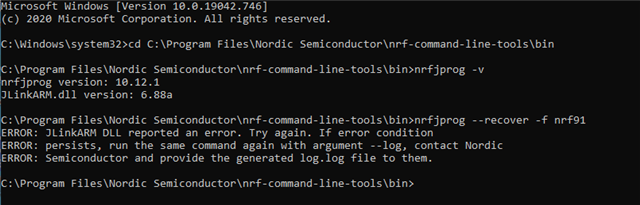
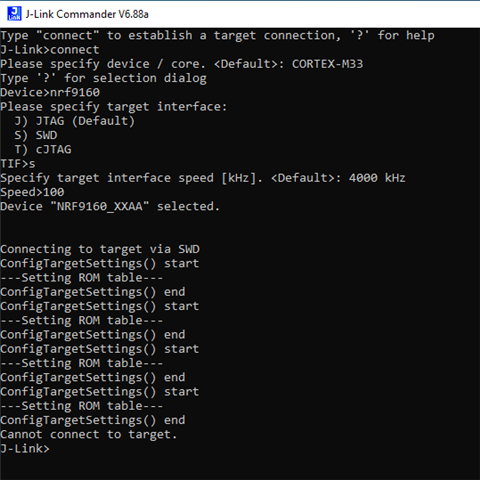
    One of the common things that I have seen to try are (1) testing the nrfjprog --recover command and (2) following the troubleshooting steps found here: https://wiki.segger.com/J-Link_cannot_connect_to_the_CPU

    The results to those two main steps are shown below in the 2 images:

    Hope these are helpful!

Reply Children
No Data
Related