This post is older than 2 years and might not be relevant anymore
More Info: Consider searching for newer posts

serial DFU bootloader: no ping response after opening the COM port

Hello everyone,

I am going to run the serial DFU example. I follow the instruction on infocenter website and run the example by using my own keys and image and I got this error: no ping response after opening the COM port.

I even used the secure_bootloader_uart_mbr_pca10056_debug example without any change and the blinky_mbr package to test that, but I got the same error again.

Should I change anything in code?

Could you please advise me on this topic?

I use nRF5SDK17.0.2.

I update the nrfutil and Jlink to the last version.

I use 115200 baud rate for the com port.

Thanks,

Sama

Parents
  • Hi Sama, 

    Are you using nRF52840DK (pca10056) or the custom board?

    Could you confirm the com port number from the device manager?

    What is the command you are using?

    There are similar cases on Devzone (like this and this) that might help. 

    -Amanda H.

  • Hi Amanda,

    Thank you for your reply.

    I am using nrf52840DK and I checked the com port number.

    The command I used is:

    nrfutil dfu serial -pkg app_dfu_package.zip -p COM3.

    I checked links you mentioned and everything was ok but I had the same error. Finally I move to windows 10 with another system and it worked. But I don't know what was the problem yet.

    Anyway, I am facing with a problem in Configuring and performing DFU over Mesh example. I successfully run the serial DFU example by using python3.7 and nrfutil 6.1.0. I am following the instruction in the infocenter to run the DFU over Mesh example. But the commands mentioned  for nrfutil does not work for me. In the serial DFU, the command used for generating zip file is 

    nrfutil pkg generate --hw-version 52 --application-version 1 --application ble_app_hrs_pca10056_s140.hex --sd-req 0x0100 --key-file private.key app_dfu_package.zip

    but in DFU over mesh it is

    nrfutil dfu genpkg --application bin/blinky/blinky_nrf52840_xxAC_s140_2.0.1.hex \
    --company-id 0x89 \
    --application-id 1 \
    --application-version 2 \
    --key-file private_key.txt \
    --sd-req 0x0100 \
    --mesh dfu_test.zip

    when I run I get this error on "genpkg".

    I searched and fiound a post (https://devzone.nordicsemi.com/f/nordic-q-a/39693/error-no-such-option---mesh).

    The solution works with python2 not 3.

    Could you please help me?

    Thank you,

    Sama


  • Hi Sama, 

    The customized version of the nRF for Mesh is available at https://github.com/NordicSemiconductor/pc-nrfutil/tree/mesh_dfu, but it only supports python2 now. Sorry for the inconvenience. 

    -Amanda H.

  • Hi Amanda,

    There is a problem with the installation of this version.

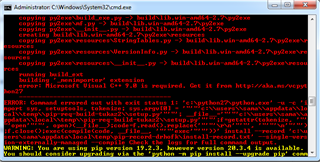
    I install Python 2.7.18 in which pip is installed automatically. Then I download the nrfutil file and clone in the python folder. then I follow the steps mentioned in the GitHub. I faced this error while I am installing py2exe.


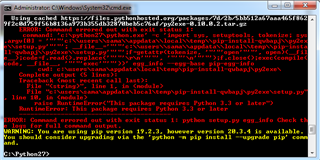
    I try again with downloading py2exe source and run pip install py2exe. I faced this error.

    Could you please advice me?

    Regards,

    Sama

Reply
  • Hi Amanda,

    There is a problem with the installation of this version.

    I install Python 2.7.18 in which pip is installed automatically. Then I download the nrfutil file and clone in the python folder. then I follow the steps mentioned in the GitHub. I faced this error while I am installing py2exe.


    I try again with downloading py2exe source and run pip install py2exe. I faced this error.

    Could you please advice me?

    Regards,

    Sama

Children
Related