This post is older than 2 years and might not be relevant anymore
More Info: Consider searching for newer posts

Configuring RTT for Nordic thingy 52 connected to nrf5340's debug out

Hi,

I am current working with nrf connect SDK, nrf5340dk and 2 Nordic thingy 52s. I am trying to implement BLE mesh sensor client and server model on both the Thingys respectively and programming them via the nrf5340dk's debug out. I wish to look at the output of the mesh sensor client via RTT but I'm unable to do so.

I have added the following configuration parameters in the prj.conf file for enabling RTT:

ONFIG_UART_CONSOLE=n
CONFIG_HAS_SEGGER_RTT=y
CONFIG_USE_SEGGER_RTT=y
CONFIG_RTT_CONSOLE=y
CONFIG_LOG_BACKEND_RTT=y
CONFIG_LOG_STRDUP_BUF_COUNT=20
CONFIG_LOG_STRDUP_MAX_STRING=8
CONFIG_LOG_DEFAULT_LEVEL=4

Can someone please help me configure RTT for nordic thingy 52?

Thank you!

Parents Reply Children
  • Hi Carl,
    thanks for the reply.
    I also have the following config parameters in the prj.conf file. Still cant see the RTT output.
    # General configuration
    CONFIG_MAIN_STACK_SIZE=4096
    CONFIG_SYSTEM_WORKQUEUE_STACK_SIZE=4096
    CONFIG_FLASH=y
    CONFIG_FLASH_MAP=y
    CONFIG_NVS=y
    CONFIG_SETTINGS=y
    CONFIG_HWINFO=y
    CONFIG_ASSERT=y
    CONFIG_ASSERT_LEVEL=2
    CONFIG_LOG=y
    CONFIG_LOG_PRINTK=y
    Can you please tell me how did you setup the jlink RTT viewer? Do you need to enable/disable VCOM via the jlink configurator? 
    best regards,
    Mudit Sharma
  • Hi!

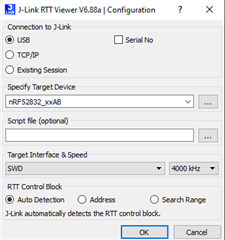
    I only used the following settings:


    Could you share your full prj.conf, so that I can see if there are any potential conflicts?

    Best regards,
    Carl Richard

  • Hey, 

    Here is my proj.conf file.

    # General configuration
    CONFIG_MAIN_STACK_SIZE=4096
    CONFIG_SYSTEM_WORKQUEUE_STACK_SIZE=4096
    CONFIG_FLASH=y
    CONFIG_FLASH_MAP=y
    CONFIG_NVS=y
    CONFIG_SETTINGS=y
    CONFIG_HWINFO=y
    CONFIG_ASSERT=y
    CONFIG_ASSERT_LEVEL=2
    CONFIG_LOG=y
    CONFIG_LOG_PRINTK=y
    
    CONFIG_DK_LIBRARY=y
    CONFIG_BT_MESH_DK_PROV=y
    
    # Bluetooth configuration
    CONFIG_BT=y
    CONFIG_BT_COMPANY_ID=0x0059
    CONFIG_BT_DEVICE_NAME="Mesh Sensor Client"
    CONFIG_BT_L2CAP_RX_MTU=69
    CONFIG_BT_L2CAP_TX_MTU=69
    CONFIG_BT_L2CAP_TX_BUF_COUNT=32
    CONFIG_BT_LL_SW_SPLIT=y
    CONFIG_BT_OBSERVER=y
    CONFIG_BT_PERIPHERAL=y
    CONFIG_BT_SETTINGS=y
    
    # Disable unused Bluetooth features
    CONFIG_BT_CTLR_DUP_FILTER_LEN=0
    CONFIG_BT_CTLR_LE_ENC=n
    CONFIG_BT_DATA_LEN_UPDATE=n
    CONFIG_BT_PHY_UPDATE=n
    CONFIG_BT_CTLR_CHAN_SEL_2=n
    CONFIG_BT_CTLR_MIN_USED_CHAN=n
    CONFIG_BT_CTLR_PRIVACY=n
    
    # Bluetooth Mesh configuration
    CONFIG_BT_MESH=y
    CONFIG_BT_MESH_RELAY=y
    CONFIG_BT_MESH_FRIEND=y
    CONFIG_BT_MESH_ADV_BUF_COUNT=64
    CONFIG_BT_MESH_TX_SEG_MAX=32
    CONFIG_BT_MESH_RX_SEG_MAX=16
    CONFIG_BT_MESH_PB_GATT=y
    CONFIG_BT_MESH_GATT_PROXY=y
    
    # Bluetooth Mesh models
    CONFIG_BT_MESH_SENSOR_CLI=y
    
    CONFIG_UART_CONSOLE=n
    CONFIG_HAS_SEGGER_RTT=y
    CONFIG_USE_SEGGER_RTT=y
    CONFIG_RTT_CONSOLE=y
    CONFIG_LOG_BACKEND_RTT=y
    CONFIG_LOG_STRDUP_BUF_COUNT=20
    CONFIG_LOG_STRDUP_MAX_STRING=8
    
    CONFIG_LOG_DEFAULT_LEVEL=4

    I'm using the same configuration on the RTT viewer. 

    Best regards,

    Mudit Sharma

  • Hi again!

    I get a build error when trying your prj.conf dure to "CONFIG_HAS_SEGGER_RTT=y". Could you try to remove this, as well as building with a "Clean build folder" (SES) or "pristine" (command line).

    Best regards,
    Carl Richard

  • Hi Carl,

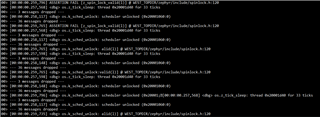
    I followed your suggestion and I see output on the RTT viewer but I'm not seeing the printk() messages. 

    On the RTT viewer I see the following output:

    Can you kindly suggest what could be causing this and how to fix this?

    thank you.

Related