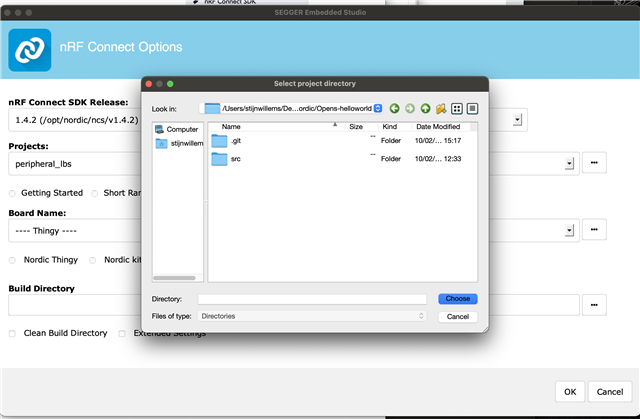
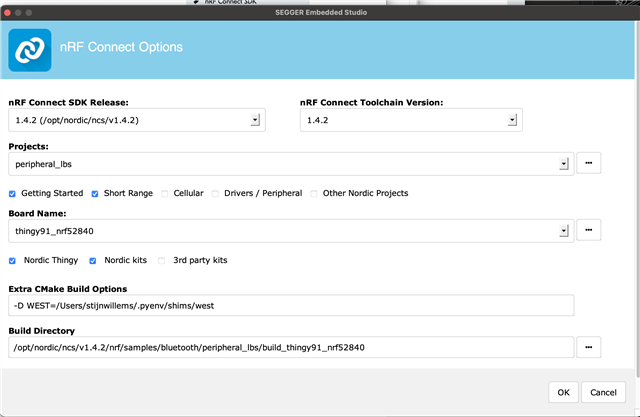
I try to folloe the tutorial devzone.nordicsemi.com/.../nrf-connect-sdk-tutorial---part-1-ncs-v1-4-0 but this failed. What did I try
1. install on macOS using setup assistant -> failed due to missing import yaml in python
2. install on macOS using Toolchain manager -> failed due to missing git
3. install windows -> fails as I due not seam able to install the segger embedded studio with Nordic tools
Output of my last attempt with FileNotFoundError: [Errno 2] No such file or directory: 'git'
Creating solution peripheral_lbs.emProject
  /opt/nordic/ncs/v1.4.2/toolchain/bin/cmake -GNinja -DBOARD=thingy91_nrf52840 -DBOARD_DIR=/opt/nordic/ncs/v1.4.2/nrf/boards/arm/thingy91_nrf52840 -B/opt/nordic/ncs/v1.4.2/nrf/samples/bluetooth/peripheral_lbs/build_thingy91_nrf52840 -S/opt/nordic/ncs/v1.4.2/nrf/samples/bluetooth/peripheral_lbs -DNCS_TOOLCHAIN_VERSION=1.4.2 -D WEST=/Users/stijnwillems/.pyenv/shims/west -DEXTRA_KCONFIG_TARGETS=menuconfig_ses -DEXTRA_KCONFIG_TARGET_COMMAND_FOR_menuconfig_ses=/Applications/arm_segger_embedded_studio_v534a_macos_x64_nordic/html/configure_nordic_project_menuconfig.py
  -- Application: /opt/nordic/ncs/v1.4.2/nrf/samples/bluetooth/peripheral_lbs
  -- Zephyr version: 2.4.0 (/opt/nordic/ncs/v1.4.2/zephyr)
  -- Found west (found suitable version "0.7.2", minimum required is "0.7.1")
  -- Configuring incomplete, errors occurred!
  Including boilerplate (Zephyr base (cached)): /opt/nordic/ncs/v1.4.2/zephyr/cmake/app/boilerplate.cmake
  -- Using NCS Toolchain 1.4.2 for building. (/opt/nordic/ncs/v1.4.2/toolchain/cmake)
  CMake Error at /opt/nordic/ncs/v1.4.2/zephyr/cmake/zephyr_module.cmake:48 (message):
    Traceback (most recent call last):

      File "/opt/nordic/ncs/v1.4.2/zephyr/scripts/zephyr_module.py", line 326, in <module>
        main()
      File "/opt/nordic/ncs/v1.4.2/zephyr/scripts/zephyr_module.py", line 235, in main
        manifest = Manifest.from_file()
      File "/opt/nordic/ncs/v1.4.2/toolchain/Cellar/[email protected]/3.8.2/Frameworks/Python.framework/Versions/3.8/lib/python3.8/site-packages/west/manifest.py", line 252, in from_file
        return Manifest(**kwargs)
      File "/opt/nordic/ncs/v1.4.2/toolchain/Cellar/[email protected]/3.8.2/Frameworks/Python.framework/Versions/3.8/lib/python3.8/site-packages/west/manifest.py", line 413, in __init__
        self._load(source_data['manifest'], manifest_path,
      File "/opt/nordic/ncs/v1.4.2/toolchain/Cellar/[email protected]/3.8.2/Frameworks/Python.framework/Versions/3.8/lib/python3.8/site-packages/west/manifest.py", line 599, in _load
        self._load_projects(manifest, url_bases, defaults, ctx)
      File "/opt/nordic/ncs/v1.4.2/toolchain/Cellar/[email protected]/3.8.2/Frameworks/Python.framework/Versions/3.8/lib/python3.8/site-packages/west/manifest.py", line 800, in _load_projects
        self._import_from_project(project, imp, ctx)
      File "/opt/nordic/ncs/v1.4.2/toolchain/Cellar/[email protected]/3.8.2/Frameworks/Python.framework/Versions/3.8/lib/python3.8/site-packages/west/manifest.py", line 873, in _import_from_project
        self._import_path_from_project(project, imap.file,
      File "/opt/nordic/ncs/v1.4.2/toolchain/Cellar/[email protected]/3.8.2/Frameworks/Python.framework/Versions/3.8/lib/python3.8/site-packages/west/manifest.py", line 884, in _import_path_from_project
        imported = self._import_content_from_project(project, path)
      File "/opt/nordic/ncs/v1.4.2/toolchain/Cellar/[email protected]/3.8.2/Frameworks/Python.framework/Versions/3.8/lib/python3.8/site-packages/west/manifest.py", line 923, in _import_content_from_project
        project.is_cloned():
      File "/opt/nordic/ncs/v1.4.2/toolchain/Cellar/[email protected]/3.8.2/Frameworks/Python.framework/Versions/3.8/lib/python3.8/site-packages/west/manifest.py", line 1332, in is_cloned
        res = self.git('rev-parse --show-cdup', check=False,
      File "/opt/nordic/ncs/v1.4.2/toolchain/Cellar/[email protected]/3.8.2/Frameworks/Python.framework/Versions/3.8/lib/python3.8/site-packages/west/manifest.py", line 1231, in git
        popen = subprocess.Popen(
      File "/opt/nordic/ncs/v1.4.2/toolchain/Cellar/[email protected]/3.8.2/Frameworks/Python.framework/Versions/3.8/lib/python3.8/subprocess.py", line 854, in __init__
        self._execute_child(args, executable, preexec_fn, close_fds,
      File "/opt/nordic/ncs/v1.4.2/toolchain/Cellar/[email protected]/3.8.2/Frameworks/Python.framework/Versions/3.8/lib/python3.8/subprocess.py", line 1702, in _execute_child
        raise child_exception_type(errno_num, err_msg, err_filename)

    FileNotFoundError: [Errno 2] No such file or directory: 'git'

  Call Stack (most recent call first):
    /opt/nordic/ncs/v1.4.2/zephyr/cmake/app/boilerplate.cmake:150 (include)
    /opt/nordic/ncs/v1.4.2/zephyr/share/zephyr-package/cmake/ZephyrConfig.cmake:24 (include)
    /opt/nordic/ncs/v1.4.2/zephyr/share/zephyr-package/cmake/ZephyrConfig.cmake:40 (include_boilerplate)
    CMakeLists.txt:8 (find_package)


  error: cmake failed
  create_nordic_project.py failed (1)