This post is older than 2 years and might not be relevant anymore
More Info: Consider searching for newer posts

Alexa_gadget sample app still broken

There have been several tickets raised on this subject.

Yesterday I installed the latest sdk, v1.4.99-dev1, on a clean windows 10 installation, with nanopb 0.4.2 and still the build process fails with the well know  error

Error starting process src\gadgets\CMakeFiles\protobuf_generation_BASE-aa7d0b8.bat

Can some explain under what setup this sample builds. Windows? Linux? SES? Command line?

I assume it must have passed some basic build test before being included in the public release, so there must just be a step missing in the instructions.

Thanks, Mike.

Parents
  • Thanks for the reply Edvin.

    I am using SES. 

    The install path is, relative, the same.

    I get that build error.

    Building with west using your command I get a different error:

    mike@DESKTOP MINGW64 ~/ncs/v1.4.99-dev1/nrf/samples/bluetooth/alexa_gadget ((v1.4.99-dev1))
    $ west build -b nrf52840dk_nrf52840 --pristine

    In file included from ../src/gadgets/gadgets_profile.h:33,
    from ../src/main.c:20:
    generated/alexa/protobuf/alexaGadgetMusicDataTempoDirective.pb.h:7:10: fatal error: directiveHeader.pb.h: No such file or directory
    7 | #include "directiveHeader.pb.h"
    | ^~~~~~~~~~~~~~~~~~~~~~
    compilation terminated.
    [81/244] Linking C static library zephyr\soc\arm\nordic_nrf\nrf52\libsoc__arm__nordic_nrf__nrf52.a
    [82/244] Building C object zephyr/CMakeFiles/zephyr.dir/lib/os/crc32_sw.c.obj
    ninja: build stopped: subcommand failed.
    FATAL ERROR: command exited with status 1: 'C:\Users\mike\ncs\v1.4.99-dev1\toolchain\opt\bin\cmake.EXE' --build 'C:\Users\mike\ncs\v1.4.99-dev1\nrf\samples\bluetooth\alexa_gadget\build'

  • Can you try to checkout the NCS v1.4.2? I was using v1.4.99 myself, but perhaps they are fetched at different times. I tested using west build on a fresh unmodified v1.4.2 now with the nanopb 0.4.2. Try this, and if it doesn't work, can you please copy paste everything that is printed after you hit the command west build -b nrf52840 ...?

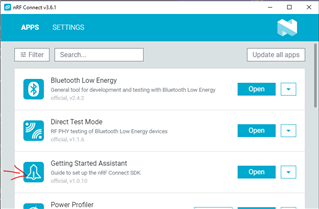
    Just out of curiosity: how did you install NCS? Did you use the toolchain manager, or did you use the "getting started assistant" from the nRF Connect for Desktop app? Or do you by chance have a mix of the two?

    Best regards,

    Edvin

Reply
  • Can you try to checkout the NCS v1.4.2? I was using v1.4.99 myself, but perhaps they are fetched at different times. I tested using west build on a fresh unmodified v1.4.2 now with the nanopb 0.4.2. Try this, and if it doesn't work, can you please copy paste everything that is printed after you hit the command west build -b nrf52840 ...?

    Just out of curiosity: how did you install NCS? Did you use the toolchain manager, or did you use the "getting started assistant" from the nRF Connect for Desktop app? Or do you by chance have a mix of the two?

    Best regards,

    Edvin

Children
  • I installed using the recommendations from the instructions provided on your website. I did not use 'getting started assistant'. Didn't even see that prompt.

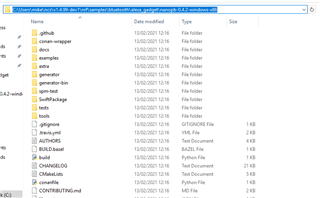
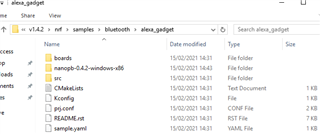
    So, I started virtual box and created a new VM, usinng Windows 10 installation. After Windows finished its updates, I went to the nordic website and installed nrf connect, 3.6.1. I then chose to install nRF Connect SDK v1.4.2. When that completed, I downloaded nanopn v 0.4.2 and copied the extracted files to the location shown.

    I then opened the 'open bash' command and navigated to the directory 

    /c/Users/mike/ncs/v1.4.2/nrf/samples/bluetooth/alexa_gadget

    and executed the command

    west build -b nrf52840dk_nrf52840

    and it failed, as I expected, but with yet a new failure. See below.

    So I spent all day yesterday trying various different things, and an hour past bedtime testing your suggestion. Same result.

    So again I ask, please tell me what your setup is for Windows 10, using SES, to build this project. Or, tell me what situation you did test it under, so I can reproduce. I am at the stage where I don't care what OS I build under, but if this alexa gadget demo is not real I would rather look to other solutions, I do not have time to waste.


    mike@DESKTOP-LBGJT18 MINGW64 ~/ncs/v1.4.2/nrf/samples/bluetooth/alexa_gadget ((v1.4.2))
    $ west build -b nrf52840dk_nrf52840
    -- west build: generating a build system
    Including boilerplate (Zephyr base): C:/Users/mike/ncs/v1.4.2/zephyr/cmake/app/boilerplate.cmake
    -- Application: C:/Users/mike/ncs/v1.4.2/nrf/samples/bluetooth/alexa_gadget
    -- Using NCS Toolchain 1.4.0 for building. (C:/Users/mike/ncs/v1.4.2/toolchain/cmake)
    -- Zephyr version: 2.4.0 (C:/Users/mike/ncs/v1.4.2/zephyr)
    -- Found Python3: C:/Users/mike/ncs/v1.4.2/toolchain/opt/bin/python.exe (found suitable exact version "3.8.2") found components: Interpreter
    -- Found west (found suitable version "0.7.2", minimum required is "0.7.1")
    -- Board: nrf52840dk_nrf52840
    -- Cache files will be written to: C:/Users/mike/ncs/v1.4.2/zephyr/.cache
    -- Found dtc: C:/Users/mike/ncs/v1.4.2/toolchain/opt/bin/dtc.exe (found suitable version "1.4.7", minimum required is "1.4.6")
    -- Found toolchain: gnuarmemb (C:/Users/mike/ncs/v1.4.2/toolchain/opt)
    -- Found BOARD.dts: C:/Users/mike/ncs/v1.4.2/zephyr/boards/arm/nrf52840dk_nrf52840/nrf52840dk_nrf52840.dts
    -- Generated zephyr.dts: C:/Users/mike/ncs/v1.4.2/nrf/samples/bluetooth/alexa_gadget/build/zephyr/zephyr.dts
    -- Generated devicetree_unfixed.h: C:/Users/mike/ncs/v1.4.2/nrf/samples/bluetooth/alexa_gadget/build/zephyr/include/generated/devicetree_unfixed.h
    Parsing C:/Users/mike/ncs/v1.4.2/nrf/samples/bluetooth/alexa_gadget/Kconfig
    Loaded configuration 'C:/Users/mike/ncs/v1.4.2/zephyr/boards/arm/nrf52840dk_nrf52840/nrf52840dk_nrf52840_defconfig'
    Merged configuration 'C:/Users/mike/ncs/v1.4.2/nrf/samples/bluetooth/alexa_gadget/prj.conf'
    Configuration saved to 'C:/Users/mike/ncs/v1.4.2/nrf/samples/bluetooth/alexa_gadget/build/zephyr/.config'
    Kconfig header saved to 'C:/Users/mike/ncs/v1.4.2/nrf/samples/bluetooth/alexa_gadget/build/zephyr/include/generated/autoconf.h'
    -- The C compiler identification is GNU 9.2.1
    -- The CXX compiler identification is GNU 9.2.1
    -- The ASM compiler identification is GNU
    -- Found assembler: C:/Users/mike/ncs/v1.4.2/toolchain/opt/bin/arm-none-eabi-gcc.exe
    CMake Warning at C:/Users/mike/ncs/v1.4.2/zephyr/CMakeLists.txt:1331 (message):
    __ASSERT() statements are globally ENABLED


    -- Configuring done
    -- Generating done
    -- Build files have been written to: C:/Users/mike/ncs/v1.4.2/nrf/samples/bluetooth/alexa_gadget/build
    -- west build: building application
    [1/242] Building C object src/gadgets/CMakeFiles/ALEXA_GADGETS_PROFILE.dir/gadgets_profile.c.obj
    FAILED: src/gadgets/CMakeFiles/ALEXA_GADGETS_PROFILE.dir/gadgets_profile.c.obj
    C:\Users\mike\ncs\v1.4.2\toolchain\opt\bin\arm-none-eabi-gcc.exe -DBUILD_VERSION=v2.4.0-ncs2 -DKERNEL -DNRF52840_XXAA -DUSE_PARTITION_MANAGER=0 -D_FORTIFY_SOURCE=2 -D__PROGRAM_START -D__ZEPHYR__=1 -IC:/Users/mike/ncs/v1.4.2/nrf/drivers/mpsl/clock_control -IC:/Users/mike/ncs/v1.4.2/zephyr/include -Izephyr/include/generated -IC:/Users/mike/ncs/v1.4.2/zephyr/soc/arm/nordic_nrf/nrf52 -IC:/Users/mike/ncs/v1.4.2/zephyr/subsys/settings/include -IC:/Users/mike/ncs/v1.4.2/zephyr/subsys/bluetooth -IC:/Users/mike/ncs/v1.4.2/nrf/include -IC:/Users/mike/ncs/v1.4.2/nrf/lib/multithreading_lock/. -IC:/Users/mike/ncs/v1.4.2/nrf/subsys/bluetooth/controller/. -IC:/Users/mike/ncs/v1.4.2/nrfxlib/mpsl/include -IC:/Users/mike/ncs/v1.4.2/nrfxlib/softdevice_controller/include -IC:/Users/mike/ncs/v1.4.2/modules/hal/cmsis/CMSIS/Core/Include -IC:/Users/mike/ncs/v1.4.2/modules/hal/nordic/nrfx -IC:/Users/mike/ncs/v1.4.2/modules/hal/nordic/nrfx/drivers/include -IC:/Users/mike/ncs/v1.4.2/modules/hal/nordic/nrfx/mdk -IC:/Users/mike/ncs/v1.4.2/modules/hal/nordic/. -IC:/Users/mike/ncs/v1.4.2/modules/debug/segger/rtt -IC:/Users/mike/ncs/v1.4.2/modules/crypto/tinycrypt/lib/include -I../src/gadgets -Igenerated/alexa/protobuf -IC:/Users/mike/ncs/v1.4.2/modules/lib/nanopb -isystem C:/Users/mike/ncs/v1.4.2/zephyr/lib/libc/minimal/include -isystem c:/users/mike/ncs/v1.4.2/toolchain/opt/bin/../lib/gcc/arm-none-eabi/9.2.1/include -isystem c:/users/mike/ncs/v1.4.2/toolchain/opt/bin/../lib/gcc/arm-none-eabi/9.2.1/include-fixed -isystem C:/Users/mike/ncs/v1.4.2/nrfxlib/crypto/nrf_cc310_platform/include -Os -imacros C:/Users/mike/ncs/v1.4.2/nrf/samples/bluetooth/alexa_gadget/build/zephyr/include/generated/autoconf.h -ffreestanding -fno-common -g -mcpu=cortex-m4 -mthumb -mabi=aapcs -imacros C:/Users/mike/ncs/v1.4.2/zephyr/include/toolchain/zephyr_stdint.h -Wall -Wformat -Wformat-security -Wno-format-zero-length -Wno-main -Wno-pointer-sign -Wpointer-arith -Wno-address-of-packed-member -Wno-unused-but-set-variable -Werror=implicit-int -fno-asynchronous-unwind-tables -fno-pie -fno-pic -fno-strict-overflow -fno-reorder-functions -fno-defer-pop -fmacro-prefix-map=C:/Users/mike/ncs/v1.4.2/nrf/samples/bluetooth/alexa_gadget=CMAKE_SOURCE_DIR -fmacro-prefix-map=C:/Users/mike/ncs/v1.4.2/zephyr=ZEPHYR_BASE -fmacro-prefix-map=C:/Users/mike/ncs/v1.4.2=WEST_TOPDIR -ffunction-sections -fdata-sections -std=c99 -nostdinc -MD -MT src/gadgets/CMakeFiles/ALEXA_GADGETS_PROFILE.dir/gadgets_profile.c.obj -MF src\gadgets\CMakeFiles\ALEXA_GADGETS_PROFILE.dir\gadgets_profile.c.obj.d -o src/gadgets/CMakeFiles/ALEXA_GADGETS_PROFILE.dir/gadgets_profile.c.obj -c ../src/gadgets/gadgets_profile.c
    In file included from C:/Users/mike/ncs/v1.4.2/zephyr/include/kernel_includes.h:36,
    from C:/Users/mike/ncs/v1.4.2/zephyr/include/kernel.h:17,
    from C:/Users/mike/ncs/v1.4.2/zephyr/include/zephyr.h:18,
    from ../src/gadgets/gadgets_profile.c:7:
    C:/Users/mike/ncs/v1.4.2/zephyr/include/syscall.h:11:10: fatal error: syscall_list.h: No such file or directory
    11 | #include <syscall_list.h>
    | ^~~~~~~~~~~~~~~~
    compilation terminated.
    [2/242] Generating misc/generated/syscalls.json, misc/generated/struct_tags.json
    ninja: build stopped: subcommand failed.
    FATAL ERROR: command exited with status 1: 'C:\Users\mike\ncs\v1.4.2\toolchain\opt\bin\cmake.EXE' --build 'C:\Users\mike\ncs\v1.4.2\nrf\samples\bluetooth\alexa_gadget\build'

  • The reason I asked about the toolchain manager is that it may mess up some of the tools that you have already installed.


    Mike Hibbett said:
    please tell me what your setup is for Windows 10, using SES, to build this project.

     I used the Getting Started Assistant to set up NCS:

    But if you intend to try this, please uninstall the install you have with toolchain manager, because as I said, this may not work well with tools installed manually. 

    Whenever you encounter compiler issues, you should always try to use the flag "--pristine". But I saw that you did earlier, so I guess you have tried. 

    Just for debugging purposes, since that compiler issue is not the same as before. Are you able to build any non-alexa samples from the nrf\bluetooth folder? Any of the ones that doesn't require an external library?

    Best regards,

    Edvin

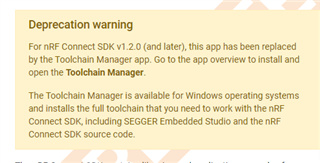
  • So the Getting started Assistant app has been deprecated, FYI

    However, this time I did a full uninstall of nrf connect, and deleted the directories followed by installing via "Getting started app" Oh wow, that was a complicated install process!

    After completed that installation process, builds did not work, but that was easily resolved - a couple of environment variables had not been included in the installation process. With those added, I could build the Alexa app using west. So thanks for your help Edvin, you can close this ticket now and I will experiment with building within SES (which I want to do, for easy debugging. But I can live with building by west if it comes to it.

    Regards,

    Mike.

  • Hello Mike, 

    I am glad it worked out. Yes. The getting started assistant is deprecated, but the method used there still works with the later nRF Connect SDK versions. It is just a guide for a manual installation rather than doing everything in the background (and yes. It is quite tedious). 

    Although I haven't used SES with NCS alot, but you should be able to compile projects that you have "generated" for west in Segger Embedded Studio. 

    Best regards,

    Edvin

Related